
Running Hermes Agent as a Telegram bot you can trust
Pull-quote: “A messaging bot is a public front door, and the allowlist is the lock you fit before you open it.”
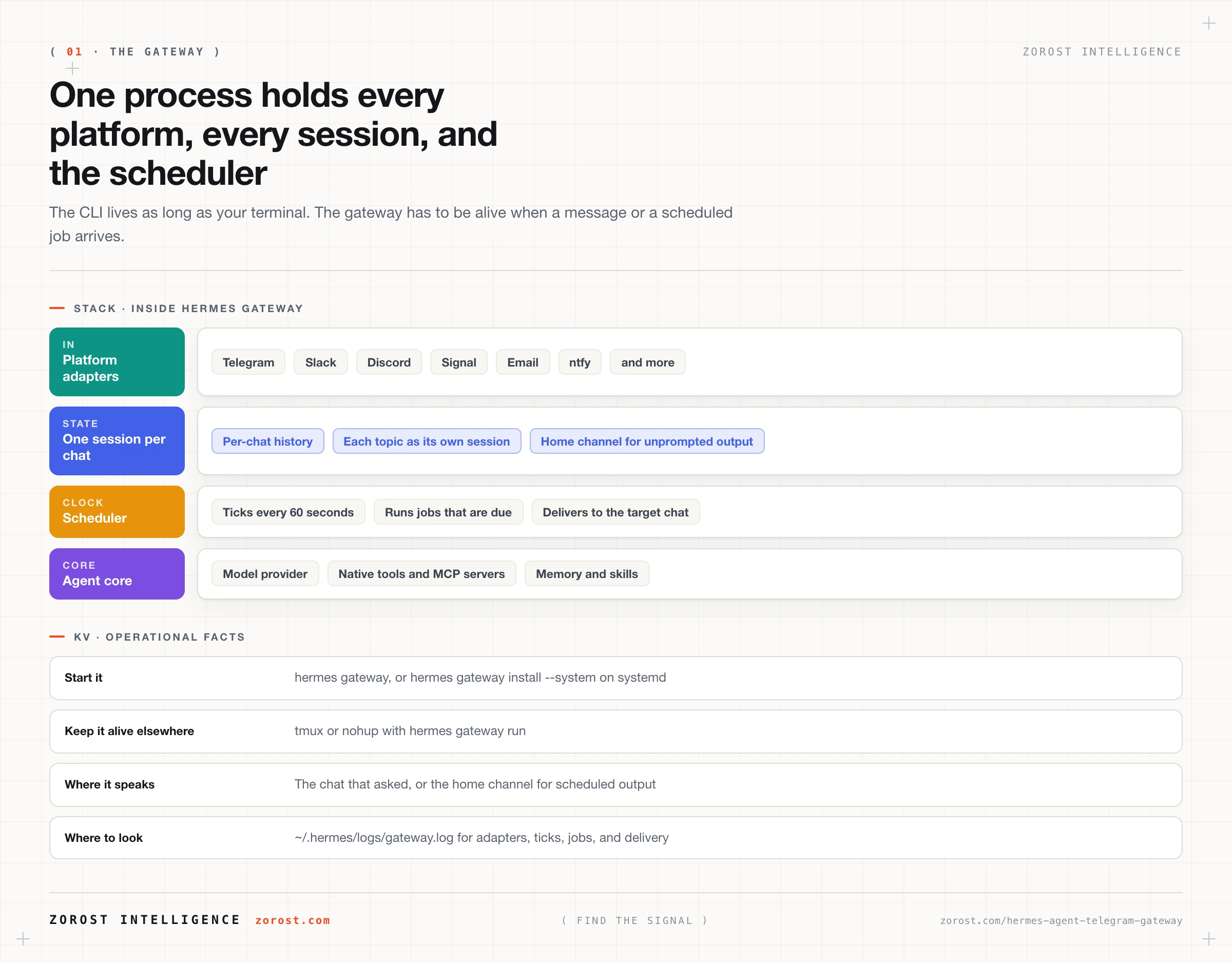
Hermes Agent reaches Telegram through the gateway, one background process that connects every platform you configure, keeps a session per chat, and runs the scheduler. Once it is running, your agent stops being something you open a terminal for and becomes something you message from a phone while walking. That single change does more for how much you actually use an agent than any model upgrade.
It also changes the security picture. A Telegram bot has a public username, anyone can find it and message it, and the only thing between a stranger and your agent’s tools is an allowlist you configure. Access control here is by numeric user ID rather than username, which is the difference between a working lock and one that looks locked.
This post assumes Hermes is installed and you know where ~/.hermes lives, which installing Hermes Agent and surviving your first session covers. By the end you will have a bot running under a numeric allowlist, a way to add teammates without editing files, voice notes working, and a gateway that survives a reboot.
What you will be able to do
- Explain what the gateway is as a component and why it runs separately from the CLI.
- Create a Telegram bot with BotFather and find your own numeric user ID.
- Configure
TELEGRAM_BOT_TOKENandTELEGRAM_ALLOWED_USERSin~/.hermes/.env. - Add teammates with one-time pairing codes instead of editing environment files per person.
- Set a home channel and use topics mode so each thread keeps its own session.
- Keep the gateway running as a service, and find the log when it misbehaves.
What is the Hermes Agent gateway, and why is it separate from the CLI?
The gateway is a single background process, started with hermes gateway, that connects every messaging platform you have configured, maintains a session per chat, and runs the scheduler. It is one process for all platforms, not one per platform, which is why adding a second platform later is configuration rather than another service to babysit.
It exists separately from the CLI because the two have different lifetimes. A CLI session lives as long as your terminal window. A gateway has to be running when a message arrives at three in the afternoon and when a scheduled job comes due at 08:00, whether or not you are at the machine. The scheduler ticks every 60 seconds, runs whatever is due, and delivers output to the target chat, which only works if the process is alive continuously. So the gateway is what you install as a service, and the CLI is what you open to work interactively.
Telegram is one adapter among many. The gateway has platform adapters for Telegram, Discord, Slack, WhatsApp, Signal, Matrix, Microsoft Teams, Mattermost, LINE, SMS, Email, Home Assistant, DingTalk, Feishu/Lark, WeCom, Weixin, QQ, BlueBubbles/iMessage, ntfy, and a browser. Most people start with Telegram because the bot API is public, setup takes a few minutes, and voice notes work well.
How do you create a Telegram bot for Hermes Agent?
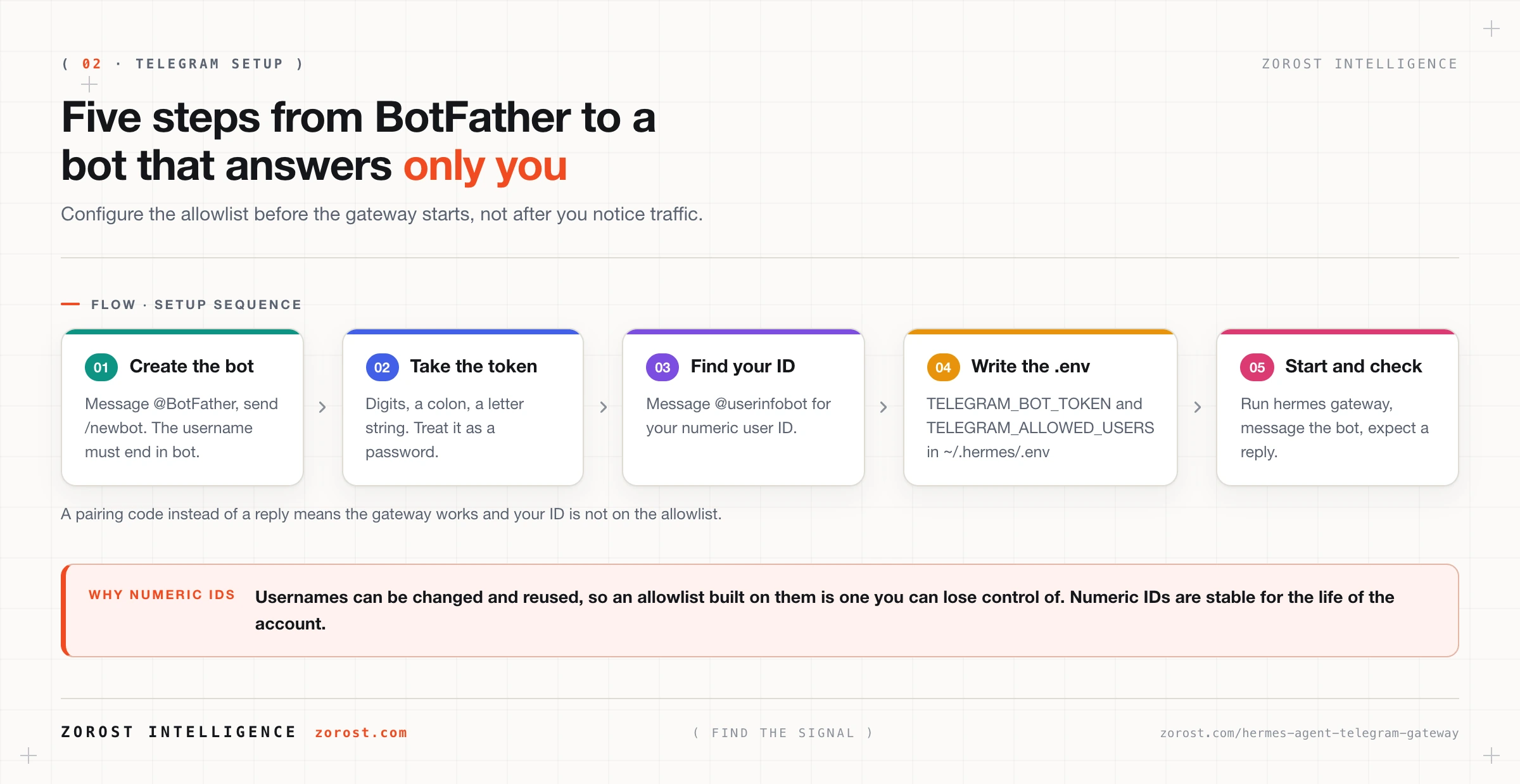
You create the bot inside Telegram itself, by messaging @BotFather, and you need two values out of the process: a bot token and your own numeric user ID.
Start a chat with @BotFather and send /newbot. It asks for a display name, then for a username. The username must end in bot, which is a Telegram rule rather than a Hermes one, so my_hermes_bot is accepted and my_hermes is not. When it finishes, BotFather returns a token shaped like this:
123456789:ABCdefGHIjklMNOpqrSTUvwxYZDigits, a colon, then a letter string. Treat it as a password, because it is one: anyone holding it can act as your bot.
Now get your own numeric ID by messaging @userinfobot, which replies with your account’s numeric identifier. This is the value the allowlist uses. Hermes controls access by numeric user ID and not by username, which is the correct design and occasionally surprising. Usernames can be changed and reused, so an allowlist built on them would be an allowlist you could lose control of. Numeric IDs are stable for the life of the account.
Hermes talks to Telegram over the public Bot API through python-telegram-bot, so there is nothing to host and no webhook to expose for a standard setup.
What goes in your .env, and what does hermes gateway setup do instead?
Two lines in ~/.hermes/.env are the whole minimum configuration:
TELEGRAM_BOT_TOKEN=123456789:ABCdefGHIjklMNOpqrSTUvwxYZ
TELEGRAM_ALLOWED_USERS=123456789,987654321
TELEGRAM_BOT_TOKEN is the token BotFather gave you. TELEGRAM_ALLOWED_USERS is a comma-separated list of numeric user IDs allowed to talk to the bot. Start with exactly one entry, your own, and add others deliberately.
If you would rather not edit files, hermes gateway setup walks the configuration interactively and writes it for you. Use whichever matches how you work. The file is worth understanding either way, because it is where you will look when something is wrong, and because everything in ~/.hermes/.env is a secret that should never end up in a repository or a screenshot.
Then start the process with hermes gateway and message your bot. Your checkpoint is a reply. If you get one, the token, the allowlist, and the provider are all correct. If you get a pairing code instead of a reply, the gateway is working and your ID is not on the allowlist, which is the next section.
How do teammates get access without you editing .env?
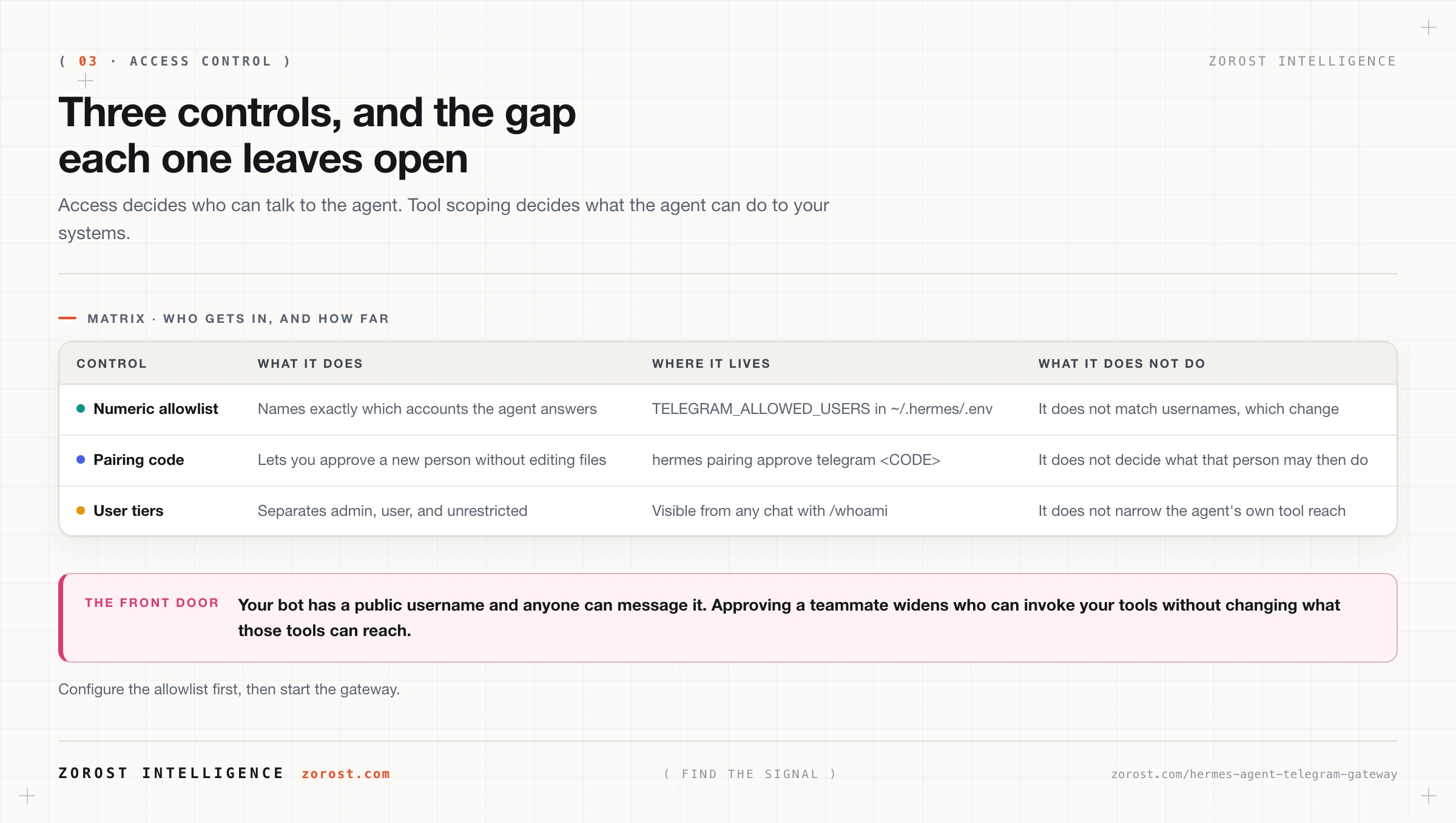
Through pairing codes. When someone who is not on the allowlist messages the bot, they get a one-time pairing code rather than either silence or access. They send you the code, and you approve it:
hermes pairing approve telegram <CODE>That is the mechanism that lets a team share one agent without a round of file edits per person, and without you handing out anything sensitive. The person requesting access never sees the token, and you never paste an ID into a config file at the moment you are least likely to check it carefully.
Access is layered rather than binary. Gateway access is controlled by per-platform allowlists plus pairing codes, and users sit in tiers: admin, user, and unrestricted. Anyone can check which tier they are in from a chat with /whoami, which is also the quickest way to confirm that a newly paired teammate landed where you intended.
One thing to hold onto: a tier decides how much of the agent a person reaches, and the tool scoping from how Hermes Agent tools work decides what the agent itself can do to your systems. Approving a teammate widens the first without touching the second, so a generous tool set becomes a generous tool set for everyone you approve.
What are home channels and topics mode for?
A home channel is where the agent sends output that nobody asked for in a conversation, such as a scheduled job’s result. Set it from a chat with /sethome, or configure it with TELEGRAM_HOME_CHANNEL and TELEGRAM_HOME_CHANNEL_NAME in ~/.hermes/.env. Without one, a scheduled digest has no obvious destination. With one, the agent has a place to speak into, and you have one channel to read in the morning instead of hunting through threads.
Topics mode solves a different problem: session bleed. By default a chat is a session, so one long-running conversation accumulates every subject you have ever raised. In topics mode, Hermes treats each Telegram topic as its own session, so a topic for your invoices and a topic for your reading list keep separate histories and separate context. It requires thread settings enabled in BotFather for the group, so if topics behave like one merged conversation, check that first.
The reason to care is context budget. Every message in a session competes for the same window, and a session mixing four unrelated projects spends context on material irrelevant to the question in front of it. Topics give you the separation a fresh CLI session gives you, without leaving the phone.
What happens when you send a voice note or an image?
Both work. Voice notes and images are supported and transcribed, so speaking a task into Telegram is a first-class way to use the agent rather than a workaround. In practice this is the feature that changes habits: dictating three sentences while walking produces a task the agent can act on, and typing the same thing on a phone usually does not happen at all.
There is one size boundary worth knowing. For voice files above 20 MB, the public Bot API is not enough, and Hermes supports pointing at a local MTProto server instead. That is configured with platforms.telegram.extra.base_url, base_file_url, and platforms.telegram.extra.local_mode: true, with credentials from my.telegram.org/apps:
platforms:
  telegram:
    extra:
      base_url: "<your local Bot API endpoint>"
      base_file_url: "<your local Bot API file endpoint>"
      local_mode: true
Most people never need this. If your use is quick voice notes and screenshots, the standard Bot API path is fine, and you can treat the large-file setup as something to reach for the first time a long recording fails rather than something to configure up front.
How do you keep the gateway running and diagnose it when it stops?
Install it as a service, because a gateway that only runs while a terminal is open will miss the scheduled work that made you want a gateway. On systemd, that is one command:
hermes gateway install --systemWhere systemd is unavailable, use tmux or nohup with hermes gateway run, which keeps the process alive after you disconnect. On WSL, enable systemd=true in /etc/wsl.conf and use Windows Task Scheduler to start it at login. If the machine sits behind a proxy, the gateway honours HTTPS_PROXY.
When something misbehaves, the answer is almost always in ~/.hermes/logs/gateway.log. That file records adapter activity, scheduler ticks, the jobs that fired, and delivery. Three habits make it useful. Read it after your first scheduled run, so you know what healthy looks like. Read it before assuming a job did not run, because “the digest never arrived” and “the job ran and delivery failed” have the same symptom and different fixes. And check it when the bot goes quiet, since a stopped gateway and a working gateway with an unreachable provider both look like silence from the Telegram side.
Why should you treat a messaging bot as a public front door?
Because it is one. Your bot has a public username, Telegram is a public network, and anyone who finds the bot can send it a message. The allowlist is what decides whether the agent answers, so the sequence matters: configure TELEGRAM_ALLOWED_USERS before you start the gateway, not after you notice traffic.
Three properties of the Hermes posture help. Access control is by stable numeric ID rather than a mutable username. Unknown users get a pairing code rather than access or a silent drop, so you find out someone tried. And the data stays local: conversation, memory, and skills live under ~/.hermes/ on your own disk, with no telemetry and no usage analytics, and API calls go only to the providers you configured.
None of that constrains the agent’s own reach. A person on the allowlist can invoke any tool the agent has, and content the agent fetches can carry instructions it did not get from you. That combination is the subject of the Hermes Agent threat model, which is the post to read before you widen either one.
Where this goes wrong
The bot ignores you completely. No reply and no pairing code. The cause is usually a gateway that is not running or a bad token rather than an allowlist problem, because an allowlist rejection produces a pairing code. Check the process, then ~/.hermes/logs/gateway.log.
You allowlisted a username instead of an ID. A pairing code arrives for someone you thought you had added, because @name went where a numeric ID belongs. Have them message @userinfobot and use the number it returns.
BotFather rejects your username. The /newbot flow stops at the username step because the name does not end in bot, or it is already taken. Append bot and try a more specific prefix.
Topics all behave like one conversation. Context from one topic shows up in another because thread settings are not enabled in BotFather for that group. The fix is in BotFather, not in the Hermes configuration.
The gateway dies on logout or reboot. Scheduled jobs stop silently and the bot goes quiet overnight, because hermes gateway was running in a terminal session. Use hermes gateway install --system, or tmux or nohup with hermes gateway run where systemd is unavailable.
A long voice note fails to process. Short voice messages work and one long one produces nothing, which is the 20 MB boundary on the public Bot API path. Configure the local MTProto path, or ask for shorter recordings.
Common questions
Do I need a server to run a Hermes Agent Telegram bot?
No, but you need a machine that stays on. The gateway is light because inference happens at your provider, so a very small VPS or an always-on machine at home is enough. A laptop that sleeps works for interactive chat and will miss scheduled jobs.
Can more than one person use the same bot?
Yes. Add their numeric IDs to TELEGRAM_ALLOWED_USERS, or let them message the bot and approve the pairing code with hermes pairing approve telegram <CODE>. Everyone shares one agent, tiers separate admin, user, and unrestricted access, and they also share the agent’s tools.
Does the gateway send my conversations anywhere?
Only to the model provider you configured, which inference requires, and to Telegram, which is delivering the messages. Hermes has no telemetry and no usage analytics, and conversation, memory, and skill data stays under ~/.hermes/ on your own disk.
Can I run Telegram and Slack at the same time?
Yes. The gateway is a single process connecting every configured platform, so a second platform is a configuration change rather than a second service. Sessions stay per chat, so the two do not share history.
What is the difference between hermes gateway and hermes gateway run?
hermes gateway is the normal way to start it. hermes gateway run is the form used when another supervisor keeps the process alive, such as tmux, nohup, or a scheduler on Windows. On systemd, use hermes gateway install --system and let the service manager handle it.
Next steps
Next in this series, scheduling real work with Hermes Agent cron jobs is what the gateway was actually for. You now have a process that runs continuously and a channel to deliver into, which are the two prerequisites for an agent that does work while you are not watching.
Before you widen access or add write-capable tools, read the Hermes Agent threat model for allowlists, secret handling, and prompt injection through fetched content. For the operational side, meaning upgrades, backups, and migration, keeping Hermes Agent running has the runbook.
Agents that answer in the channel people already use, under an allowlist decided before launch rather than after, are what we build and operate in the AI Lab.