
Securing a self-hosted agent, the Hermes Agent threat model
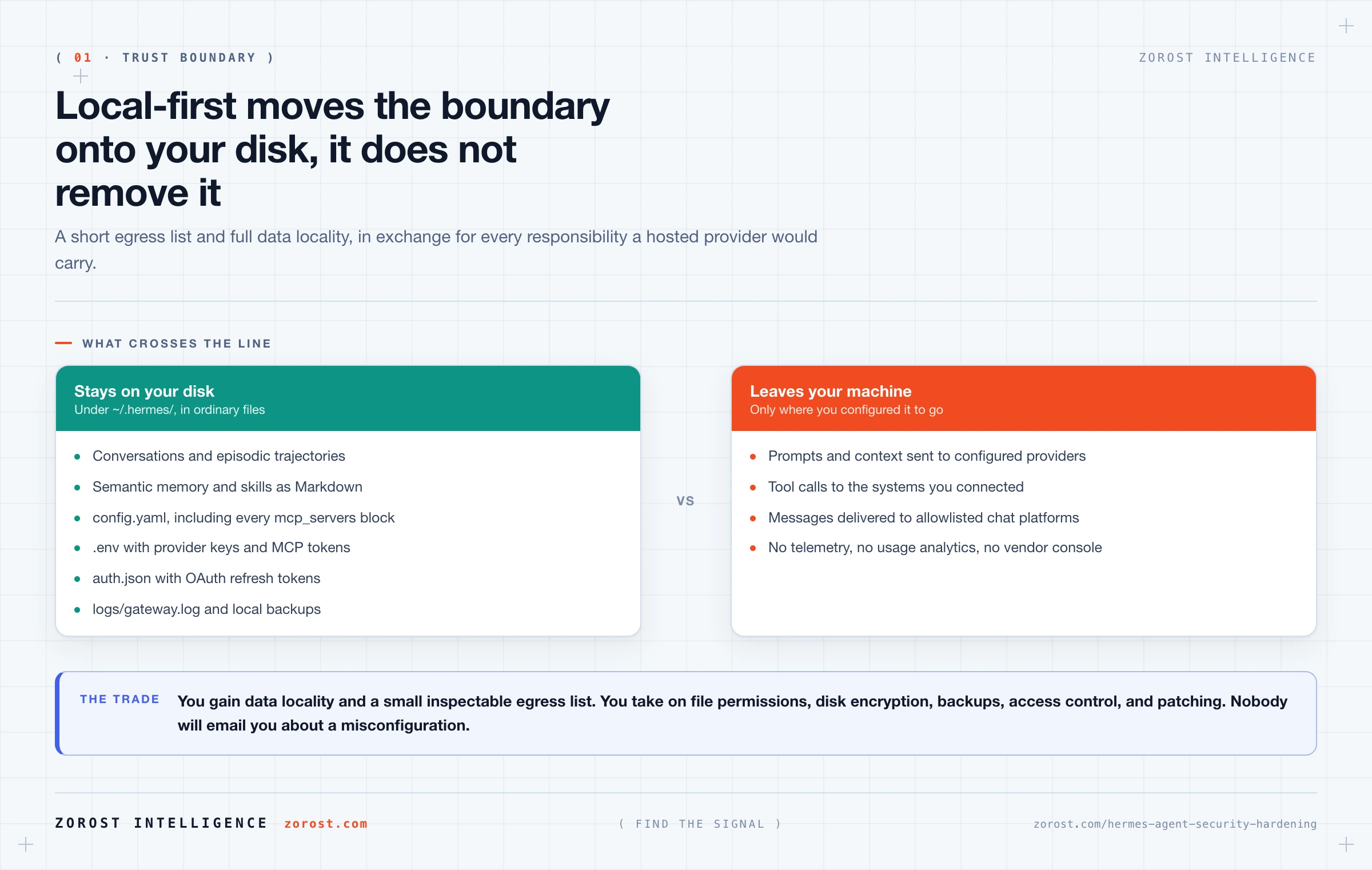
Pull-quote: “The dangerous combination is not a powerful tool. It is untrusted input and a write-capable tool in the same context.”
A self-hosted agent moves the trust boundary onto your own machine, which is simultaneously the point and the risk. Hermes Agent is an open-source, self-hosted agent harness from Nous Research that keeps your conversations, memory, and skills under ~/.hermes/ on your own disk, sends no telemetry and no usage analytics, and makes API calls only to the providers you configure. Every one of those properties is real. None of them makes the agent safe on its own.
Security on a self-hosted agent is a configuration outcome rather than a product feature. The harness gives you the controls: tool allowlists, per-platform access lists keyed on numeric identity, user tiers, and a setup mode that starts with everything off so you opt in deliberately. What it cannot do is decide which of your files matter, which tokens are dangerous in the wrong hands, or whether the page you just asked it to summarise was written by a friend. What follows is the threat model and the hardening pass, ending with a checklist ordered by return.
What you will be able to do
- Name what an agent with tools can damage, in confidentiality, integrity, and availability terms.
- Store provider keys and MCP tokens so an agent with filesystem access cannot read them back to you.
- Lock the gateway to specific numeric identities, and know which tier each one holds.
- Scope an MCP server so the tools it exposes are exactly the tools you chose.
- Recognise indirect prompt injection and break the chain before it reaches a write.
- Reconstruct what your agent did, from the gateway log and trajectory history.
What can an agent with tools actually damage?
An agent can damage anything its tools can reach, which is a larger set than most people picture on the day they enable their first server. Think in the three classical terms, because each fails differently.
| Property | What failure looks like | The tool that enables it |
|---|---|---|
| Confidentiality | The agent reads a file, repository, or inbox and restates it into a chat other people can see | Any read tool, plus a delivery channel |
| Integrity | The agent edits, overwrites, or deletes something, and the partial result looks like success | Write tools, especially file writes and record creation |
| Availability | A scheduled job loops, exhausts a quota, or locks a resource, and what you depend on stops | Any tool called on a schedule with no stop condition |
The useful part is not any single row. It is the combination rule falling out of them: untrusted input plus a write-capable tool in the same context is the dangerous configuration. A read tool alone leaks. A write tool driven only by you does what you asked. Put content you did not author into a context that can write, and you have handed its author a channel to your tool layer. Blast radius is therefore a design variable rather than a property of the model, and you set it by deciding which tools exist in which sessions.
Does local-first actually make Hermes Agent more secure?
Local-first removes a category of risk and adds a responsibility, so it changes the shape of your exposure rather than reducing it. Hermes sends no telemetry and no usage analytics, calls only the providers you configure, and keeps all conversation, memory, and skill data under ~/.hermes/. No vendor console holds your history.
What you gain is data locality and a short, inspectable egress list. What you take on is everything a hosted provider would otherwise do: file permissions, disk encryption, backups, access control on the interface, and patching. Nobody is going to notice your misconfiguration and email you about it. One consequence is easy to miss: because your data sits in ordinary files, anything with filesystem access can read it, and that now includes the agent.
Where do the secrets live, and how could the agent leak them?
Your secrets live in ~/.hermes/.env, which holds provider keys such as OPENAI_API_KEY, ANTHROPIC_API_KEY, GEMINI_API_KEY, and KIMI_API_KEY, alongside tokens for MCP servers such as GITHUB_PERSONAL_ACCESS_TOKEN. Providers that authenticate with OAuth store refresh tokens in ~/.hermes/auth.json. Both are plain files, and both are worth exactly as much as the accounts behind them.
Three controls cover the ordinary cases. Set restrictive permissions with chmod 600 ~/.hermes/.env so other accounts on the machine cannot read it. Turn on full disk encryption, which protects the file when the laptop is stolen rather than when it is running. Never copy the file into a repository; the layout already helps, because the cloned code lives at ~/.hermes/hermes-agent while .env sits above it.
The fourth control is specific to agents. An agent with a filesystem tool rooted at your home directory can read ~/.hermes/.env, because to the tool it is just a file. It does not need to be attacked to do this. It needs only a question whose answer happens to be in there, or content that induces it to look. Root every filesystem server at one project directory rather than $HOME, and the class of problem stops existing.
Who is allowed to talk to your gateway?
Only the identities you allowlist, and that is something you configure rather than inherit. The gateway is a single background process connecting every platform you configured, so the moment you attach a messaging bot you have created an internet-facing entry point into a program that runs tools on your machine.
Access is controlled per platform. On Telegram it is keyed on numeric user ID rather than username, which matters because usernames can be changed and reassigned while numeric IDs cannot. Get yours from @userinfobot and put it in ~/.hermes/.env:
TELEGRAM_BOT_TOKEN=123456789:ABCdefGHIjklMNOpqrSTUvwxYZ
TELEGRAM_ALLOWED_USERS=123456789,987654321
Someone not on the list gets a one-time pairing code rather than access, and you approve it deliberately with hermes pairing approve telegram <CODE>. Hermes also carries user tiers, admin, user, and unrestricted, and any identity can check which it holds with /whoami. Run it from a teammate’s account after pairing them, because assuming a tier is how people end up with an unrestricted account they meant to make a user. See running Hermes Agent as a Telegram bot you can trust for the full setup.
Why is MCP scoping a security control rather than a preference?
Because tools.include is the list of things your agent can do, and everything else in this post is downstream of it. Scoping is usually presented as tidiness, but the documented guidance reads like a security standard once you attach the reason to each rule.
| Rule | The reason it is a control |
|---|---|
Start with the narrowest tools.include allowlist |
A tool that is not exposed cannot be called, by you or by anyone reaching the agent |
Set resources: false and prompts: false when unused |
Unused surfaces are surfaces nobody is watching |
Root a filesystem server at one directory, not $HOME |
This is what keeps ~/.hermes/.env out of reach |
| Point Git servers at single repositories | Limits a mistaken write to one project rather than everything you cloned |
Disable a server with enabled: false |
Keeps the record of the decision while removing the capability |
Verify rather than assume. Running hermes mcp test <name> reports what the server exposes right now, and that list should match your include list exactly. Connecting MCP servers to Hermes Agent covers the configuration in detail.
How does prompt injection reach a self-hosted agent?
Through content the agent fetches, and it is the failure mode most self-hosted users have not thought about. Indirect prompt injection happens when text the agent retrieves contains instructions addressed to the agent rather than to you, and the agent has no reliable way to separate “my operator asked for this” from “this arrived in a document”.
Consider the most innocent task in the catalogue: summarise this page. You have just given the author of that page a writing channel into your agent’s context. The same applies to a README, an issue comment pulled through a repository server, an email in a triage job, and a calendar invite from a stranger. None of this requires a clever payload. It requires only that untrusted text and a capable tool end up in the same place.
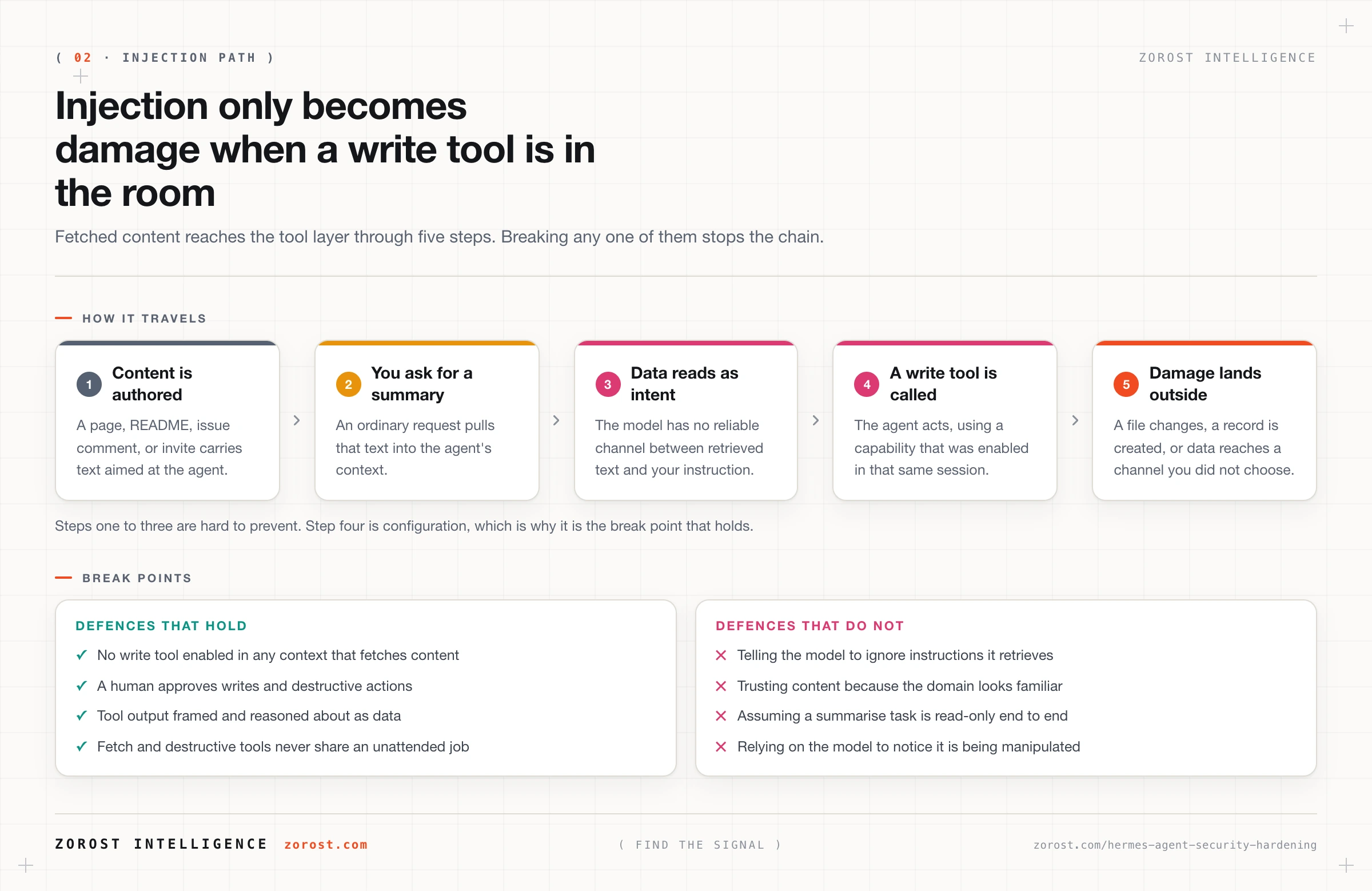
Four defences work, and they work because they are structural rather than persuasive. Apply least privilege, so the tools present in that context cannot do damage. Put a human in front of writes and destructive actions. Treat tool output as data to reason about rather than instructions to follow, and make that framing explicit. Above all, never grant a fetch tool and a destructive tool in the same unattended context, which is the rule that breaks the chain before its last step.
What does not work is asking the model to ignore instructions found in retrieved content. It helps at the margin and fails under pressure. Guardrails and prompt injection covers the exfiltration paths and the defences that hold.
What should never run unattended?
Anything that can both read untrusted content and change something you care about. Apply that literally, because unattended is where your defences quietly stop existing: nobody reads the output, nobody notices an odd tool call, and the scheduler repeats the mistake every day at eight.
Hermes gives you the structural gate through configuration. The Blank Slate setup mode starts with everything off so you opt in deliberately, tools.include decides which verbs exist, and enabled: false removes a server from a context without deleting your work. Build the split with those: one session where the agent can fetch and summarise but not write, and a separate session where it writes but only touches content you authored. Whether Hermes offers a native per-action approval prompt is [NEEDS SOURCE], so build the gate out of scoping, which is documented and verifiable. Delivery counts too, because a job posting to a shared channel can leak by summarising, without any tool misbehaving.
How do you reconstruct what the agent did?
From two append-only records, the gateway log and episodic memory. Gateway activity, including scheduler runs and delivery, is written to ~/.hermes/logs/gateway.log. Episodic memory holds time-stamped conversation and run trajectories, which can be exported. Together they answer the question you will actually be asking, which is not “is the agent secure” but “what did it do at 03:14 on Tuesday, and who asked it to”.
That is why an audit trail is a security control rather than paperwork. Every other control here is preventive, and preventive controls fail. The record establishes scope, and scope decides whether you rotate one token or all of them.
One trade-off deserves attention. Running /compress reclaims context by compressing episodic history, and compression loses detail. That is right for context economy and wrong for audit, so export the trajectory before compressing anything you might need to explain later. How Hermes Agent remembers covers the export path.
What is the hardening checklist, in order?
Work down this list, because it is ordered by how much risk each step removes rather than by how easy it is. The first four are an afternoon and they carry most of the value.
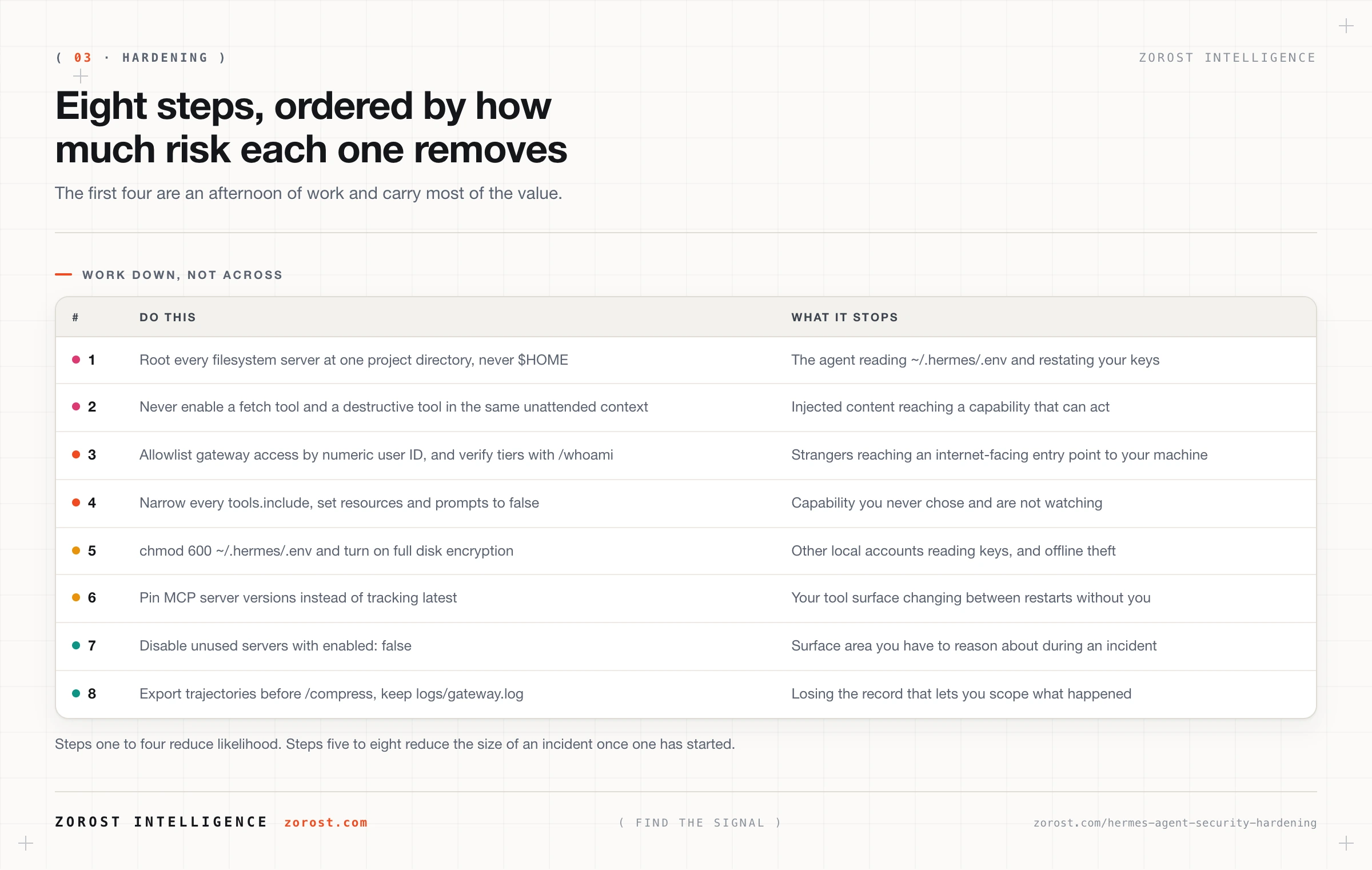
Steps one and two close the two paths to serious damage, secret disclosure and injection-driven writes. Step three closes the front door, step four shrinks what is reachable at all, and everything after that reduces the size of an incident rather than its likelihood.
Where this goes wrong
The agent quotes your own configuration back to you. The symptom is provider keys appearing in a chat window. The cause is a filesystem server rooted at $HOME, which puts ~/.hermes/.env inside the tool’s reach. Root the server at one project directory and rotate every key that was displayed, because it is now in episodic memory as well as on your screen.
A stranger reaches your bot, or your own access breaks. Both come from allowlisting by username instead of numeric user ID, and usernames change hands. Use the numeric ID from @userinfobot in TELEGRAM_ALLOWED_USERS.
An unattended job writes something nobody asked for. The symptom is a file or record that appeared overnight with no human behind it, and the cause is a scheduled context that could both fetch external content and write. Split the job, so one session reads and reports while a second, driven by you, acts on the report.
You cannot reconstruct the incident. The symptom is a suspicion you cannot confirm, usually because /compress ran across the window you needed. Export trajectories on a rhythm, and keep ~/.hermes/logs/gateway.log.
A secret passed through a conversation. Once a token has been pasted into a chat, it is in episodic memory, in the trajectory, and possibly in a provider’s request logs. Rotating it beats cleaning every place the text landed.
Common questions
Is Hermes Agent safe to run on my personal laptop?
It is as safe as the tools you enable, because the harness sends no telemetry and keeps data under ~/.hermes/ on your disk. The risk is a broad filesystem tool combined with the ability to fetch external content. Root your servers narrowly and keep write tools out of unattended sessions.
Does Hermes Agent send my conversations anywhere?
Only to the model providers you configure. There is no telemetry and no usage analytics, and conversation, memory, and skill data stay under ~/.hermes/ on your own disk. Your provider still sees the prompts you send it, which is worth remembering when one includes a document you would not email.
Can a stranger who finds my Telegram bot talk to my agent?
No, provided you configured the allowlist, because access is keyed on numeric user ID and unlisted users receive a one-time pairing code rather than a session. The failure case is an empty allowlist, so verify it rather than assuming, and check tiers with /whoami.
What is indirect prompt injection, in plain terms?
It is when text the agent reads contains instructions meant for the agent, and the agent treats them as guidance because it cannot reliably separate retrieved data from operator intent. A page, a README, an issue comment, or an email can carry it. The damage only lands if that same context holds a tool that can change something.
Is a file permission enough, or do I need disk encryption?
They protect against different things, so use both. chmod 600 ~/.hermes/.env stops other accounts on a running machine from reading your keys, and full disk encryption protects the same file when the machine is off. Neither stops an agent with filesystem access, which is a scoping problem rather than a permissions problem.
Next steps
- Do the first four checklist items today: root your filesystem servers narrowly, separate fetch from write in unattended contexts, confirm your numeric allowlists, and tighten every
tools.include. Then runhermes mcp teston each server and check the reported tools against what you wrote. - Read keeping Hermes Agent running next, because a hardened agent still has to survive reboots, upgrades, and the day the gateway dies quietly, and that runbook depends on the audit trail you just protected.
- For the full threat model, including exfiltration paths and the defences that fail under pressure, read guardrails and prompt injection.
- The same posture, least privilege on every tool and an append-only record of what ran, is how audit works behind ComplyGrid in federal compliance work, where some installations have no internet connection at all and the trail has to be readable by someone who was not in the room.