
How to add MCP servers to Hermes Agent, safely
Pull-quote: “An MCP server is a contract, and the only part of it you control is how narrow you make the allowlist.”
Hermes Agent MCP servers are how the agent reaches systems it did not ship with: your repositories, your browser, your internal APIs, a specific directory on disk. Hermes is an MCP client, MCP servers supply tools, and the connection between them is a few lines of YAML rather than integration code you write and maintain. That is the promise of the Model Context Protocol, and it is a real one.
The risk arrives in the same few lines. A server added with default settings usually hands the agent everything it can do, and a filesystem server rooted at your home directory is a materially different product from one rooted at a project. This post covers both halves: adding and testing a server, then scoping it so an enthusiastic or manipulated model cannot reach past the task. It assumes you have read how Hermes Agent tools work, or at least know that a tool call is the model requesting an action and the harness executing it. No prior knowledge of MCP is needed.
What you will be able to do
- Explain what the Model Context Protocol is and which problem it removes.
- Decide between a STDIO server and an HTTP server for a given integration.
- Add a server with
hermes mcp add, test it withhermes mcp test, and reload it mid-session. - Read and write the
mcp_serversblock in~/.hermes/config.yamlfield by field. - Scope a filesystem, GitHub, or browser automation server so its blast radius matches the task.
What is the Model Context Protocol, and what problem does it solve?
The Model Context Protocol is an open standard for how an agent discovers and calls tools that live outside itself. Without it, every integration is bespoke code inside the agent: a GitHub client, a Slack client, a database wrapper, each written against one harness and each needing maintenance when either side changes. Multiply that by every tool and every harness and you have the situation MCP was designed to end.
With MCP, the integration moves out of the agent and into a separate program called an MCP server. The server declares which tools it offers and what arguments they take, and any MCP client can use it. Hermes is one such client, so a server someone else wrote and tested works with your agent without a line of code from you.
Two consequences follow. Your agent’s tools are no longer fixed by the harness release, and the trust boundary moves: you are running code from an external project, with whatever reach you granted it, on the machine that holds your keys.
How do Hermes Agent and MCP servers fit together?
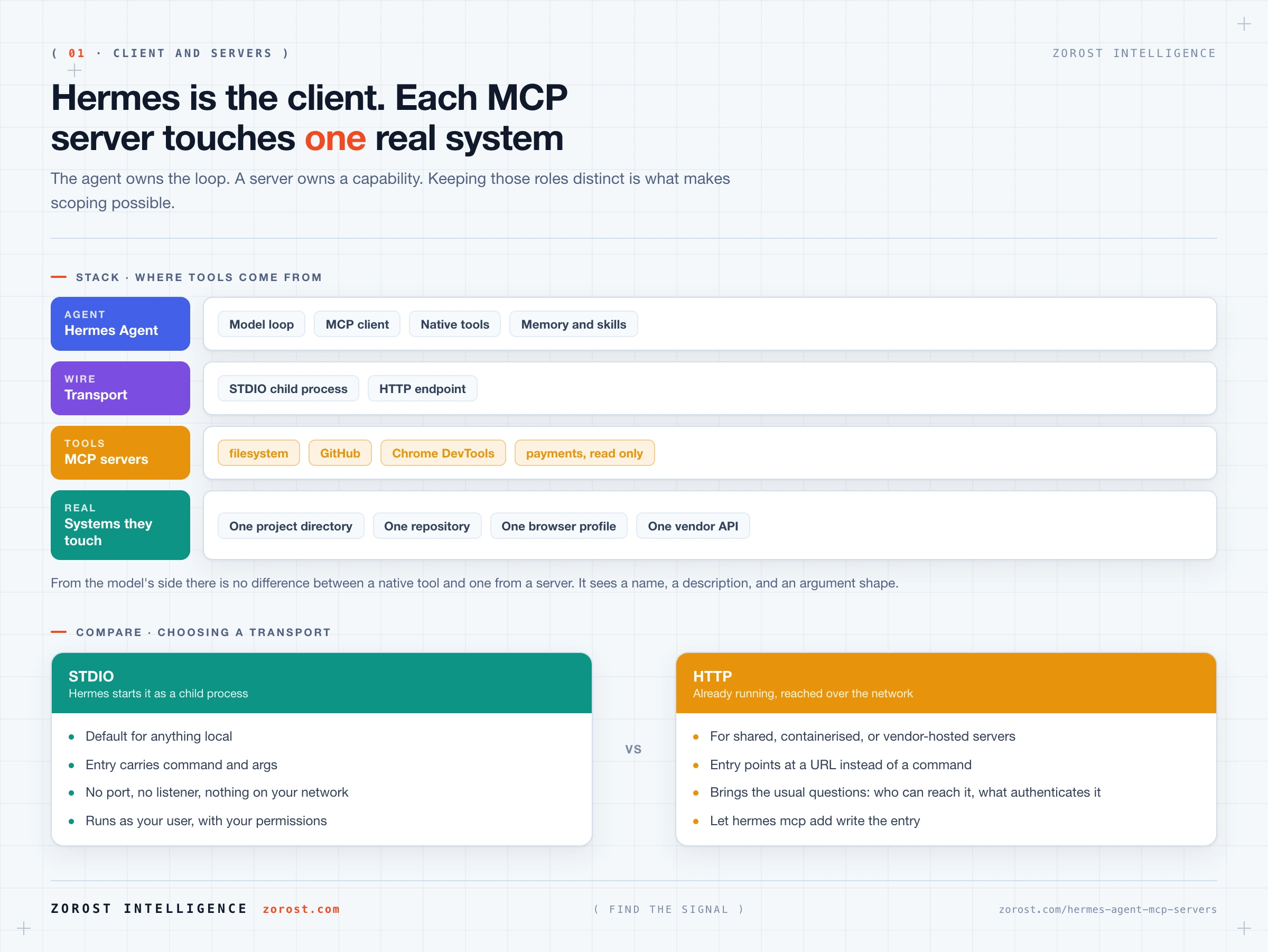
Hermes is the agent and MCP servers are tool providers, with Hermes acting as the MCP client that connects to them. Keep those three roles distinct and the rest of this post follows.
Hermes owns the loop: the conversation, the memory, the model connection, and the choice of which tool to call. An MCP server owns a capability: reading files under one root, querying one repository, driving one browser. When Hermes starts, it launches or connects to each enabled server, asks what tools it offers, and adds the ones you allowlisted to the list the model chooses from. To the model, a native tool and a server tool are the same thing: a name, a description, an argument shape.
That last detail is why scoping happens in configuration rather than in conversation. The model cannot decline a tool it should not have been given, because it has no way to know it should not have it.
When do you use a STDIO server and when do you use HTTP?
MCP servers reach Hermes over one of two transports: STDIO or HTTP. STDIO means Hermes launches the server as a local child process and talks to it over standard input and output. HTTP means the server is already running somewhere reachable and Hermes connects to it over the network.
STDIO is the default for anything local and what most published servers assume. The lifecycle is simple: Hermes starts the process, uses it, and shuts it down. No port, no listener, no authentication layer, and no chance of another program on your network reaching it. The server runs as your user, with your permissions, which is why the scoping rules later in this post exist.
HTTP applies when the capability cannot be a child process on your machine: a server shared by several people, something in a container or on another host, or a vendor-operated endpoint. It brings the questions any network service brings, namely who can reach the port, what authenticates the connection, and whether the transport is encrypted.
A STDIO entry carries command and args, because Hermes has to know how to start the process. An HTTP entry points Hermes at the server’s URL instead. Let hermes mcp add write that entry rather than hand-writing key names from memory.
What do you need installed before adding your first server?
The MCP extras inside Hermes, plus whichever runtime your chosen server is published for. If you used the standard installer you likely have the extras already. After a minimal install, add them inside the cloned repository:
uv pip install -e ".[mcp]"The repository lives at ~/.hermes/hermes-agent, and uv is already present because the Hermes installer bootstraps it. Nothing here needs sudo.
Most published MCP servers are npm packages, so you need Node and npx on the machine. Python-based servers can run through uvx. Check which a server expects before adding it, because a missing runtime produces a server that fails to start, and that looks from inside a chat like an unhelpful agent rather than a broken process.
How do you add, test, and reload an MCP server?
Three commands cover the lifecycle. hermes mcp add walks you through the entry and writes it into mcp_servers in ~/.hermes/config.yaml. hermes mcp test <name> checks it, using the name you gave it. /reload-mcp picks up configuration changes inside a running session, which saves restarting the CLI every time you tighten an allowlist.
hermes mcp add
hermes mcp test filesystem
The interactive flow collects the same fields the config block holds, so reading the next section first makes the prompts obvious. The exact prompt sequence is not reproduced here [NEEDS SOURCE]; the fields it needs are the server name, how to start or reach it, and which tools to expose.
Test before you rely on it. Your checkpoint for this post is hermes mcp test filesystem completing without error, then /reload-mcp in an open session, then the agent using one of the tools you allowlisted and nothing else. If the test passes but the agent still cannot use the tool, check the allowlist.
What does the mcp_servers config block mean, line by line?
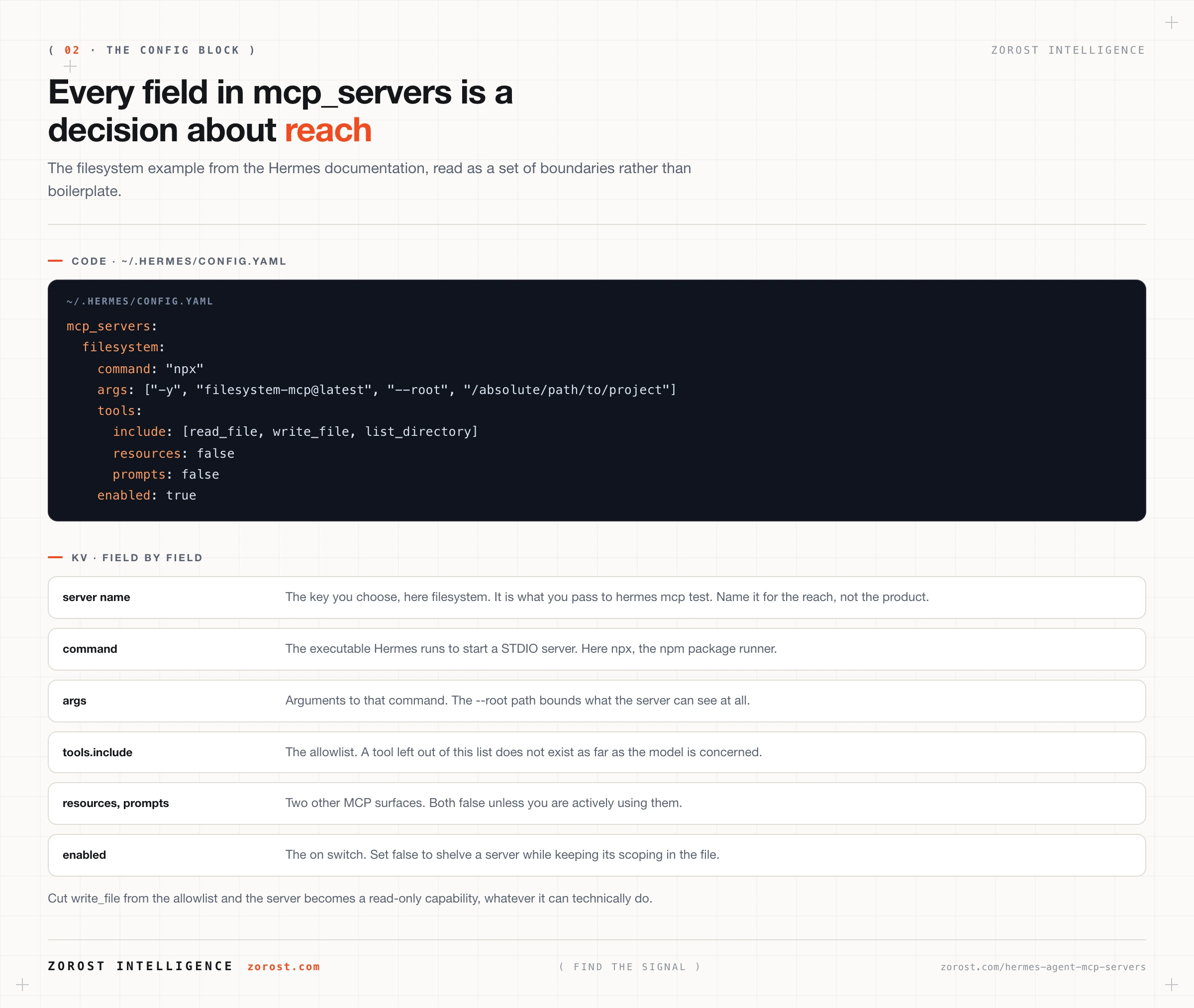
The mcp_servers block in ~/.hermes/config.yaml is a map of server names to definitions, and every field in it is a decision about reach. Here is the filesystem example from the Hermes documentation:
mcp_servers:
  filesystem:
    command: "npx"
    args: ["-y", "filesystem-mcp@latest", "--root", "/absolute/path/to/project"]
    tools:
      include: [read_file, write_file, list_directory]
      resources: false
      prompts: false
    enabled: true
Field by field.
mcp_servers is the top-level map. Each key under it, here filesystem, is the name you chose. You pass that name to hermes mcp test <name>, so pick something that describes the reach rather than the product. project-docs ages better than filesystem once you have three of them.
command is the executable Hermes runs to start a STDIO server. Here it is npx, the npm package runner.
args is the argument list passed to that command. Three parts matter. -y accepts the install prompt so the server starts without waiting for input. filesystem-mcp@latest resolves the package at start time, so the server can change under you between runs, and pinning a version trades convenience for predictability. --root /absolute/path/to/project is the most important argument on the line, because it bounds what the server can see at all. Replace it with an absolute path to one project.
tools.include is the allowlist. Tools omitted from it do not exist as far as the model is concerned, whatever the server offers. The example exposes read_file, write_file, and list_directory. If the task only reads, cut write_file and the server becomes a read-only capability regardless of what it can technically do.
resources: false and prompts: false switch off two other MCP surfaces. A server can also publish resources, which are data the agent can read, and prompts, which are templates it can pull in. Both are extra surface area when unused, so off is the correct default.
enabled: true is the on switch. Setting it to false keeps the entry and its scoping in the file while stopping the server from loading, which is the right way to shelve one. Deleting the block means rewriting the allowlist next time.
What do good server configurations look like in practice?
Every good configuration answers one question: which single system does this server touch, and which three or four tools does the task need? Four documented examples, in increasing order of caution.
Filesystem, rooted to one project. Take the block above and change two things: point --root at one absolute path such as /Users/you/projects/site-content, and cut the allowlist to what the work needs. For a research and drafting agent, this is enough:
    tools:
      include: [read_file, list_directory]
      resources: false
      prompts: false
That is a read-only capability over one tree, and the lowest-risk server most people add.
GitHub, with a token and a tool allowlist. Run hermes mcp add so it writes the correct command and args, then tighten the tools block by hand to the three operations the Hermes documentation cites: list_issues, create_issue, and search_code. Put the GITHUB_PERSONAL_ACCESS_TOKEN in ~/.hermes/.env with your other secrets, and scope the token itself at GitHub to the repositories the agent needs. Two boundaries beat one.
    tools:
      include: [list_issues, create_issue, search_code]
      resources: false
      prompts: false
Chrome DevTools, for browser automation. This server drives a browser through remote debugging, which makes it the most capable and most sensitive entry on the list. A logged-in browser profile holds your session cookies for everything, so a tool that can navigate it reaches anything you are signed into. Set enabled: false between the tasks that need it.
Payments and other sensitive systems, read-heavy only. The Hermes documentation’s Stripe example is deliberately read-heavy, which is the pattern to copy wherever a write has financial or contractual consequences. Let the agent read, summarise, and reconcile, and do the writing yourself.
Which scoping rules keep an MCP setup safe?
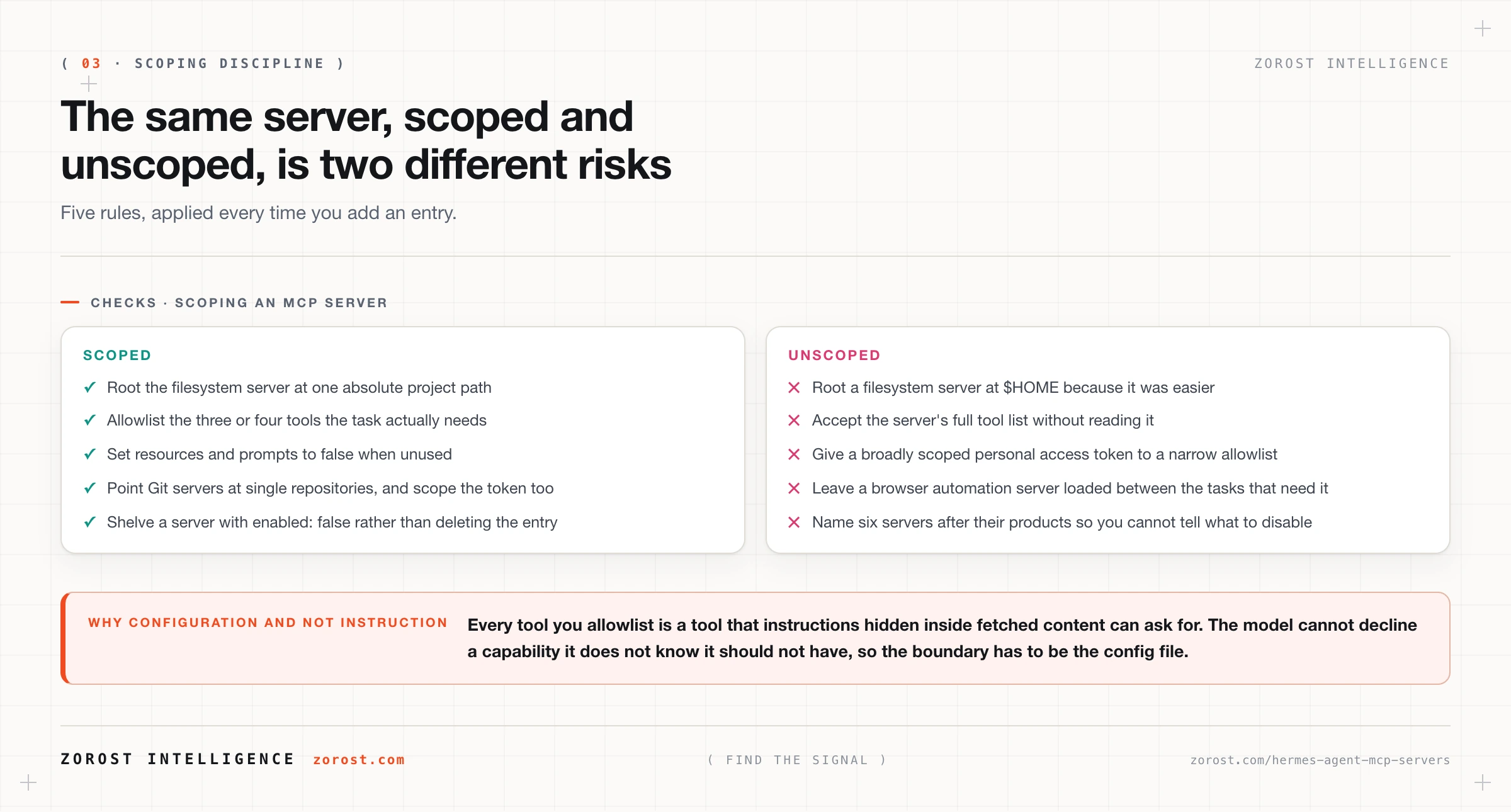
Five rules, short enough to apply every time. Start with the narrowest tools.include allowlist that completes the task. Set resources: false and prompts: false unless you are using them. Root filesystem servers at one directory rather than $HOME. Point Git servers at single repositories rather than everything you own. Turn a server off with enabled: false rather than leaving it loaded in case you need it later.
The reasoning behind all five fits in one sentence: every tool you allowlist is a tool that instructions inside fetched content can ask for. That is indirect prompt injection, and the defence that holds is a boundary the model cannot cross rather than an instruction telling it not to. Guardrails and prompt injection covers the threat model, including which defences do not work.
One more rule, from practice rather than documentation: write the reach into the server name. When you are deciding what to disable before a session that reads untrusted web content, github-issues-readonly tells you what you need and github does not.
Where this goes wrong
The server never starts and the agent just seems unhelpful. The agent says it cannot do something you know the server provides. The cause is usually a missing runtime, Node or npx for npm packages, or a package name that does not resolve. Run hermes mcp test <name> outside a chat session, which surfaces the process failure instead of hiding it behind conversation.
You tightened the allowlist and nothing changed. The agent still offers or attempts a tool you removed, because the open session is holding the previously loaded server. Run /reload-mcp, and start a fresh session if the behaviour persists.
The filesystem server can read your whole life. The agent cites files from unrelated directories, because the root is $HOME or a relative path resolved somewhere unexpected. Use an absolute path to one project, and a second server with its own root if you genuinely need two trees.
A token has more reach than the allowlist. The agent successfully does something in a repository you did not intend to expose. The tool allowlist limits which operations are available, not which repositories the credential can touch, so scope the token at the provider as well.
Tool choice gets worse after adding servers. Near-miss selections and more calls than the task needs, because each allowlisted tool spends context on its description and adds a candidate to every selection decision. Disable the servers this session does not need.
Common questions
Do I need to write code to use an MCP server?
No. That is the point of the protocol. You install a server someone else published, add an entry to mcp_servers in ~/.hermes/config.yaml, and allowlist the tools you want. Writing your own server is worthwhile for an internal system that has no published one, and that is a separate project from configuring one.
Is an MCP server the same thing as an API?
No. An MCP server usually wraps an API, a filesystem, or a browser and presents it in the shape an agent can consume: named tools, declared arguments, results as text. The value it adds is the standard interface, so any MCP client can call it without custom code.
Can Hermes run several MCP servers at once?
Yes. mcp_servers is a map, so each server is an independent entry with its own transport, allowlist, and enabled flag. Running several is normal. Running several with generous allowlists is where tool selection degrades, so keep each one narrow.
Where do secrets for MCP servers go?
In ~/.hermes/.env, with your provider keys. That is where Hermes keeps secrets, it stays on your own disk, and it keeps credentials out of config.yaml, the file you are most likely to copy or paste into a support thread.
Next steps
Next in this series, running Hermes Agent as a Telegram bot you can trust puts the tools you just scoped behind a messaging front door, which changes who can invoke them. The allowlist decision there is the same kind you made here.
For why narrow, well-named tools outperform comprehensive ones, tool design for agents covers typed contracts, error surfaces, and selection degradation. When you are deciding whether an integration should be an MCP server, a native tool, or a scheduled script, wiring Hermes Agent into the rest of your stack works through that choice.
We publish what we test in the open in AI Fieldwork, including the scoping patterns we keep and the ones we abandon.