
Keeping Hermes Agent running, from service to recovery runbook
Pull-quote: “A dead gateway does not send an error. It sends nothing, and nothing looks a lot like a quiet week.”
An agent you actually rely on is infrastructure, which means it needs the boring disciplines rather than the interesting ones. Hermes Agent is an open-source, self-hosted agent harness from Nous Research that runs on your own machine, and by this point in the series you have it installed, configured with a provider, connected to a messaging gateway, running scheduled work, and hardened. What is left is keeping it that way.
This is the last post in the series and deliberately the least exciting. Where it runs, how it starts after a reboot, what fills the disk, how you upgrade without breaking a configuration that took a week to get right, and what you do at the moment you discover it has been down since Thursday. None of that is clever. All of it is the difference between an agent you use and an agent you used to use.
The failure that motivates the whole post is worth naming up front. A dead gateway raises no error, because the component that would have told you is the one that died. Scheduled jobs never run, output never arrives, and the absence reads as a quiet week.
What you will be able to do
- Choose between a laptop, an always-on machine at home, and a small cloud VM, for stated reasons.
- Install the gateway so it survives a reboot, on systemd, on hosts without it, and on WSL.
- Keep logs and episodic memory from filling the disk while keeping what you need for audit.
- Back up before an upgrade and migrate to a new machine without losing memory or skills.
- Detect that the gateway has stopped, using a heartbeat rather than noticing an absence.
- Work a recovery runbook covering the five ways this actually breaks.
Where should Hermes Agent actually run?
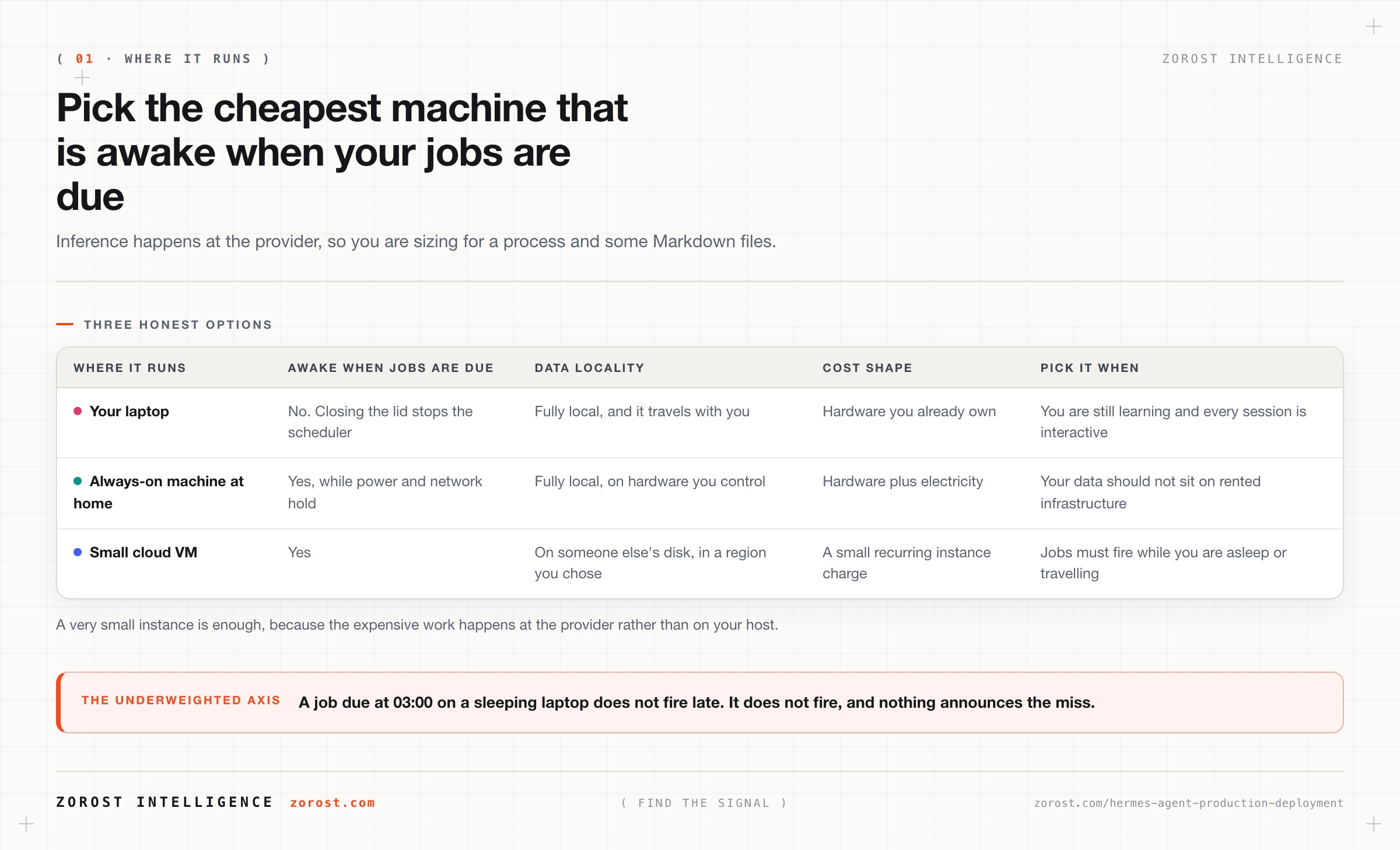
On the cheapest machine that is awake when your jobs are due, which for most people is an always-on box at home or a very small cloud VM. Hermes is light enough for a very small instance because the expensive part, inference, happens at the provider rather than on your host. That removes most of the sizing anxiety: you are provisioning for a Python process and some Markdown files, not for a model.
The axis people underweight is what happens when you close the lid. A laptop that sleeps stops the scheduler, which is what ticks every 60 seconds looking for due jobs. A job set for 03:00 on a sleeping laptop does not fire late, it does not fire, and nothing announces the miss.
Data locality decides between the other two. A machine at home keeps ~/.hermes/ on hardware you physically control, which matters if the agent reads a vault you would not put on rented infrastructure. Community write-ups describe both working well, running Hermes on a Mac mini or a small cloud VM and driving it from a phone. Choose on where your data should sit, then availability, then cost.
How do you install the gateway as a service?
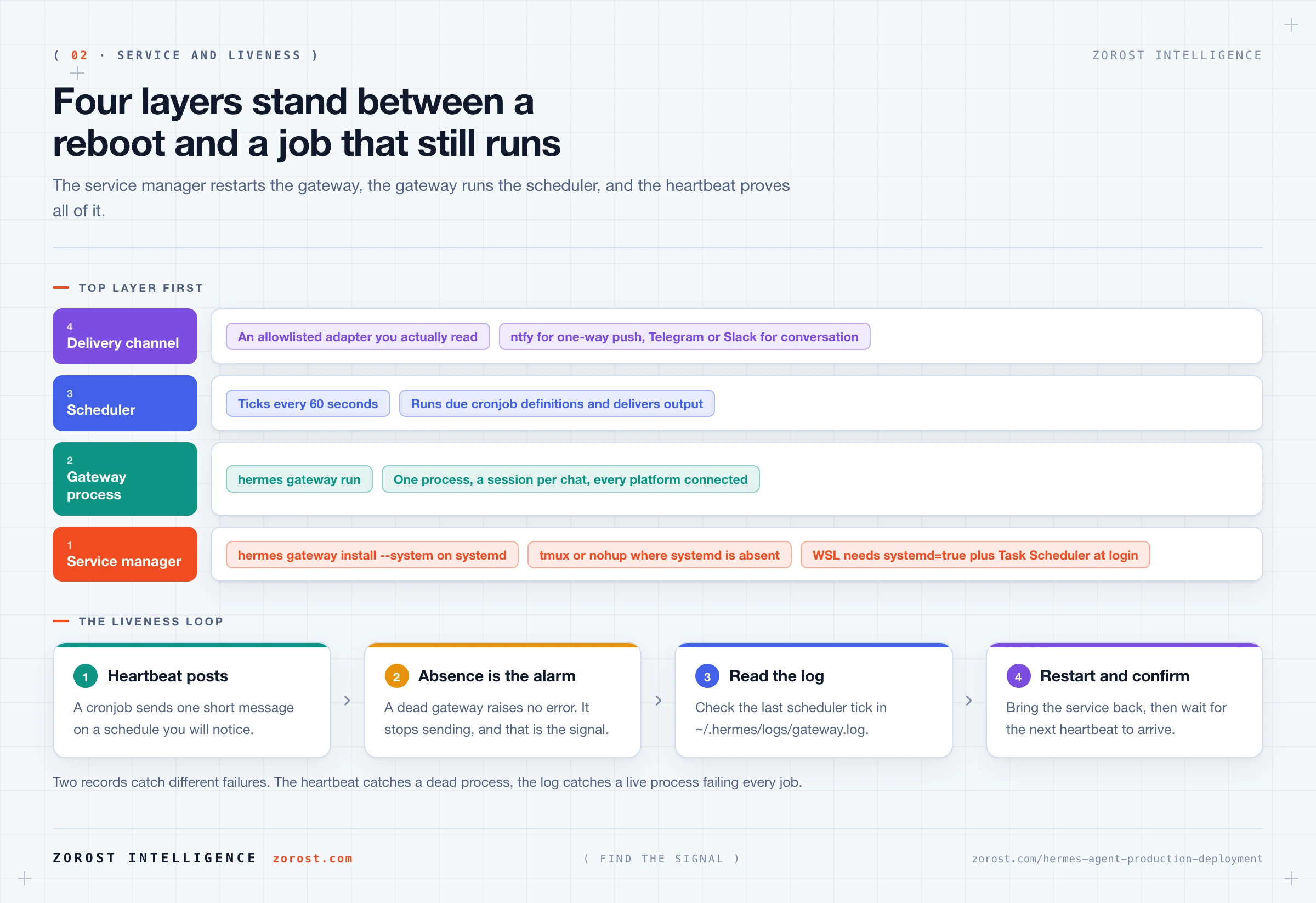
With hermes gateway install --system on any host running systemd, which registers the gateway so it starts on boot rather than when you remember. The gateway is a single background process that connects every configured platform, keeps a session per chat, and runs the scheduler, so “the gateway is running” and “my agent works” are the same statement.
Where systemd is unavailable, run it under a supervisor you already have. Use tmux or nohup with hermes gateway run, which is the same gateway in the foreground, and a reasonable answer on macOS or any host where you do not control init. The trade is that restart-on-boot becomes your problem.
WSL has its own path and it catches people out. Enable systemd inside the distribution by setting systemd=true in /etc/wsl.conf, then use Windows Task Scheduler to start it at login, because WSL does not run until Windows gives it a reason to. Skip the first step and the service install has nothing to register against. Skip the second and the distribution stays asleep until you open a terminal.
The exact systemd unit name created by hermes gateway install --system is [NEEDS SOURCE], so read what the install command prints rather than guessing at a service name. Your checkpoint is simpler than the unit name anyway: reboot the machine, wait, and see whether a scheduled job arrives on its own.
What grows on disk, and what is safe to delete?
Episodic memory and logs grow without limit and everything else is roughly static, so those two are the whole disk story. Episodic memory holds time-stamped conversation and run trajectories, accumulating every time you or a scheduled job talks to the agent. The gateway writes activity to ~/.hermes/logs/gateway.log, which grows fastest when the scheduler is busy.
Check it with du -sh ~/.hermes/ before deciding anything, because the right retention policy depends on numbers you can measure. Whether Hermes ships its own rotation policy is [NEEDS SOURCE], so treat rotation as your responsibility.
| What it is | Where it lives | Prune or keep |
|---|---|---|
| Gateway log | ~/.hermes/logs/gateway.log |
Rotate rather than delete, because it is your first stop in every incident |
| Episodic trajectories | Under ~/.hermes/ |
Export before pruning; this is the record of what the agent actually did |
| Semantic memory and skills | Markdown under ~/.hermes/ |
Keep. Small, and it is what makes the agent yours |
| Backups | Under ~/.hermes/ |
Keep recent ones, prune old ones, verify one before trusting the set |
| The cloned repository | ~/.hermes/hermes-agent |
Never prune by hand. The installer owns this directory |
The audit distinction matters more than the disk saving. Logs and trajectories are the only records that answer what the agent did and when, which is the argument made at length in securing a self-hosted agent. Export before you delete.
How do you upgrade without breaking a working configuration?
Run hermes backup first, every time, because what an upgrade puts at risk is not the code but the configuration and memory you built around it. A working setup is a provider configuration, a set of scoped MCP servers, an allowlist, a pile of skills the agent wrote for itself, and a scheduler full of jobs. The code is replaceable and that collection is not.
The upgrade command itself is [NEEDS SOURCE], so follow whatever the project documents at the time. What does not change is the shape of a safe upgrade: back up, upgrade, then verify in a fixed order rather than by poking at it.
Verification has three quick checkpoints. Start a session and read the startup line, which prints the detected context limit, for example Context limit: 128000 tokens; anything below roughly 64,000 tokens is not enough for a persistent agent and tells you the model configuration moved. Run hermes mcp test <name> on each server and compare the reported tools against your tools.include list. Then watch one scheduled job complete, because the scheduler is the part most likely to be quietly missing.
How do you back up and move to another machine?
Back up with hermes backup, and migrate by installing Hermes on the new machine and then copying the directory across. The documented migration is a single rsync:
rsync -av --exclude='hermes-agent' ~/.hermes/ newmachine:~/.hermes/The exclusion explains the whole design. ~/.hermes/hermes-agent is the code repository the installer cloned, along with the Python environment built around it. That is machine-specific and reproducible from the installer, and copying it moves stale paths and a possibly wrong interpreter onto a host that just built a correct one. Everything you care about, config.yaml, .env, auth.json, memory, skills, session history, and cron definitions, sits outside that directory and travels in the same command.
So the order is fixed. Install on the new machine with curl -fsSL https://hermes-agent.nousresearch.com/install.sh | bash, which clones a fresh repository and builds a correct environment. Then rsync the rest over the top, start a session, confirm the context limit line, and check that your cron definitions survived.
How do you know the gateway is still alive?
With a heartbeat job, because the alternative is noticing an absence and people are bad at noticing absences. This is the highest-value item in the post. Every other section describes a failure you can see; this one describes the failure that hides, in the place you are least likely to look, which is the space where output should have been.
The simplest liveness check uses machinery you already have. Create a cronjob on a schedule you will notice, have it post a short fixed message to a channel you actually read, and let its absence be the alarm. The scheduler ticks every 60 seconds and delivers output to the target chat, so a heartbeat that stops arriving means the gateway is down or its scheduler is stuck. Send it somewhere with push notifications; ntfy is on the gateway’s adapter list and is built for exactly this one-way shape.
Back the heartbeat with the log. Gateway activity, including scheduler runs, goes to ~/.hermes/logs/gateway.log, and tail -f ~/.hermes/logs/gateway.log while you test is the fastest way to watch a tick happen. The two records catch different failures: the heartbeat catches a dead process, the log catches a live process failing every job. See scheduling real work with Hermes Agent cron jobs for designing jobs that fail loudly.
What do you do when it breaks?
Work the runbook rather than improvising, because the five common failures have different first checks and guessing wrong wastes the time you have. Print this, or keep it in the vault the agent can read.
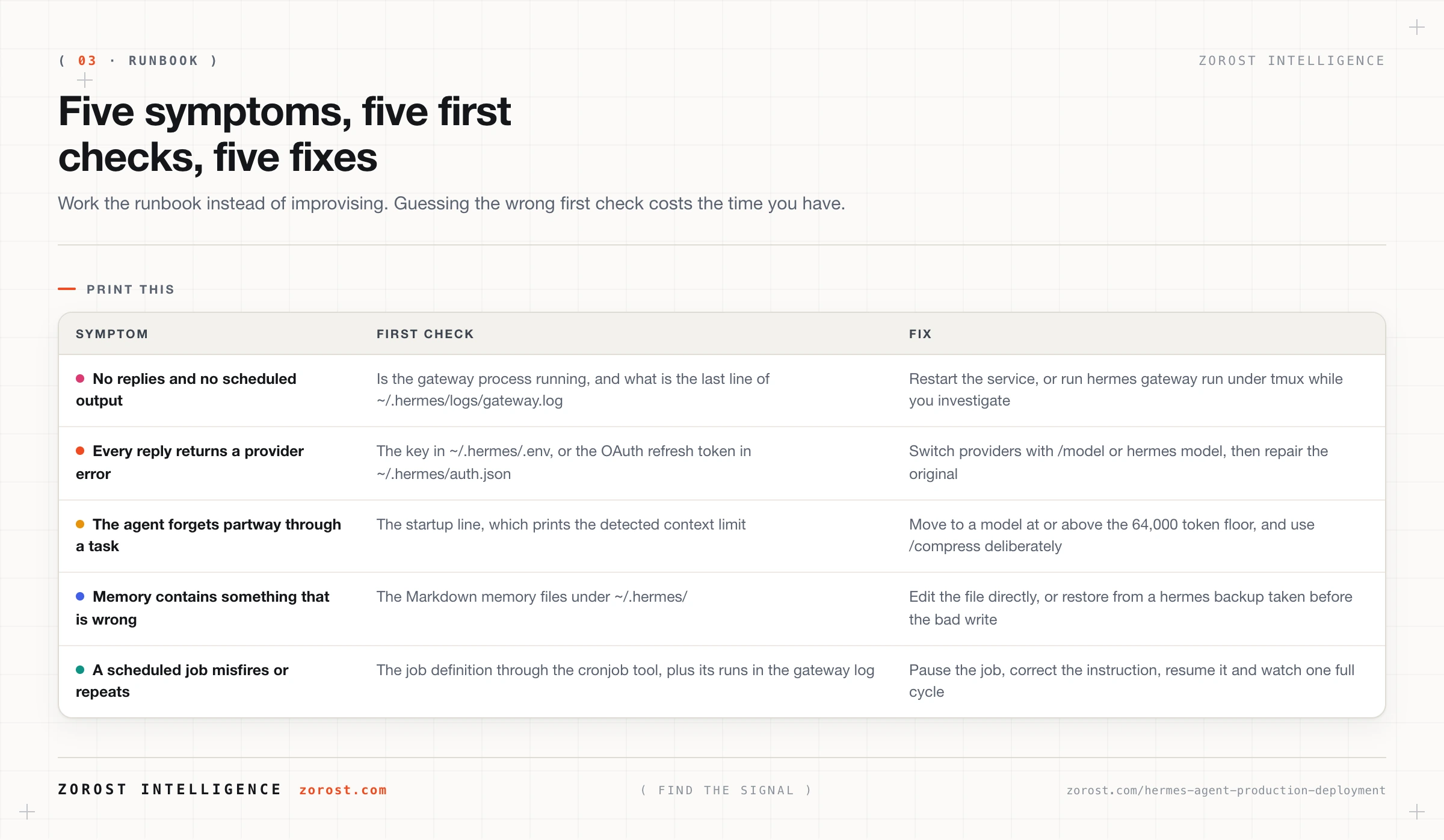
Two entries deserve a note beyond the table. When a provider is failing, the fastest recovery is switching rather than repairing: move to a second provider with /model in session or hermes model outside it, then fix the original afterwards. That is the practical argument for configuring two providers even when you use one, covered in choosing and configuring models for Hermes Agent.
When memory is the problem, remember that memory is Markdown files under ~/.hermes/, so the fix is often to open the file and correct the sentence. That is worth trying before a backup restore.
What should you review weekly and monthly?
Two short reviews, and they cost less time than one incident. A personal agent drifts in ways that are invisible day to day: memory picks up a claim that is no longer true, a server quietly changes its tools, the disk creeps up.
| Cadence | Review this | Why |
|---|---|---|
| Weekly | The heartbeat arrived every time, and ~/.hermes/logs/gateway.log has no errors you have been ignoring |
Catches a stuck scheduler and a job failing silently |
| Weekly | What memory has learned about you recently | Wrong facts compound, and they are cheap to correct early |
| Monthly | hermes backup ran, and one backup has actually been checked |
An unverified backup is a belief, not a control |
| Monthly | hermes mcp test <name> on each server, against your tools.include |
Catches contract drift before it presents as the model getting worse |
| Monthly | Gateway allowlists and user tiers, checked with /whoami |
Access lists grow by accident and nobody removes anyone |
| Monthly | Disk under ~/.hermes/, with du -sh |
A full disk kills the gateway, and that failure is silent |
Where this goes wrong
The machine sleeps and the jobs never fire. The symptom is a scheduled digest that stopped arriving with no error anywhere. The cause is almost always a laptop closing, since a suspended host runs no scheduler ticks. Move the gateway to a host that stays awake, and note that a heartbeat would have told you within a day rather than a month.
The service install has nothing to install into. On WSL, hermes gateway install --system needs systemd running inside the distribution, which means systemd=true in /etc/wsl.conf, and it needs Windows to start the distribution, which means a Task Scheduler entry at login. Miss either and the install appears to succeed while nothing starts on boot.
A previous sudo install leaves a stale binary. The symptom is a hermes command that behaves like an older version or cannot find its environment. Hermes does not need sudo, so remove the hermes binary from /usr/local/bin and rerun the normal installer.
The migration brought the wrong directory. The symptom is a fresh machine where the CLI errors on paths that exist only on the old host, because ~/.hermes/hermes-agent came across instead of being excluded. Install first, then rsync with --exclude='hermes-agent'.
The disk fills and everything stops. The symptom is a gateway that dies and stays dead, often overnight. Episodic memory and the gateway log both grow and neither warns you. Check du -sh ~/.hermes/ in your monthly review, and rotate the log rather than finding out through an outage.
Common questions
Is a very small VPS really enough to run Hermes Agent?
Yes, because inference happens at the provider rather than on your host, so the machine runs a Python process, a scheduler, and some Markdown files. Size for the gateway staying up and for disk growth from logs and episodic memory, not for model weights. Running local models is a different sizing problem entirely.
What happens to my scheduled jobs when the machine restarts?
The definitions survive, because cron definitions persist under ~/.hermes/, but they only run while the gateway is running. That is exactly why the service install matters: without it, a reboot leaves your job definitions intact and completely inert. Reboot deliberately once and confirm a job fires afterwards.
Do I need systemd to run Hermes Agent reliably?
No. Where systemd is unavailable, run the gateway under tmux or nohup with hermes gateway run, and on WSL enable systemd=true in /etc/wsl.conf and start the distribution from Windows Task Scheduler at login. What you need is something that restarts the process after a reboot, and systemd is only the most convenient version of that.
How often should I back up?
Before every upgrade without exception, and on a schedule the rest of the time. Because hermes backup is a command rather than an agent task, the right home for the scheduled version is your system’s own cron, not the agent’s. That is the principle from the integrations post applied to your own tooling: a task with no judgment in it should not be paying for a model.
Next steps
- Do the two things that matter most this week. Install the gateway as a service on a host that stays awake, and add a heartbeat job that posts to a channel you read. Then reboot on purpose and confirm the heartbeat comes back on its own.
- If you arrived here from a search result and none of this has context yet, start at the beginning with Hermes Agent explained and work forward. The series takes you from nothing installed to the runbook on this page.
- For the reasoning underneath the design decisions across all fifteen posts, why the loop, the state, the tools, the budgets, and the verification step are arranged as they are, read the harness, not the model, decides whether your agent works. This series is one concrete implementation of that argument.
- Everything else we publish, including the rest of this programme, is indexed in Signals.
- The disciplines here, a heartbeat rather than an absence, a verified backup rather than a believed one, and a runbook written before the incident, are the ones we apply to systems we run ourselves. We publish what we test in the open in AI Fieldwork.