
How Hermes Agent memory works, and how skills make it improve
Pull-quote: “Your agent’s memory is a Markdown file. You can open it, fix a wrong line, and save, which almost no other agent memory allows.”
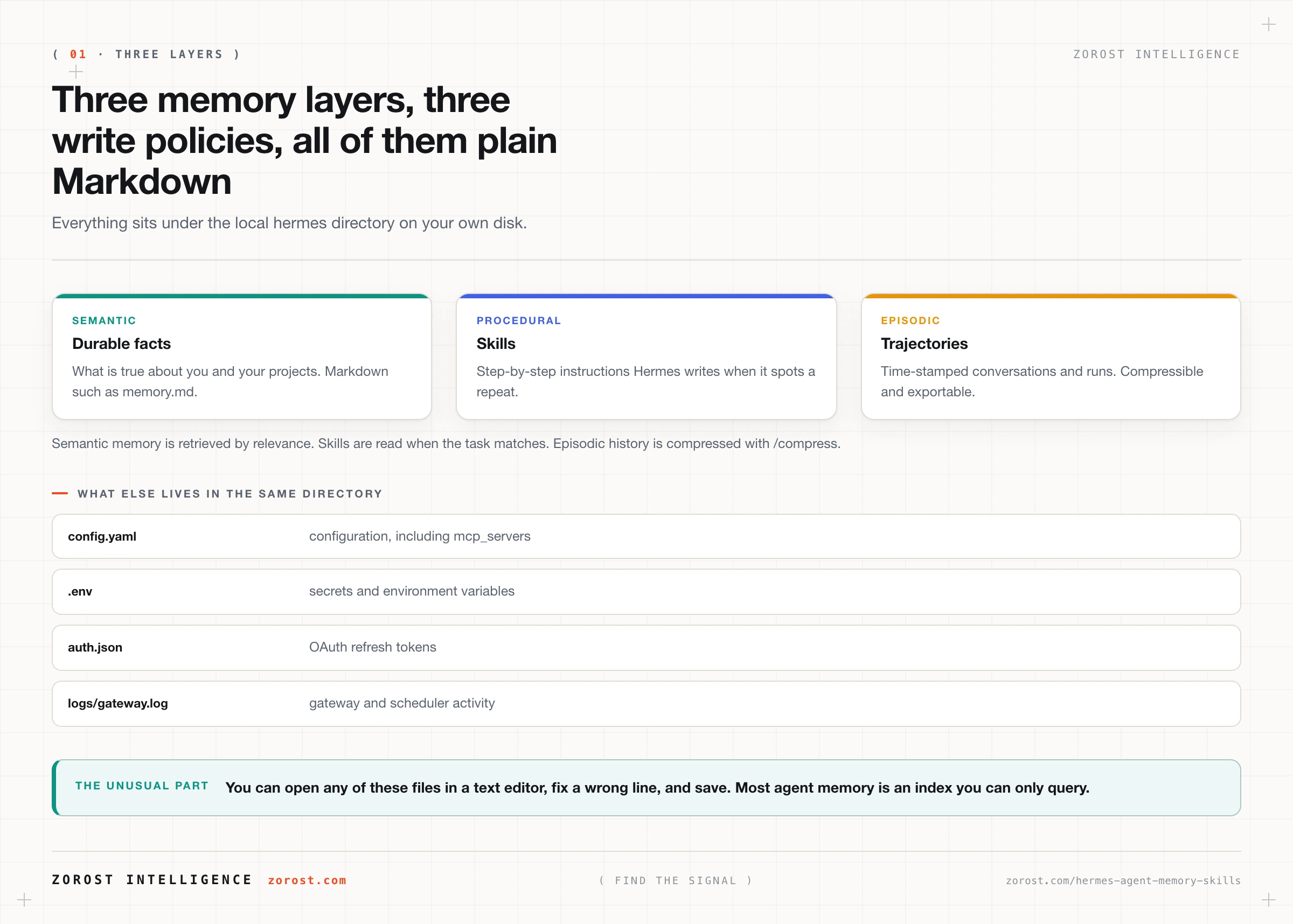
Hermes Agent memory comes in three layers, and all of them are plain Markdown files on your own disk. That second fact is stranger than it sounds. Most agent memory is a vector index you can query and cannot read, so when your assistant develops a wrong belief about your work, your only recourse is to argue with it. In Hermes you open the file, delete the line, and save.
Hermes Agent is an open-source, self-hosted agent harness from Nous Research, and memory is what separates it from a chat window that forgets you between visits. The three layers are semantic memory, holding durable facts about you and your projects; procedural memory, holding skills, meaning step-by-step task instructions the agent writes for itself; and episodic memory, holding time-stamped conversation and run trajectories. Each has a different lifetime, write policy, and reason to exist.
This assumes Hermes is installed, which installing Hermes Agent and surviving your first session covers, including the ~/.hermes layout referenced throughout.
What you will be able to do
- Explain what belongs in semantic, procedural, and episodic memory, and why one undifferentiated store works badly.
- Find and read the actual files your agent writes about you, and edit them safely.
- Recognise a skill as an artifact, understand how Hermes writes one, and correct one that has drifted.
- Run
/compressat the right moment and know what you are trading away. - Use time-stamped trajectories to reconstruct what your agent did and why.
- Audit accumulated memory on a cadence, including what should never have been written down.
What are the three layers of Hermes Agent memory?
Hermes splits memory into semantic, procedural, and episodic layers because facts, procedures, and history need different handling. A single store would either forget things you need permanently or hoard things that were only true for an afternoon.
Semantic memory holds durable facts about you and your projects, written to local Markdown such as memory.md and retrieved by relevance when a request looks related. This layer knows your repository names, your timezone, your preference for short answers, and the fact that the client calls the product something your code does not. It is read often and written rarely.
Procedural memory holds skills: step-by-step task instructions stored as Markdown under ~/.hermes/. Hermes writes these itself when it notices you asking for the same workflow repeatedly, and refines them over time. Knowing how to do something differs from knowing that something is true, and it earns its own layer because it is retrieved by task instead of by topic.
Episodic memory holds time-stamped conversation and run trajectories: what happened, in order. It is the largest layer and the most disposable. You compress it with /compress when it stops earning its space, and export it to evaluate how the agent has been performing.
The three-layer split is a general design pattern for agent state, and what to persist, what to forget, and where works through the write policies, retrieval strategies, and contradiction handling in the abstract. What follows is that pattern as one harness actually implements it.
Where do the memory files live, and why does plain Markdown matter?
Everything lives under ~/.hermes/ on your own disk. That directory holds config.yaml for configuration, .env for secrets, auth.json for OAuth refresh tokens, memory and skills as Markdown files, session logs, cron definitions, backups, and logs/gateway.log. Nothing leaves the machine unless you send it to a model provider, and Hermes collects no telemetry.
The Markdown part deserves more attention than it usually gets. Because memory is a text file, four things become possible that are awkward with an opaque store. You can read it, so you learn what your agent believes about you without interrogating it. You can edit it, so correcting a wrong fact is a one-line change. You can put it under version control and see what changed this week. You can delete a line, and it is genuinely gone, with no embedding lingering in an index.
That transparency is why Hermes pairs cleanly with Obsidian, which stores notes as plain local Markdown too. The Hermes Console community plugin embeds the CLI inside Obsidian so the agent loop runs in the note you are working in, reading and writing vault files as ordinary files. Two systems that both treat text as the source of truth compose without an integration layer.
How does Hermes Agent create a skill?
Hermes writes a skill when it notices a repeated workflow, without you asking for one. The trigger is repetition. You ask for the same shape of task a third time, the agent recognises the pattern, and it records the procedure as Markdown so the next run starts from the procedure instead of rediscovering it.
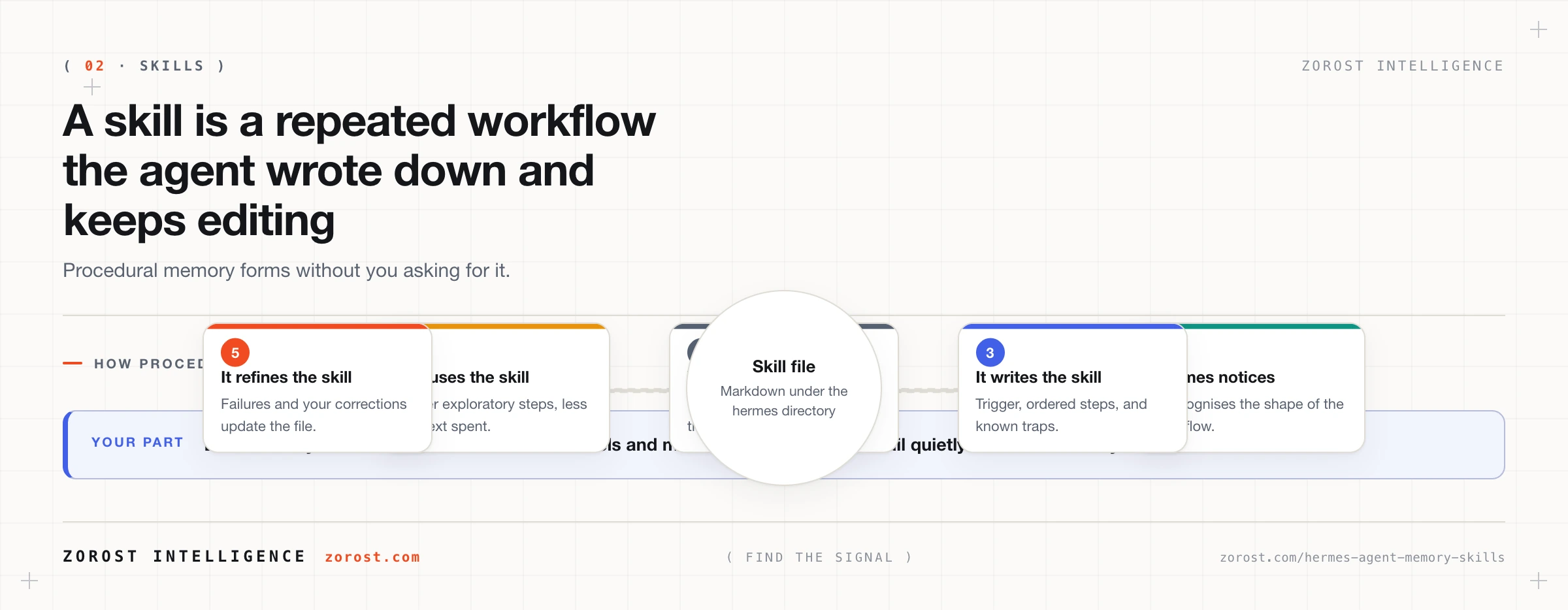
A skill reads like a short runbook. It names itself, states the situation that should make the agent reach for it, lists the steps in order, and records the traps someone hit last time. The block below illustrates that shape, since Hermes writes these itself and yours will reflect your own work:
# Skill: Weekly repository digest

Use when asked to summarise what changed in a repository over the past week.

1. List merged pull requests since the date of the last digest, oldest first.
2. Group them by area using labels, and drop anything labelled chore.
3. Write three bullets per area and name the author of each change.
4. Post to the home channel and record today's date as the last run.

Traps: treat the labels infra and platform as the same area, they were split in June.
Refinement is what makes skills worth having. When a run fails or you correct the output, that correction can end up in the skill, so the next run avoids the mistake. Your agent gets cheaper and faster at work you do often, because a skill replaces exploratory steps with a known procedure and fewer steps means less context spent. Editing a skill by hand is the fastest way to fix one that picked up a bad habit.
How do you curate memory instead of letting it pile up?
Read what your agent wrote about you, correct what is wrong, and delete what should never have been recorded. Curation matters because semantic memory is retrieved by relevance, so a wrong fact reaches the model with the same confidence as a right one. Nothing in the system knows which line is stale.
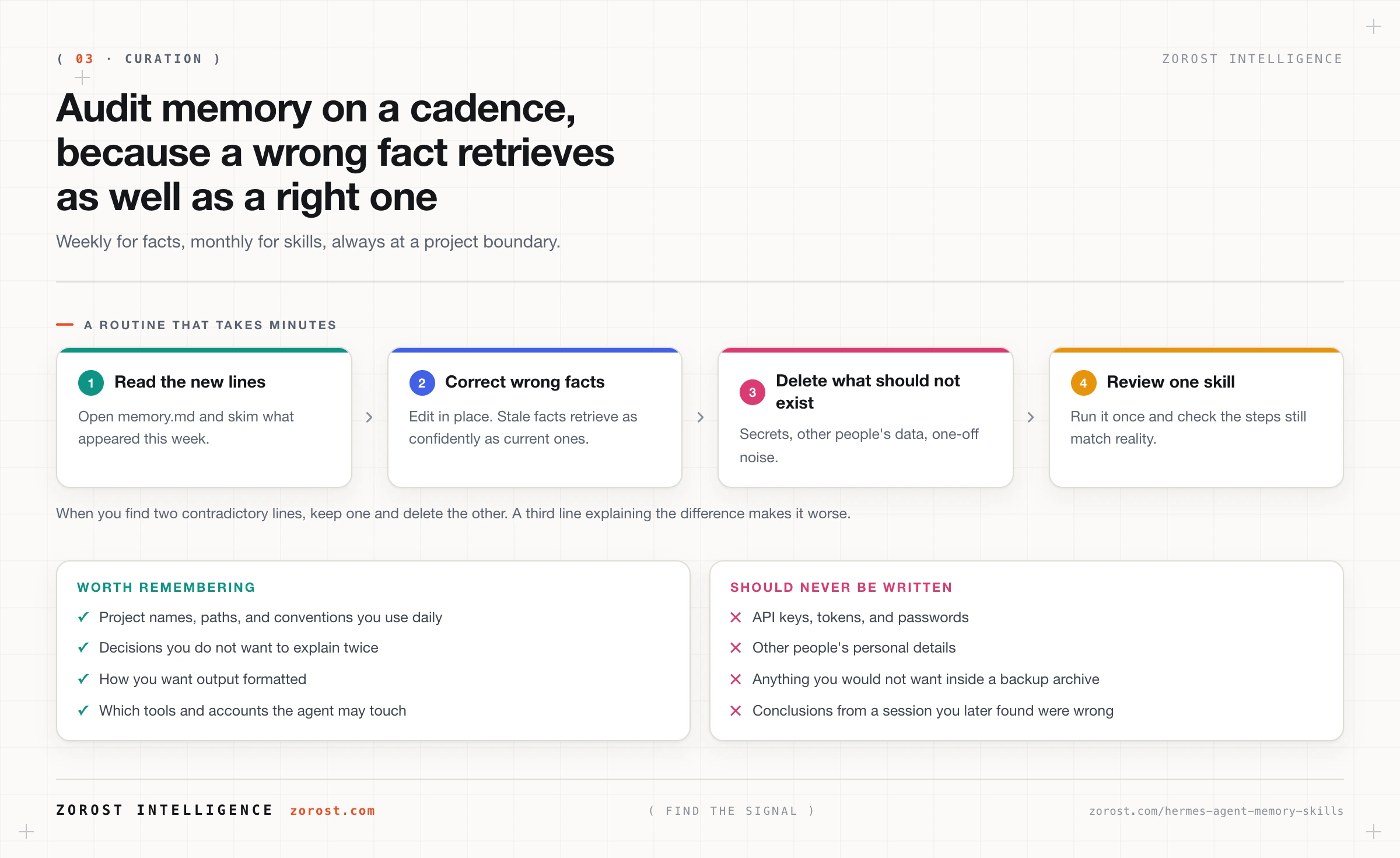
Three categories are worth deleting on sight. Secrets come first: if you pasted a key into a conversation and the agent recorded context around it, delete the line and rotate the key, because secrets belong in ~/.hermes/.env and nowhere else. Other people’s personal details come second, since your convenience does not justify keeping a colleague’s private information in a file on your laptop. Third is conclusions from a session you later found were wrong, which are worse than no memory at all because they are confidently retrievable.
Watch for contradictions specifically. Two lines that both look true produce an agent whose answer depends on which one got retrieved this time, and that is the root cause of most “it knew this yesterday” complaints. When you find a pair, keep one and delete the other instead of adding a third line explaining the difference.
What does /compress actually do to a session?
/compress shortens the episodic history a session carries forward, trading verbatim detail for context room. Long agent sessions accumulate history until they press against the model’s context limit, at which point the agent starts losing the thread. Compression buys the room back.
Use it at boundaries. After a task is finished and verified, before you switch topics, or when a long session starts feeling forgetful, compression costs you nothing you still need. Avoid it mid-debugging, where the exact text of an error three steps ago is what you are working from. Copy out anything you need verbatim first.
Compression targets the session’s working history, so treat the time-stamped trajectories as your record of what happened. On local hardware there is a second payoff: a smaller live context means a smaller attention cache, which is the resource a local model runs out of.
Why export trajectories from your agent?
Because grading an agent means grading runs, and a run is a trajectory. Hermes keeps time-stamped conversation and run trajectories as episodic memory, and they can be exported for evaluation or training. Since they are files under ~/.hermes/, copying them out is the export.
Trajectories answer questions a final response cannot. Which tool did it call, with which arguments, in what order. Where did it retry. When something surprising happens, the trajectory tells you whether the model made a bad decision or a tool returned bad data, and that distinction changes what you fix.
They also matter for trust, which is a hard requirement for an agent with tools. A scheduled job that runs unattended and posts to a channel needs a record you can go back to. hermes backup captures the directory, so trajectories, memory, and skills travel together.
How often should you audit what your agent has learned about you?
Weekly for facts, monthly for skills, and always at a project boundary. Cadence matters more than thoroughness, because a five-minute skim every week catches drift while a three-hour audit every year catches nothing you can still act on.
The weekly pass is short. Open memory.md, read what appeared since last time, fix anything wrong, and delete anything that was only true for an afternoon. The monthly pass is different in kind: pick one skill, run it deliberately, and check that the steps still describe reality, since paths move and labels get renamed and a skill encoding last quarter’s process fails quietly.
Project boundaries deserve their own trigger. When a project ends, its conventions, paths, and decisions stop being useful facts and become noise competing for retrieval. Delete them. The same applies before any backup leaves your machine, and if teammates reach the agent through the messaging gateway, /whoami shows which tier a given user holds.
What does a persistent agent mean for your privacy?
A persistent agent accumulates a detailed picture of your work, and that picture is a file on your disk. Hermes takes the defensible position on everything it controls: no telemetry, no usage analytics, API calls only to the providers you configure, and all conversation, memory, and skill data under ~/.hermes/. Which moves the residual risk from the vendor to the file itself, and the file is yours to protect.
Three consequences follow. Anyone with access to your unencrypted disk can read months of your working context in a text editor, so full-disk encryption stops being optional. Backups carry the same content, so a hermes backup archive, or an rsync of ~/.hermes/, needs the same protection as the original. And retrieved memory goes into prompts, so memory that cannot leave your network requires a local model.
Getting this right is a security exercise, and the Hermes Agent threat model covers secret handling, allowlists, tiers, and the hardening checklist.
Where this goes wrong
The agent confidently repeats something that stopped being true. You get an answer that was correct two months ago, delivered with no hedging. A stale fact is sitting in semantic memory and being retrieved by relevance like any other. Open the file, edit the line, save. There is no cache to clear.
Answers change between sessions for no visible reason. Two contradictory facts are both in memory, and which one shapes the answer depends on which one got retrieved. Find the pair, keep the correct line, and delete the other instead of adding a clarification.
A skill starts failing quietly. The output looks plausible and is subtly wrong, usually after something moved: a renamed label, a relocated directory, a changed process. The skill still encodes the old shape. Run it deliberately, read its steps against reality, and edit the ones that no longer hold.
Memory grows until it crowds out the work. Sessions feel tighter, /compress comes up sooner, and the agent seems distracted. Retrieved memory competes for the same context budget as your task, so an unpruned store taxes every request. Prune aggressively.
A secret ends up in a memory file. You pasted a token into a conversation while debugging and the agent recorded the surrounding context. Delete the line, rotate the credential, and put the value in ~/.hermes/.env where secrets belong. Assume any secret that reached a prompt also reached your provider.
Common questions
Where exactly does Hermes Agent store memory?
Under ~/.hermes/ on your own disk, as Markdown files. That directory also holds config.yaml, .env for secrets, auth.json for OAuth refresh tokens, session logs, cron definitions, backups, and logs/gateway.log. Nothing is stored remotely, and Hermes sends no telemetry.
Can I edit my agent’s memory by hand?
Yes, and doing so is the intended workflow. Memory and skills are plain Markdown, so you can open them in any editor, correct a wrong fact, delete a line you disagree with, and keep the directory under version control to see what changed.
Do I have to write skills myself?
No. Hermes writes skills when it notices a repeated workflow and refines them over time, which is why the procedural layer improves without your involvement. Editing one by hand is still the quickest way to fix a skill that drifted or to tighten steps that are vaguer than you would like.
What is the difference between memory and context?
Memory is what persists on disk between sessions. Context is what the model sees on this one request, bounded by the context limit Hermes reports on startup as a line like Context limit: 128000 tokens. Memory is retrieved into context when it looks relevant, which is why a bloated store costs you tokens and attention together.
Does my memory get sent to the model provider?
Retrieved memory becomes part of the prompt, so it goes to whichever provider serves that request. Hermes calls only the providers you configure and adds no telemetry, but the prompt itself contains whatever memory was retrieved. Serve the model locally if some of your memory cannot leave your network.
How do I know what my agent did on an unattended run?
Read the trajectory. Episodic memory keeps time-stamped conversation and run histories, and gateway activity is logged in ~/.hermes/logs/gateway.log, so a scheduled job that behaved strangely leaves a record of which tools it called and in what order.
Next steps
Read turning Hermes from a chatbot into something that acts next, because memory only becomes valuable once the agent can do things, and the tool set you enable determines what ends up in your skills.
For the reasoning behind compression, retrieval, and eviction policy, including how to measure tokens spent against tokens useful, see treating the context window as a budget you spend.
Reviewing what a system retained, and being able to point at the file a retained claim came from, is the same discipline behind EvidAI in pharmaceutical evidence review, where an unsourced fact in the record counts as a defect.