
Building a second brain with Hermes Agent and Obsidian
Pull-quote: “A bad code change fails a test, and a bad note edit sits quietly until you go looking for the original a year later.”
Hermes Agent and Obsidian fit together because an Obsidian vault is a folder of plain Markdown files on your disk, so a local agent needs no API, no bridge service, and no sync provider to work in it. It needs a path. That single property is why this pairing beats a hosted notes product, where every read costs an API call and the vendor decides what the agent may see.
This post covers the Hermes Console plugin, the vault conventions that decide whether an agent is useful or annoying, capture from your phone, consolidation passes that produce something you read, how to encode all of it as skills, and the write scoping that stops an agent from quietly damaging years of work.
That last part deserves a warning. Write access to a knowledge base is the highest-consequence permission you will grant this agent, and it behaves nothing like write access to code. A bad code change fails a test within the hour. A bad note edit sits there, plausible and wrong, until you go looking for the original and find a summary in its place.
What you will be able to do
- Give Hermes Agent access to a vault through a filesystem MCP server rooted to the vault and nothing above it.
- Run the agent loop inside the note you are editing, using the Hermes Console community plugin.
- Set vault conventions, folders, frontmatter, naming, index notes, and tags, that make the output predictable.
- Capture into the vault from your phone through the messaging gateway, including voice notes.
- Run consolidation passes that read many notes and write one new dated note.
- Scope writes so every change is reversible, and know what should never enter the vault.
Why do Obsidian and Hermes Agent fit together?
Both are local-first and file-based, so there is no integration layer between them. Obsidian is a note-taking application that stores every note as a Markdown file inside a local folder called a vault. Hermes Agent is an open-source, MIT-licensed agent harness from Nous Research that runs on your own machine, and it is a separate thing from the Hermes language models that Nous also publishes.
Put those facts together and the integration disappears. A vault is a directory tree of .md files, frontmatter is a YAML block at the top of a file, and links are wiki-style references between filenames. All of it is plain text a model reads without a translation step, reachable by any tool that can list a directory and read a file.
The formats match on both sides, since Hermes stores its own memory and skills as Markdown under ~/.hermes/. Hermes also sends no telemetry and calls only the providers you configure, which matters more here than in most integrations because the corpus is your private thinking.
What does the Hermes Console plugin do?
Hermes Console is an Obsidian community plugin that embeds the Hermes CLI inside Obsidian, so the agent loop runs in the note you are working in. It installs from the community plugin browser and expects the Hermes CLI to be installed already.
What it buys you is the removed context switch. Without it, working on a note with the agent means leaving Obsidian, describing which note you mean, and coming back for the result. Because the plugin embeds the CLI, the providers, memory, and skills are the ones your terminal sessions already use.
The plugin is a convenience rather than the integration, since the actual connection between agent and notes is filesystem access. Set that up first.
How do you give Hermes Agent access to your vault?
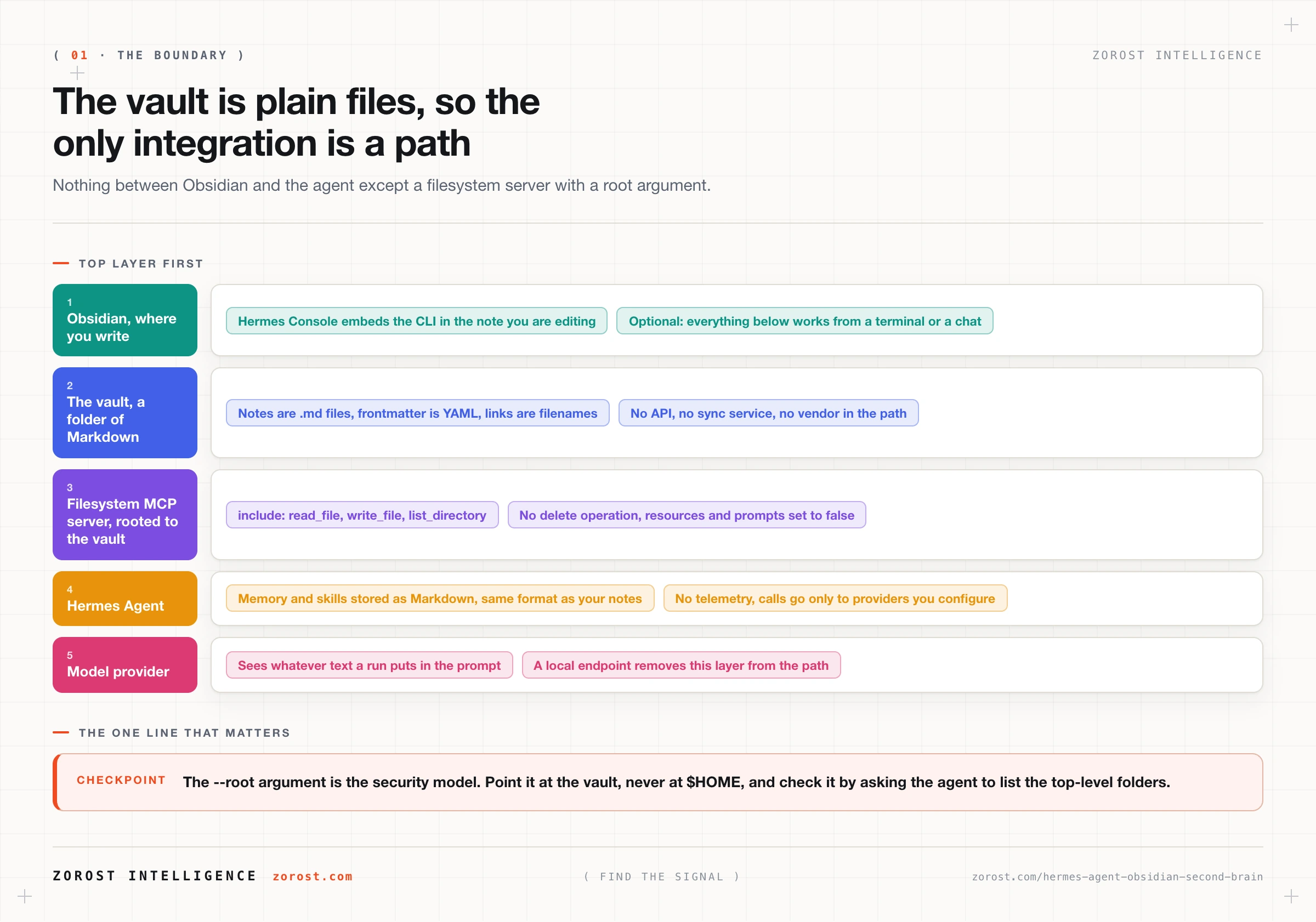
Point a filesystem MCP server at the vault directory and at nothing above it, with the narrowest tool allowlist your workflows need. MCP servers supply tools to Hermes, which acts as an MCP client, and the configuration lives under mcp_servers in ~/.hermes/config.yaml.
mcp_servers:
  vault:
    command: "npx"
    args: ["-y", "filesystem-mcp@latest", "--root", "/Users/you/Notes"]
    tools:
      include: [read_file, write_file, list_directory]
      resources: false
      prompts: false
    enabled: true
Three details matter more than the rest. The --root argument is the boundary and the whole security model, so point it at the vault and never at $HOME. The include list contains no delete operation, which is deliberate. Setting resources and prompts to false keeps the surface down to the three tools you asked for, following the scoping discipline in connecting MCP servers to Hermes Agent safely.
Add the server with hermes mcp add, check it with hermes mcp test vault, then pick it up mid-session with /reload-mcp.
Your checkpoint: ask the agent to list the top-level folders in the vault. If it returns your folders, the boundary is right. If it returns your home directory, fix the root before letting the agent write anything.
Which vault conventions make an agent effective?
Predictable structure beats clever structure, because the agent inherits your organisation rather than imposing one. A vault where you cannot say in one sentence where a meeting note goes is a vault where the agent invents a folder, then a different one next week.
| Convention | What it looks like | Why the agent needs it |
|---|---|---|
| Predictable folders | 01-Inbox, 10-Projects, 20-Areas, 90-Archive |
“File this” needs a destination rule, not a judgment call |
| Consistent frontmatter | type, status, project, created on every note |
Filtering on metadata beats reading every file |
| Stable naming | 2026-09-19-standup.md, freight-index.md |
Dated filenames make an idempotent write possible |
| One index note per project | 10-Projects/Freight/_index.md linking the rest |
One place to read, one place to update |
| Explicit tag discipline | A short controlled list, written down in the vault | Stops three tags coming to mean the same thing |
The item that pays most costs ten minutes. Write your conventions into a note such as _conventions.md and reference it in the instructions you give the agent. That turns “file this appropriately” from a guess into a lookup, and gives you something to correct when filing goes wrong.
How do you capture into the vault from anywhere?
Send it to the agent through the messaging gateway and let the agent write the file, so capture does not depend on sitting at the machine the vault lives on.
Three routes cover most of it. From your phone, the gateway handles Telegram voice notes and images and transcribes them, so a thought on a walk lands as a note without typing, which running Hermes Agent as a Telegram bot sets up. From reading, hand over a URL and ask for a summary note with the source link in the frontmatter. From a schedule, run a nightly pass that files whatever accumulated, using Hermes Agent cron jobs.
One discipline holds all three together: captured material goes to one folder, always. 01-Inbox and nowhere else, with filing as a separate step you review. That is what makes agent capture safe, because anything moving a note into the body of your vault has passed through a pass you read.
How do you turn scattered notes into a weekly review?
Run a consolidation pass that reads a date range of notes and writes one new dated note, rather than editing the notes it read.
| Pass | What it reads | What it writes |
|---|---|---|
| Weekly review | Daily notes from the last seven days | A new dated note, such as 2026-09-19-weekly-review.md |
| Index refresh | Every note carrying the project tag | A proposed update to the project index note |
| Task extraction | Notes with unchecked checkboxes | One task list note, linking back to each source |
| Link suggestions | Notes sharing tags or repeated terms | A note proposing links for you to apply |
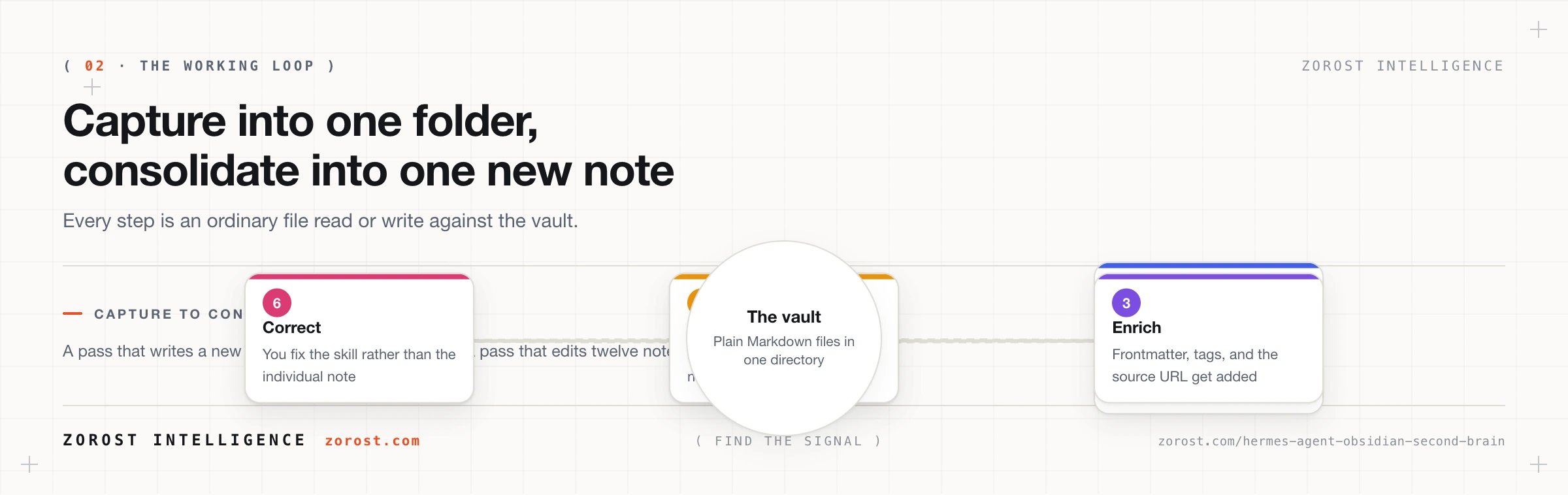
The pattern underneath all four is read many, write one, and make what you write new and dated. A pass that writes a new file is safe to run twice, which matters because you will run it twice. A pass that edits twelve existing notes can go wrong twelve times before you notice.
Ask each pass to list the notes it read and the note it wrote at the top of its output. That line costs nothing and makes the review verifiable at a glance, since a weekly review assembled from two daily notes when you wrote six is visibly incomplete.
How do you teach the agent your vault conventions?
Encode them as skills, the procedural layer of Hermes memory: step-by-step task instructions stored as Markdown under ~/.hermes/. Hermes writes skills on its own when it notices a repeated workflow and refines them over time, and you can read and correct them because they are ordinary text files.
Three skills carry most vault work: how to file an inbox note, how to write the weekly review, and how to update a project index. Each starts as a long instruction you type once, and by the fifth run “run the weekly review” is enough.
Put your effort into correcting the skill rather than the output, because a correction in chat fixes one run while a correction to the skill fixes every future run. That is the subject of how Hermes Agent remembers and how skills make it improve.
How do you stop an agent from damaging years of notes?
Four rules, all of which assume the agent will get something wrong rather than trying to guarantee it will not.
Root the filesystem server to the vault. The --root argument points at the vault directory, so nothing above it is reachable. Every other rule is a second line of defence behind this one.
Keep the vault in version control. A vault is plain text in a folder, so git works on it directly. Commit before the agent’s first write and daily after that, which turns every mistake into a diff you can revert.
Have it propose before it edits. Ask for proposed changes in a staging note you apply yourself, or have the agent write new dated files. Reserve direct edits for files the agent created.
Never give it a delete tool. Leave delete operations out of tools.include. When a note has to go, it moves to 90-Archive. Deletion in a knowledge base is almost never urgent and never reversible enough.
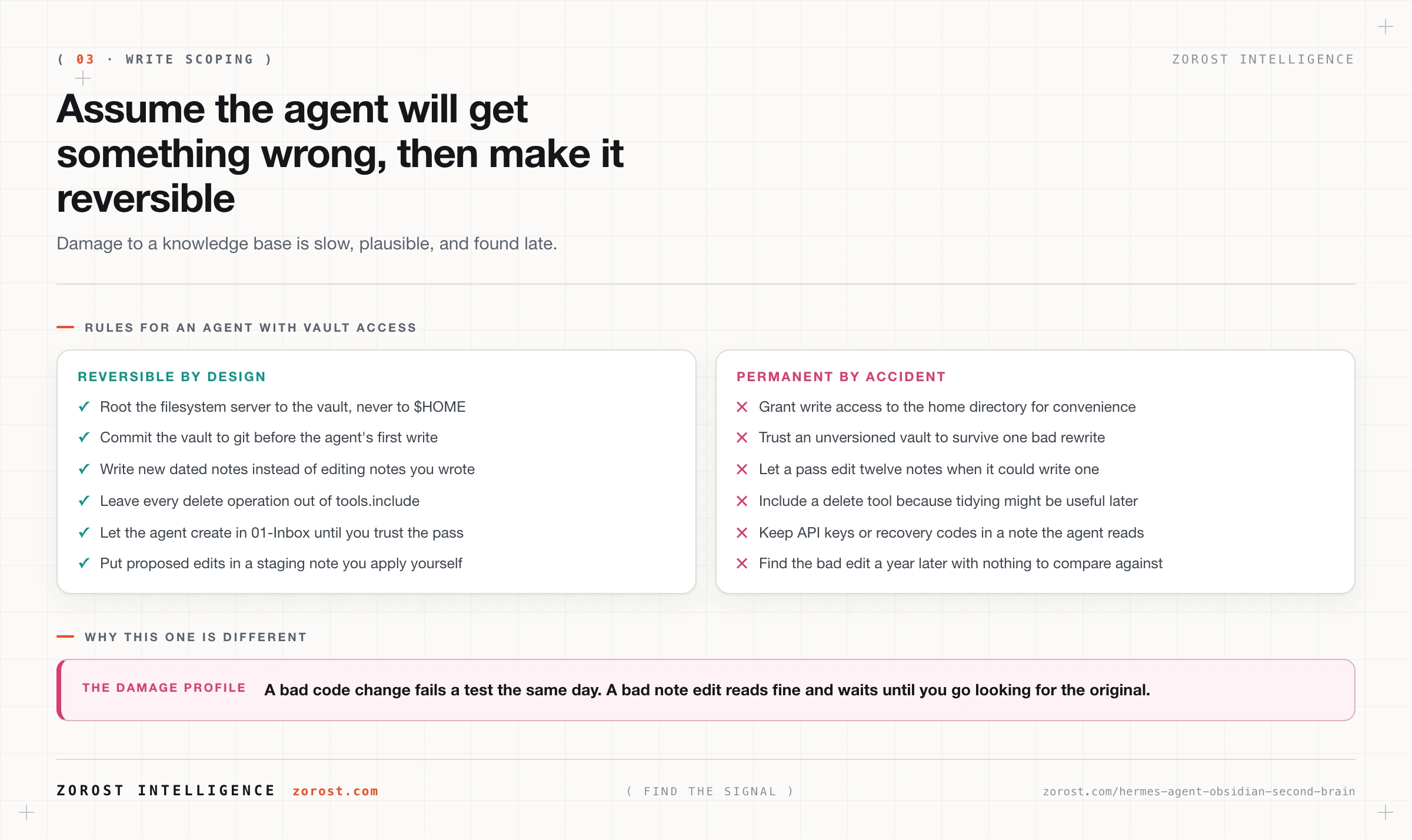
Why this matters more here than in a code repository comes down to how the damage surfaces. A bad code change breaks a build and you find out the same day. A bad note edit reads fine, sits quietly for a year, and gets discovered when you open the note expecting the original.
What should you keep out of the vault?
Credentials, and anything you would not want included in a model prompt. Whatever the agent reads can end up in the text sent to your provider, which is fine for meeting notes and wrong for API keys, passwords, recovery codes, client material under an NDA, and health or financial records you have not decided to share.
Hermes keeps its own secrets in ~/.hermes/.env and calls only providers you configure, but the provider still sees whatever text a run puts in the prompt. Keep sensitive material outside the server’s root, or in a separate vault the agent has no path to. Running vault work against a local endpoint removes the provider entirely, which is a good reason to read running Hermes Agent fully local with vLLM, Ollama, and llama.cpp.
Where this goes wrong
The agent files everything in the wrong place. There was no written convention, so it invented one and stayed consistent with its own invention. Write _conventions.md and reference it in the filing instruction.
A consolidation pass overwrites last week’s review. The pass writes to a fixed filename, so you have one note that keeps changing instead of a series. Use dated filenames for anything a pass produces.
The agent cannot see the vault at all. The --root path is relative rather than absolute, or the server was added but the session never reloaded it. Use an absolute path, run hermes mcp test vault, then /reload-mcp.
Frontmatter comes back mangled. The agent rewrote a whole file to change one field. Ask for appends and staging notes rather than rewrites, and let the git diff show you what changed.
The vault grows a second organisational scheme. Conventions drifted and the skill was never updated, so two tag systems coexist. Correct the skill, not the chat.
Simple questions take a long time. Inconsistent frontmatter means the agent cannot filter, so it reads everything. Fix the frontmatter, add index notes, and use /compress when a session has grown long.
Common questions
Do I need the Hermes Console plugin to use Hermes Agent with Obsidian?
No. The integration is filesystem access, so a terminal session or a Telegram message does everything the plugin does. Hermes Console is an Obsidian community plugin that embeds the Hermes CLI inside Obsidian, and it buys you the removed context switch when you are already writing in a note.
Does my vault need to sync anywhere for this to work?
No. The agent reads and writes files on the machine it runs on, with no sync service in the path. If you already sync the vault between devices, run the agent on one machine and let your existing sync carry the results.
Can Hermes Agent write to my vault without me approving each change?
Technically yes, and that is the risk to plan around. Grant write_file only when a workflow needs it, keep the vault in version control so every change is a revertable diff, and prefer workflows where the agent creates new dated notes.
Is this the same Hermes as the Hermes language models?
No. Hermes Agent is the open-source agent harness from Nous Research, and the Hermes models are a separate family of language models from the same organisation. The harness is model-agnostic, so you can point it at any configured provider or a local endpoint.
How large a vault can this handle?
Context is the constraint, not disk. The agent reads a subset of files per run, so what matters is how many files one task needs to open, and a model with roughly 64,000 tokens of context or more is the floor for persistent agent work. Frontmatter and index notes keep that read set small, which does more for a large vault than any setting.
Next steps
- Add the filesystem server rooted to your vault, run
hermes mcp test vault, and confirm the agent lists your top-level folders and nothing above them. - Put the vault in git and commit it today, before the agent’s first write. That commit is your undo button.
- Write
_conventions.md, then ask the agent to file one inbox note using it. Read what it did, and correct the skill rather than the note. - Next in this series, twelve Hermes Agent automations that earn their keep turns these workflows into a catalogue with the trigger, tools, and failure mode for each.
- If capture will run from a phone, running Hermes Agent as a Telegram bot you can trust covers the allowlists that keep the gateway from being an open door.
An agent that reads a corpus freely but writes only into a review surface a person approves is the same boundary we hold in EvidAI for pharmaceutical evidence review, where the cost of a quiet, plausible edit to the record is measured in months.