
Running Hermes Agent fully local with vLLM, Ollama, and llama.cpp
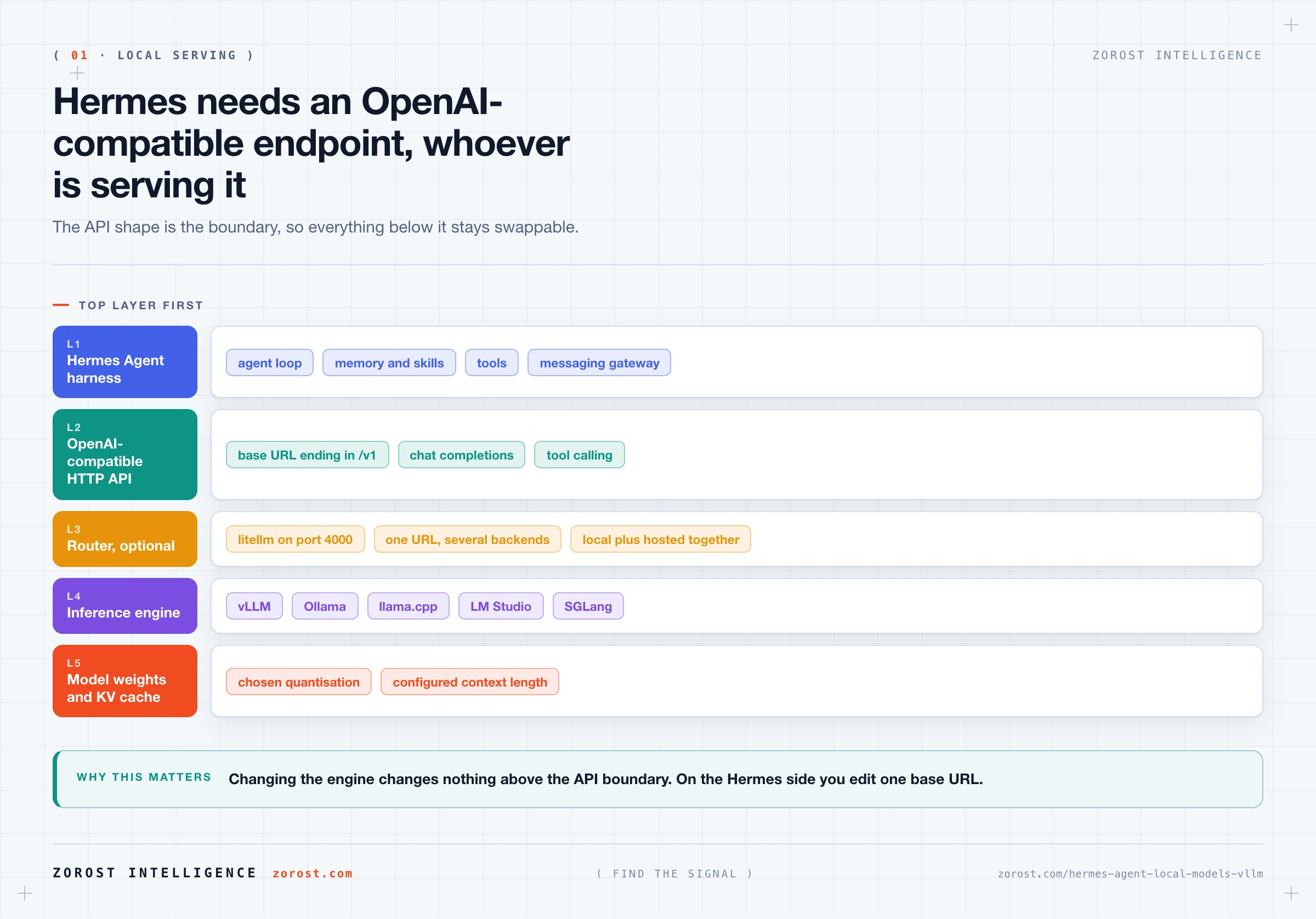
Pull-quote: “Every engine worth using presents an OpenAI-compatible endpoint, so switching engines changes nothing above one base URL in your config.”
Running Hermes Agent on local models takes one configuration change, because vLLM, Ollama, llama.cpp, LM Studio, and SGLang all present an OpenAI-compatible HTTP endpoint, and that endpoint is all the harness asks for. Hermes Agent is an open-source, self-hosted agent harness from Nous Research supporting more than 30 providers plus any OpenAI-compatible endpoint, so pointing it at your own machine is the same kind of change as pointing it at another vendor.
The plumbing is easy. The hard part is memory. An agent that works well needs roughly 64,000 tokens of context or more, and holding that much context on your own hardware costs more memory than most people expect, often more than the model weights themselves. That constraint decides whether local is viable for you, long before the choice of engine matters.
This assumes Hermes is installed with at least one provider working, which choosing and configuring models for Hermes Agent covers. One clarification: the harness is model-agnostic and separate from the Hermes family of language models that Nous Research also publishes, so you can serve any model you like behind it.
What you will be able to do
- Decide whether local inference suits your workload, using three distinct motivations instead of a preference for self-hosting.
- Choose between vLLM, Ollama, llama.cpp, LM Studio, and SGLang by what each was built for.
- Point Hermes Agent at a local OpenAI-compatible endpoint, including through litellm as a router.
- Size memory for a target context length yourself, using weights, KV cache, and overhead as three line items.
- Read the startup line that confirms your local model gives Hermes the context it needs.
- Configure Hermes so an offline machine never tries to reach the network.
Why would you run Hermes Agent on your own models?
Three motivations justify local inference, and they are genuinely different from each other. Which one applies decides your engine, your hardware, and how much operational effort is reasonable.
The first is data that cannot leave. Client contracts, regulated records, personnel data, and anything covered by a data residency clause create a hard boundary. When your agent reads that content, the content becomes a prompt, and the prompt goes wherever the model lives. Local inference is the only configuration where the answer to “who saw this text” is “nobody outside this network”.
The second is volume economics. Per-token pricing has no idle cost, which makes it unbeatable while you experiment. Once your agent runs scheduled work all day, and most of that work is routine summarising and extracting, a fixed hardware cost with near-zero marginal cost starts to win. Running Hermes Agent cheaply works through the crossover signals.
The third is offline and air-gapped operation. A machine with no route to the internet still runs a full agent loop, because the harness, memory, skills, and session logs all live under ~/.hermes/ on local disk.
Be honest about the cost. You give up capability, since the models you can serve on one machine are weaker at long-horizon reasoning, and you take on operations: a model server to keep running, memory to manage, upgrades to test. If none of the three motivations applies, hosted inference is the better decision.
Which local inference engine should you use?
Pick by the job the engine was built for, because they are interchangeable in interface and very different in effort. Ollama is the easiest way to a first working local model, vLLM is a serving system built for throughput, llama.cpp goes where other engines will not, LM Studio gives you a graphical workspace, and SGLang targets structured output at volume.
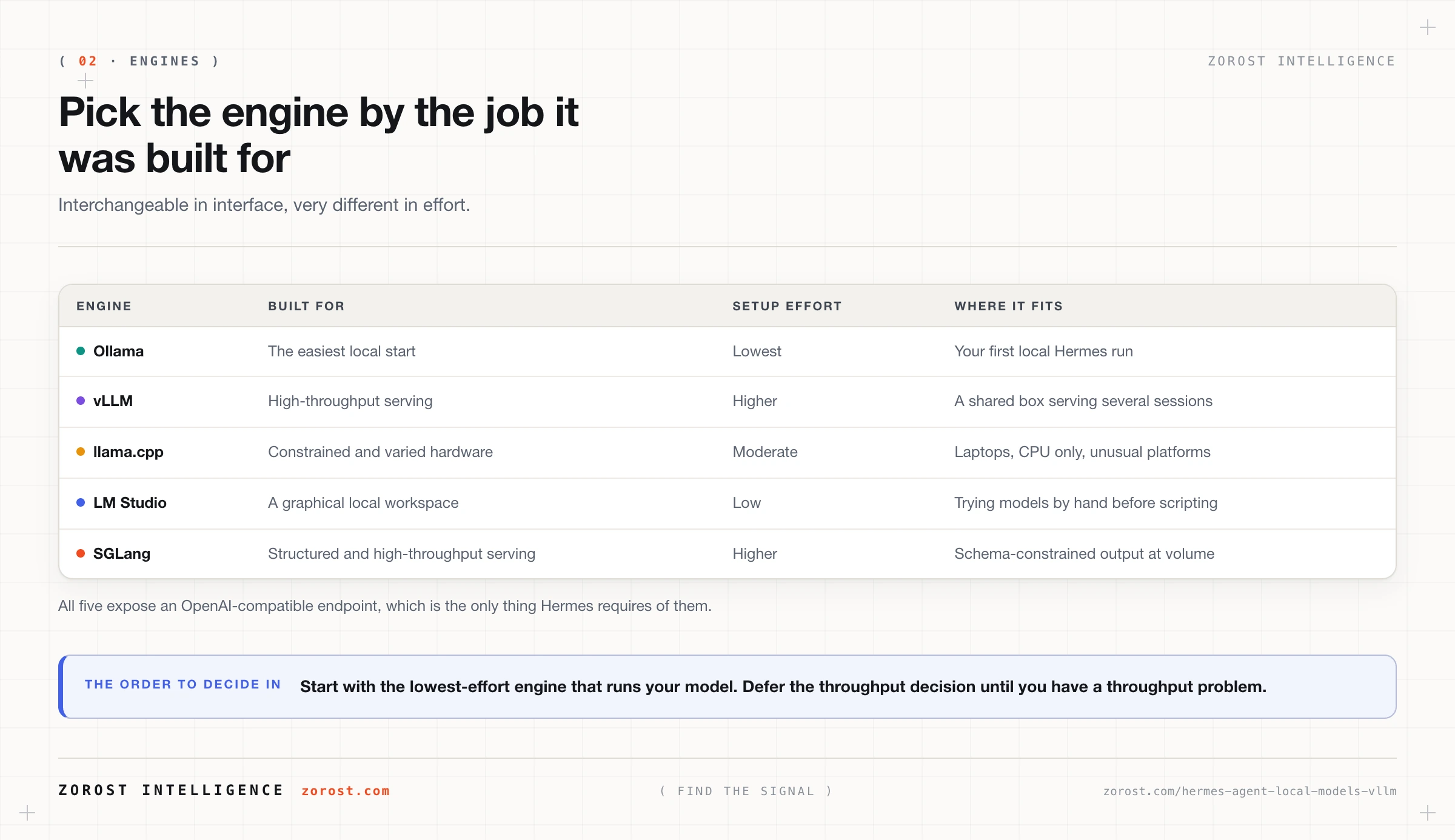
One insight makes that table less important than it looks: all five expose an OpenAI-compatible endpoint, and Hermes talks to the endpoint rather than the engine. Start on Ollama this evening, move to vLLM when you have concurrent sessions, and the only change on the Hermes side is a base URL.
How do you point Hermes Agent at a local endpoint?
You give Hermes the base URL of your engine’s OpenAI-compatible API. Ollama serves at http://localhost:11434/v1, and other engines print the host and port they bind on startup, to which you append /v1.
Run hermes setup and choose Full Setup, which exposes every provider and option, including custom OpenAI-compatible endpoints. Setup writes configuration into ~/.hermes/config.yaml and secret values into ~/.hermes/.env. To edit the file by hand instead, check the provider section of the docs at hermes-agent.nousresearch.com first, since the exact key name for a custom base URL is version specific [NEEDS SOURCE]. After setup, hermes model lists and sets your default and /model switches inside a session.
For several backends behind one URL, use litellm as a router. It presents one OpenAI-compatible surface in front of local engines and hosted providers together, which is the cleanest way to mix a local default with a hosted escalation path:
litellm --config litellm_config.yaml --port 4000Then point Hermes at http://localhost:4000/v1. Your litellm configuration holds the model names and the upstream endpoint each maps to, so adding a model later never touches your Hermes config.
Here is your checkpoint. Start a session and read the first lines the CLI prints. You should see the detected context limit, for example Context limit: 128000 tokens. A number at or above roughly 64,000 means the connection works and the model has the room Hermes needs. A number far below the model’s advertised context means the engine capped it.
One security note. Treat a local model endpoint as unauthenticated unless you deliberately put a key on it, and keep it bound to localhost or a private network. The Hermes Agent threat model covers the rest of the exposure surface.
Why does context length decide whether local inference works?
Context length drives memory harder than parameter count does, because the attention cache grows with every token you keep. That cache, usually called the KV cache, stores the key and value tensors for tokens already in the context so the model does not recompute them. It scales linearly with context length, and with layer count and attention head shape, which is why two models of similar size can have very different appetites at the same context length.
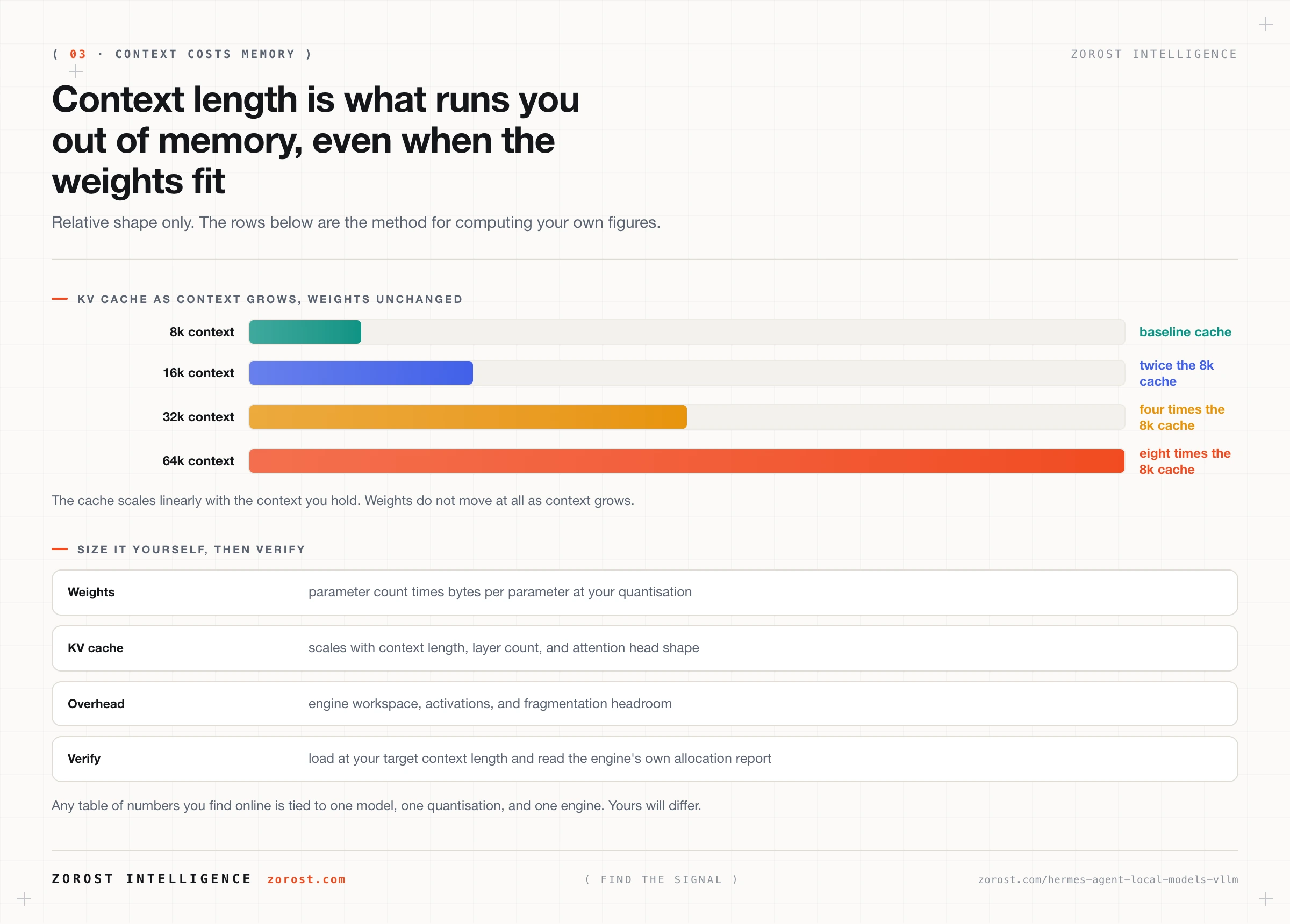
The arithmetic surprises people coming from chat use. Double the context, double the cache. Going from an 8,000 token context to the 64,000 token floor Hermes wants multiplies the cache by eight while the weights do not move at all, which is why a model that loads comfortably and chats happily can fail on its first long agent session.
Context discipline therefore pays twice locally. Compressing a session with /compress, keeping memory lean, and enabling fewer tools all shrink the live context, and the live context is what sizes the cache.
How do you size memory for a local model without a lookup table?
Add three line items and measure the result, because any table of numbers you find online is tied to one model, one quantisation, and one engine. Treat this as a method you run once per model.
- Weights: parameter count multiplied by bytes per parameter at your quantisation. A 16-bit weight is two bytes, an 8-bit weight is one byte, a 4-bit weight is roughly half a byte, so quantisation moves this line almost proportionally.
- KV cache: scales with context length, layer count, and attention head shape, and grows as the session fills. Size it for the context you intend to hold, not for an empty session.
- Overhead: engine workspace, activations, and enough headroom that fragmentation does not kill you at the worst moment.
- Verification: load the model at your target context length and read what the engine reports about allocation. That measurement beats every estimate, including this one.
Quantisation is the main lever, and it is not free. Reducing bytes per parameter shrinks the weights and buys room for context, at some cost to output quality. In agent work the damage shows up in one place first: tool call arguments get sloppier and instruction following gets looser while the prose still reads fine. Test it directly. Run a task that makes five or six tool calls, inspect the arguments, then decide whether your quantisation is acceptable.
Should you optimise for throughput or for latency?
Optimise for latency if one person is using the agent, and for throughput if a queue is. A single-user agent loop blocks on the model at every step, so what you feel is time to first token, repeated once per step. A task that feels slow is usually eight acceptable waits stacked up.
Throughput, measured as aggregate tokens per second across concurrent requests, is what serving systems like vLLM and SGLang maximise. Continuous batching pays off when many requests overlap, and a single interactive user gives it little to work with. That is the honest reason Ollama feels fine for personal use while vLLM earns its complexity on a shared box.
Agent prompts also have an unusual shape: long on input, short on output, so the prefill stage, where the engine processes your prompt before generating anything, dominates. Prefill time grows with prompt length, so context bloat costs you twice locally, once in cache memory and again in the wait before every step.
What hardware do you actually need?
Enough memory to hold the weights and the cache at your target context, and after that, more compute buys shorter waits. The ladder below is qualitative on purpose, since exact requirements depend on the model, the quantisation, and the engine.
A laptop is a genuine starting point. With a small quantised model and a modest context you can run a real agent loop, do offline note work, and learn the operational shape of local serving. Expect waits, compress often, and keep the tool set narrow.
A workstation with one serious accelerator is where local becomes pleasant: a mid-size quantised model at a useful context, tool calling that holds up across several steps, and latency you stop noticing. For most individuals this is the sweet spot, and where the volume economics argument lands.
A small server with several accelerators, or a large pool of unified memory, is what a larger model at the full context floor needs with several concurrent sessions. Here vLLM’s serving design starts to matter, and the gateway belongs in a system service.
When is running local the wrong choice?
Local is wrong when your usage is occasional, when your work needs frontier reasoning, or when nobody on your side owns the operations. Idle hardware is the most expensive inference there is, so a few sessions a week belong on a hosted provider. Long-horizon planning, subtle code work, and tasks where one wrong turn invalidates a dozen steps still favour the strongest model you can reach.
Most people should take the middle answer. Keep a local model as the default for summarising, extracting, and file work, and configure a hosted provider alongside it for the hard steps. Switch with /model when a task earns it, or put litellm in front of both so routing lives in one file. Committing to local for everything is a policy decision, and data residency is the reason that justifies it.
Where this goes wrong
Hermes reports a context limit far below what the model supports. The Context limit: line shows a number in the low thousands when you expected tens of thousands. Your engine started with a smaller context length than the model allows, often trimming to fit available memory. Set the context length explicitly when you start the engine, restart Hermes, and read the line again.
The model loads, then the first long session dies. The engine gets killed or returns an allocation error partway through a task that started fine. The weights fit; the KV cache did not, because it grew as the context filled. Reduce the configured context length, quantise further, or move to hardware with more memory.
Tool calls come back malformed after you quantised further. Arguments are wrong-typed, keys are missing, and the agent retries. Heavy quantisation degrades structured output before fluent prose, so the model still sounds capable while failing at what an agent needs most. Step the quantisation back up, or route tool-heavy steps to a stronger model.
Everything works and it feels unusably slow. Each step takes a long time before any text appears. Prefill on a long prompt does that, once per loop step. Run /compress, trim memory, and disable unused tools, which shrinks the prompt that has to be processed every time.
An offline machine hangs or logs network errors at startup. Model lists for OpenRouter and Nous Portal come from a remote JSON manifest with a one-hour default TTL, falling back to an in-repo snapshot when it cannot be reached. On an air-gapped box, set model_catalog.enabled: false in ~/.hermes/config.yaml so nothing attempts the fetch.
Common questions
Do I need a GPU to run Hermes Agent locally?
No. llama.cpp runs on CPU and on Apple unified memory, and Ollama uses whatever acceleration your machine has. Memory capacity is what you cannot avoid, since the weights and the KV cache have to fit somewhere, and without a GPU expect longer prefill waits on long prompts.
Which engine should a beginner start with?
Ollama, because it reaches a working OpenAI-compatible endpoint at http://localhost:11434/v1 with the least setup. Move to vLLM once your workload has concurrent sessions or needs maximum throughput from a shared machine. Nothing above the endpoint changes when you do.
Can Hermes Agent run completely offline?
Yes. The harness runs locally, all conversation, memory, and skill data stays under ~/.hermes/, and there is no telemetry. For an air-gapped machine, serve a model from a local endpoint and set model_catalog.enabled: false so the catalogue never tries to refresh. You need network access once, for the install, before the machine is isolated.
Does anything about using Hermes change when I go local?
No. Slash commands, memory, skills, scheduled jobs, and the messaging gateway all behave the same, because the only change is which URL the harness sends completions to. That is the practical benefit of the OpenAI-compatible boundary.
Can I run local and hosted models side by side?
Yes, and most people should. Configure both, then switch with /model when a task needs more capability, or put litellm in front of both so one base URL covers everything. Keys for hosted providers live in ~/.hermes/.env, and OAuth providers keep refresh tokens in ~/.hermes/auth.json.
Next steps
Read how Hermes Agent remembers and how skills make it improve next, because memory and skills determine how much context your local model has to carry, and on local hardware that is the same as deciding how much memory you need.
For the wider engineering picture, including routing by task difficulty and the real cost of retries across a whole system, see cost and latency engineering for LLM systems.
The same architecture, with the model server and the agent loop both inside the customer’s network boundary, is how we run air-gapped and sovereign deployments, including the agent tier behind ComplyGrid in federal compliance work, where data residency decides the design before any performance question is asked.