
Scheduling real work with Hermes Agent cron jobs
Pull-quote: “Make the scheduled job report what it did, not only what it concluded, because a job that says it checked zero issues is obviously broken and a job that says there were no priority issues is not.”
A scheduled Hermes Agent cron job is a different engineering problem from an interactive session, because nobody is watching when it runs. In a chat you are the verification layer: you see a wrong answer and correct it on the next turn. A job that fires at 08:00 on a Tuesday has no such layer, so every assumption you would normally catch by glancing at the screen becomes a silent defect that lands in a channel and gets believed.
This post covers the cronjob tool, creating jobs in plain language and in cron syntax, what actually makes a job fire, and how to build jobs that fail in a way you notice. Hermes Agent is an open-source, MIT-licensed agent harness from Nous Research that runs on your own machine, and its scheduler lives inside the messaging gateway rather than in your system crontab, which explains most of the trouble people hit.
You need a working install and a gateway connected to one chat platform. If not, start with installing Hermes Agent and running it as a Telegram bot you can trust.
What you will be able to do
- Create, list, pause, edit, and remove scheduled jobs with the
cronjobtool, in plain language or with an explicit cron expression. - Read and write a five-field cron expression without looking up the syntax.
- Explain why a job did not fire, and find the evidence in
~/.hermes/logs/gateway.log. - Design idempotent jobs, so a run that happens twice does not do the work twice.
- Make an unattended job report what it did rather than what it concluded.
- Copy six scheduled jobs, each with its tool set and the failure mode to watch.
What changes when nobody is watching the agent run?
Three things get harder at once: verification, blast radius, and cost. All three change for the same reason, which is that you have taken yourself out of the loop.
During a session the cycle runs agent, tool, agent, you. Remove the last step and it closes on the agent’s own judgment about whether it succeeded. That produces the class the failure taxonomy for production agents calls hallucinated success, where the agent reports a task complete without the evidence. On a schedule it becomes a report saying “no priority issues” every morning for three weeks, because a token expired on the first day and the read has returned nothing since.
Blast radius stretches with the clock, since a write tool used wrongly at 02:00 has the rest of the night rather than one turn. Cost compounds the same way: one bad turn becomes 96 bad runs a day on a fifteen-minute schedule.
How do you create a Hermes Agent cron job?
You describe the job to the agent in plain language and it creates the schedule, using the cronjob tool, which has action-style operations for create, list, pause, edit, and remove.
Send this:
every weekday at 8am, summarise priority issues and post to the team channel
The agent creates a job on the expression 0 8 1-5. Scheduling is a tool call like any other, so the agent can reason about jobs it has already made. “Pause the morning digest until Monday” works, and so does “move the digest to 07:30”, which edits the existing job rather than creating a rival.
Hand over the expression directly when the timing genuinely matters. Phrases like “every morning” and “twice a day” leave room for interpretation, and 0 8 1-5 does not.
Build one habit. After creating a job, run the list operation and read back the schedule the agent recorded, so you fix a wrong expression now instead of at 08:00 tomorrow. Listing before you create also avoids two digests arriving every morning.
How do you read a cron expression?
A cron expression is five space-separated fields answering minute, hour, day of month, month, and day of week, in that order, and an asterisk in any field means every value of that field.
| Position | Field | Range | In 0 8 1-5 |
|---|---|---|---|
| 1 | Minute | 0 to 59 | 0, on the hour |
| 2 | Hour | 0 to 23 | 8, the 08:00 hour |
| 3 | Day of month | 1 to 31 | *, any day |
| 4 | Month | 1 to 12 | *, any month |
| 5 | Day of week | 0 to 6, where 0 is Sunday | 1-5, Monday to Friday |
Four operators cover nearly everything you will write. An asterisk means every value, a comma makes a list such as 0,30, a hyphen makes a range such as 1-5, and a slash makes a step such as */15.
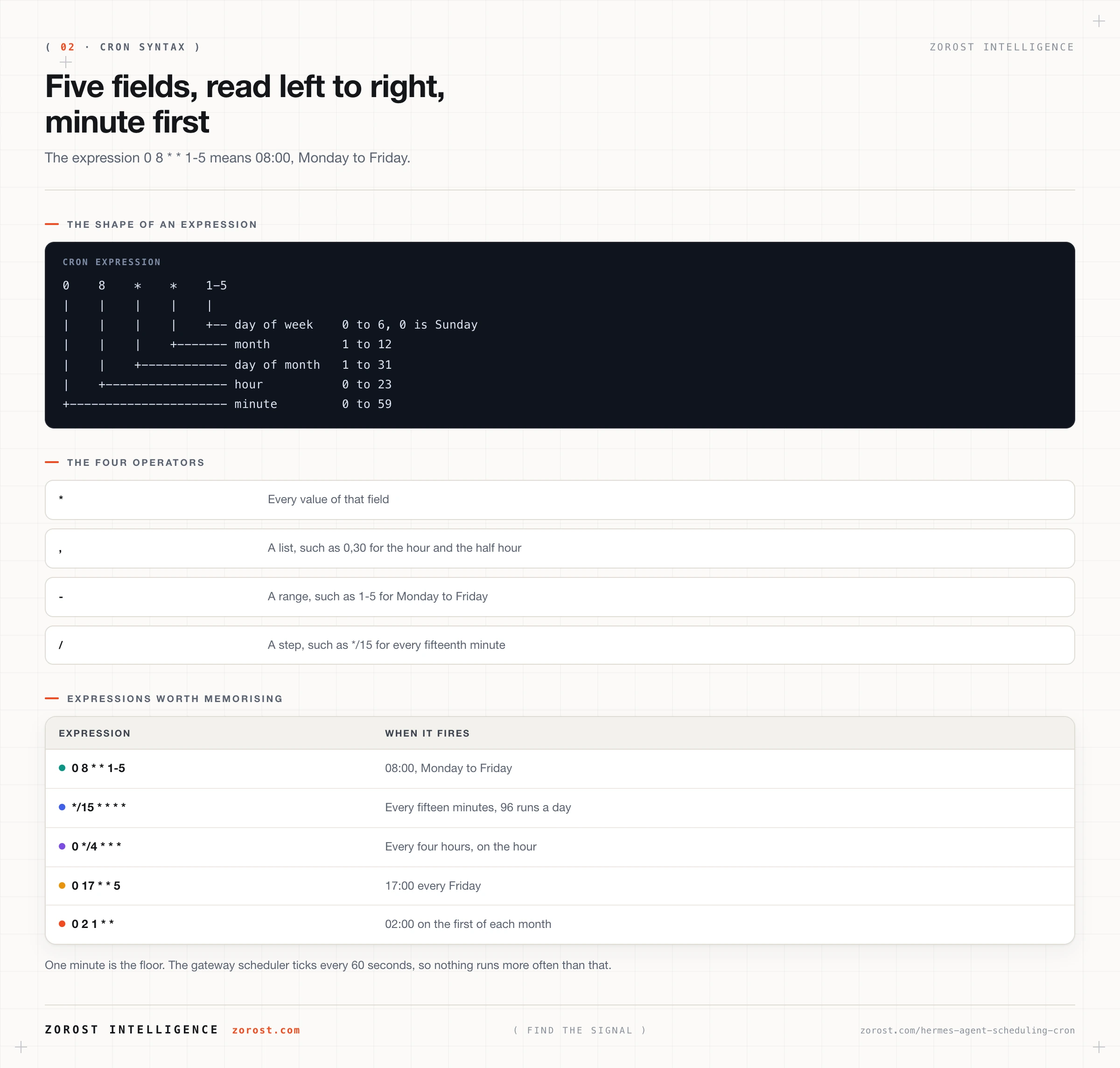
| Expression | When it fires |
|---|---|
0 8 1-5 |
08:00, Monday to Friday |
/15 * |
Every fifteen minutes, all day |
0 /4 |
Every four hours, on the hour |
0 17 5 |
17:00 every Friday |
0 2 1 |
02:00 on the first of each month |
One minute is the floor, because the gateway scheduler ticks every 60 seconds. Nothing runs more often than that.
Where do scheduled jobs live, and what actually makes them fire?
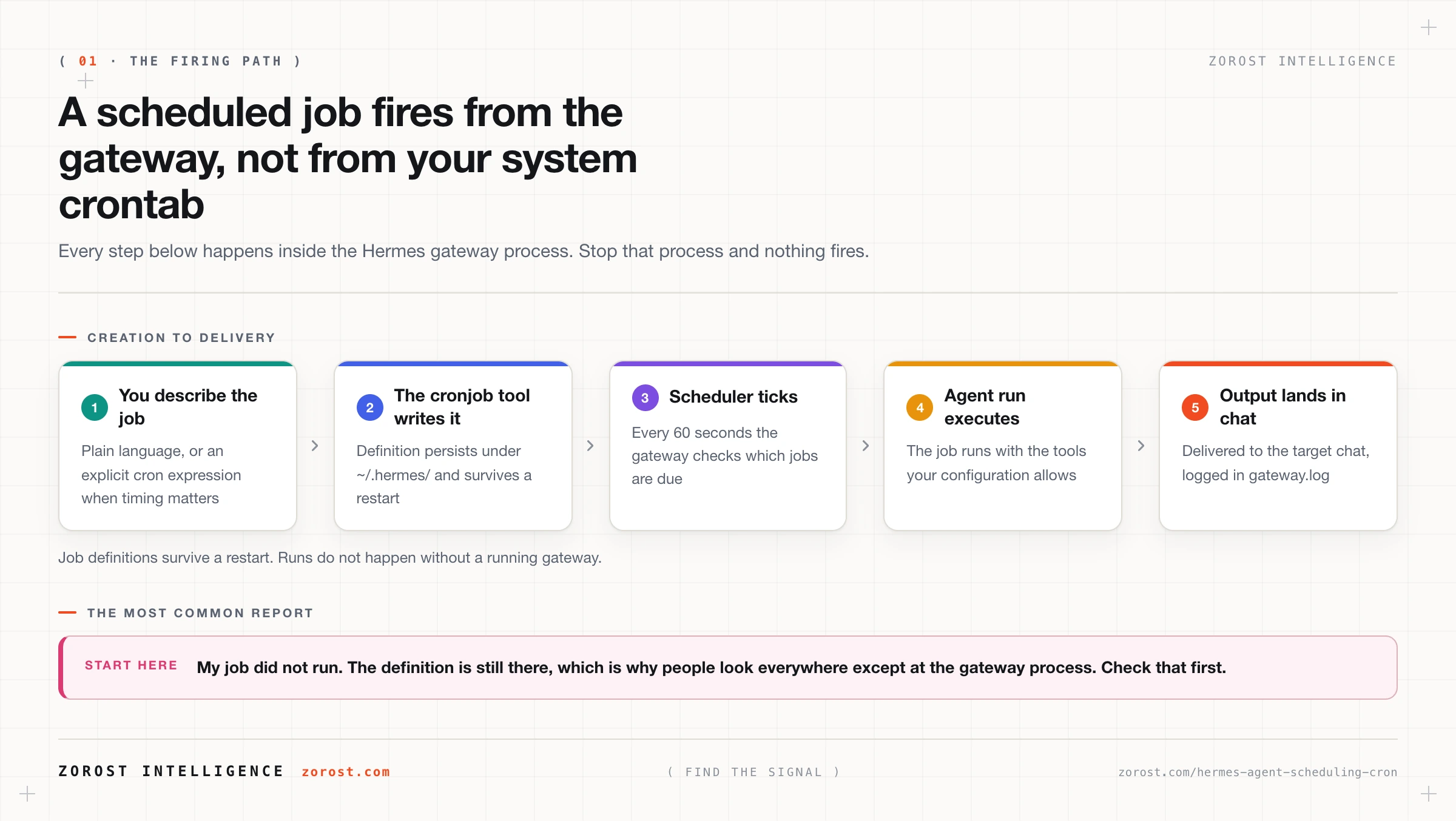
Job definitions persist under ~/.hermes/ and survive a restart, but nothing fires unless the gateway process is running, because the scheduler is part of the gateway rather than part of your system crontab.
The mechanism is short. The scheduler ticks every 60 seconds, checks which jobs are due, runs the due ones as agent runs with the tools your configuration allows, and delivers output to the target chat. Activity goes to ~/.hermes/logs/gateway.log.
The consequence catches almost everyone once. Close the terminal and nothing fires. Let the laptop sleep and nothing fires. The definition sits there intact, which is why the job still appears when you list it, and that is what sends people looking everywhere except at the process.
Give the gateway a supervisor. On systemd, hermes gateway install --system makes it a service that returns after a reboot. Without systemd, run hermes gateway run under tmux or nohup. On WSL, set systemd=true in /etc/wsl.conf and start it at login with Windows Task Scheduler. If the machine sleeps, move the gateway to a very small VPS, which works because inference happens at the provider.
Delivery needs a destination. Set a home channel with /sethome or TELEGRAM_HOME_CHANNEL so jobs land somewhere predictable instead of in whichever chat created them.
How do you design a scheduled job that fails safely?
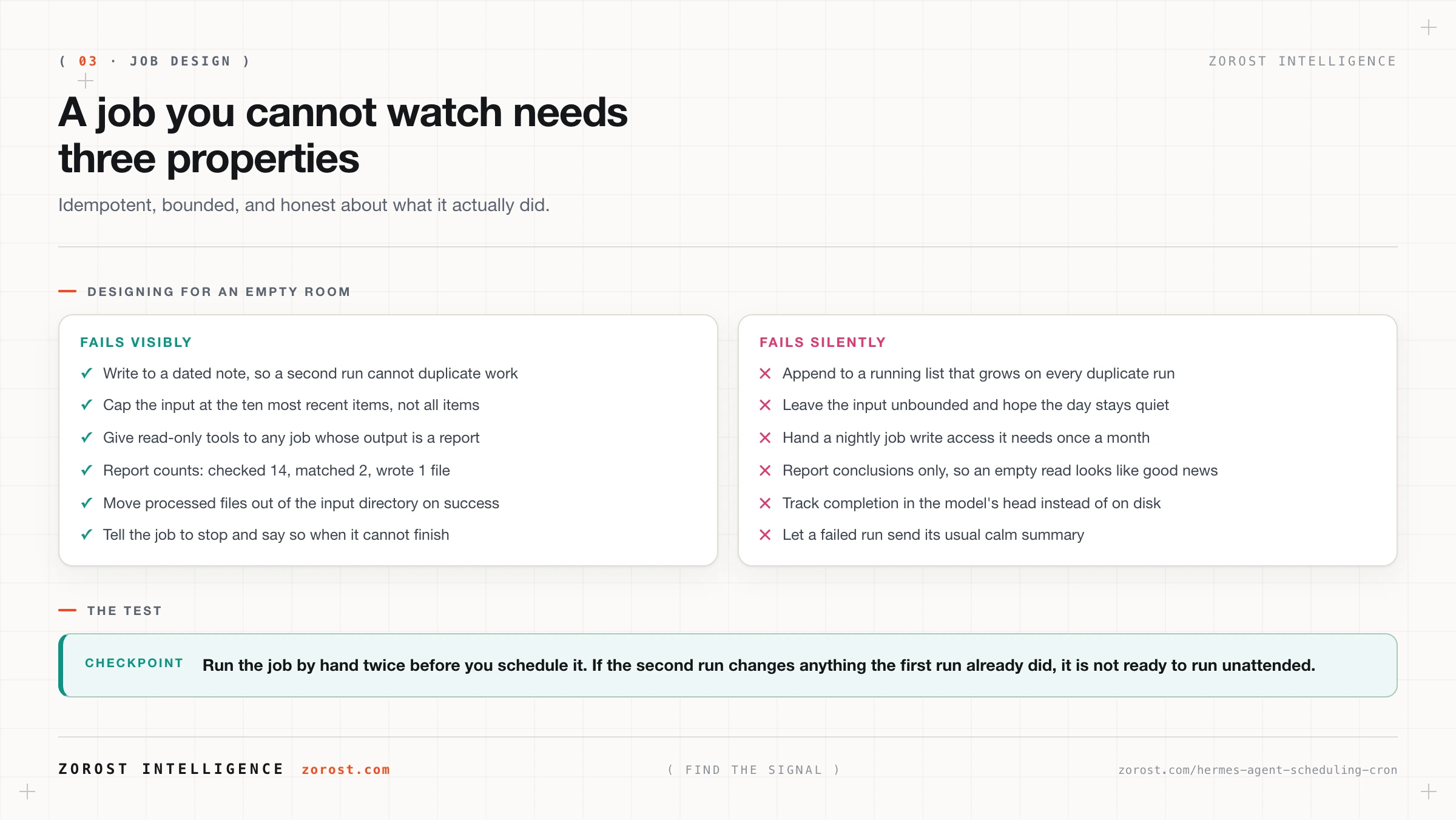
Give it three properties: it is idempotent, its scope is bounded, and it reports what it did rather than only what it concluded.
Idempotency means a second run does not repeat the first run’s work, and second runs arrive from restarts, from jobs created twice, and from manual tests you forget about. Write to a dated note rather than appending to a running list, and move a processed file out of the input directory instead of remembering you handled it. The test is easy: run the job by hand twice, and if the second run changes anything the first already did, it is not ready.
Bounded scope means a ceiling written into the job’s own instruction. “Summarise the ten most recent open issues labelled priority” is bounded. “Summarise the open issues” is not, and on the morning somebody bulk-imports 400 issues it exhausts the context window and returns a truncated summary that looks complete. Bound the item count, then bound the tool set to the narrowest one that finishes, because a digest needs read tools only. That is the practical form of the read-versus-write line in turning Hermes from a chatbot into something that acts.
Reporting what it did is the property people skip and the one that pays. “Checked 14 open issues across 3 repositories, 2 matched the priority label” is a report. “Here is your priority digest” is a conclusion. When the token expires, the first prints “checked 0 open issues across 0 repositories” and looks broken from across the room, while the second prints a calm digest that reads like a quiet week.
How does a scheduled agent verify its own work?
It re-reads the result through a different path than the one that produced it, then puts the evidence in the message it sends you.
Three patterns cover most jobs. After a write, read the file back and quote its first line. After a create, run a list and confirm the item is there. When counting, state the before and after numbers rather than the difference alone. Each costs one extra tool call and turns a claim into an observation.
Then instruct the job to stop and say so when it cannot finish. “The GitHub token returned 401, no digest produced” is a correct outcome and worth more than a digest. The corollary is uncomfortable: treat a job that has never reported a problem with suspicion, because every real data source has bad days.
What do scheduled jobs cost?
A scheduled job costs a model call every time it fires, whether or not there is anything to report, so frequency is the main lever you have.
The arithmetic is stark. A job on /15 fires 96 times a day and roughly 2,900 times a month. The same work on 0 8 * 1-5 fires around 22 times a month. Identical prompt, identical tools, two orders of magnitude apart on the bill.
Three things help. Match the frequency to how fast the underlying thing actually changes. Make the job cheap when there is nothing to do, by reading one small signal first and exiting early. Route scheduled work to a cheaper model than your interactive sessions, since summarising and classifying do not need your most expensive option, which the cost ladder for running Hermes Agent cheaply works through.
Early exit carries a catch. Silence now means two different things, so check the gateway log weekly to confirm it means “ran and found nothing” rather than “has not run since Tuesday”.
Which scheduled jobs are worth copying?
These six cover the common ground, and every one of them is read-heavy on purpose.
| Job | Expression | Tools it needs | Failure mode to watch |
|---|---|---|---|
| Weekday priority digest | 0 8 1-5 |
GitHub MCP server, list_issues only |
An expired token gives an empty digest that reads like a quiet week |
| Monday repository housekeeping | 0 9 1 |
GitHub MCP server, read-only allowlist | It reports the repositories it can see, not the ones you have |
| Half-hourly change check | /30 * |
A read-only fetch tool, or Chrome DevTools MCP for pages needing a browser | Reporting every tick rather than only on change, which trains you to ignore it |
| Nightly filing pass | 0 2 * |
Filesystem MCP server rooted to one inbox directory | Reprocessing the same files because nothing moves them out |
| Friday weekly review | 0 17 5 |
Filesystem MCP server rooted to the notes directory | Overwriting last week’s review instead of writing a dated note |
| Weekday schedule brief | 45 7 1-5 |
A read-only calendar server | It arrives after your first meeting, from a time zone you never confirmed |
The shape they share matters more than the list: read something, compare it against something else, write one artefact you can check in under a minute.
Where this goes wrong
The job never fired. The gateway was not running, which is the cause far more often than anything else. Check for the process, look in ~/.hermes/logs/gateway.log for tick activity, and install the gateway as a service with hermes gateway install --system.
The job fired an hour early or late. The schedule came from an ambiguous phrase and got recorded against a time zone you never confirmed. List the job, read the expression back, and set the hour explicitly.
Two digests arrive every morning. You created a second job when you meant to edit the first. List, remove the duplicate, and build the habit of listing before creating.
The digest is always empty. A credential expired, an allowlist is narrower than the query, or the filter matches nothing. Make the job report counts, so “checked 14, matched 0” tells you the read worked and “checked 0” tells you it did not.
The job ran away. The input was unbounded on a day it got large, giving you a long run, a large bill, and truncated output. Cap the item count and cut the tool set back.
Output landed in the wrong chat. The target was whichever session created the job. Name the destination at creation, and set a home channel with /sethome.
Common questions
Does Hermes Agent use my system crontab?
No. The scheduler runs inside the Hermes gateway process, so jobs are created through the cronjob tool and their definitions live under ~/.hermes/ rather than in a crontab. Nothing fires while the gateway is stopped, and the schedule continues once you start it again.
What happens to a job that was due while the gateway was down?
The definition survives the outage, since job definitions persist under ~/.hermes/, so the schedule resumes once the gateway is running. Whether a run that came due during the outage executes late or gets skipped is not something to assume [NEEDS SOURCE]. Design jobs so a missed run is an inconvenience, and check ~/.hermes/logs/gateway.log after any long outage.
Can a scheduled job use the same tools as an interactive session?
Yes. A scheduled run is an agent run, so it has the tools your configuration gives the agent, which is why the tool set deserves more thought for unattended work. Keep write tools out of any job whose output is a report, and scope every MCP server to the narrowest tools.include allowlist that lets the job finish.
What is the shortest interval I should schedule?
One minute is the technical floor, since the gateway scheduler ticks every 60 seconds. The useful floor comes from your data, because a job on /15 * fires 96 times a day and very few sources change that often.
How do I confirm that a job actually ran?
Read ~/.hermes/logs/gateway.log for the scheduler activity, then look for the artefact the job was supposed to produce. A job that logged a run and left a file or a message behind is a job that ran, whereas a cheerful message alone is only evidence that a model produced text.
Next steps
- Create one job today, the weekday priority digest on
0 8 1-5, with read-only tools. Run the list operation and read the expression back before you leave it alone. - Run that job by hand twice before you trust the schedule. If the second run changes something the first already did, fix the idempotency now.
- Install the gateway as a service with
hermes gateway install --system, because a schedule that does not survive a reboot is worse than no schedule. - Next in this series, building a second brain with Hermes Agent and Obsidian gives your scheduled jobs somewhere durable to write.
- For the wider pattern, the failure taxonomy for production agents covers hallucinated success and the other classes that get expensive once nobody is watching.
Unattended runs that report what they did rather than what they concluded are how we operate the monitoring loops behind Aquil in geopolitical intelligence, where a quiet report and a broken collector have to look different at a glance.