
Installing Hermes Agent and surviving your first session
Pull-quote: “The Hermes Agent installer needs no sudo. If you reach for it out of habit, you create a problem you then have to undo.”
You install Hermes Agent with a single command, and the whole thing lands in one directory in your home folder. This post walks that install end to end on Linux, macOS, WSL2, and native Windows, then explains what the installer did, what each file under ~/.hermes/ is for, which setup mode to choose, and how to confirm the result actually works.
Hermes Agent is an open-source, MIT-licensed agent harness from Nous Research that runs on your own machine. If that sentence needs unpacking, read what Hermes Agent is and how it differs from a chatbot first. This post assumes only that you can open a terminal.
The install itself takes a couple of minutes. Understanding the directory it creates takes a little longer, and that is the part worth your attention, because every later post in this series edits a file inside it.
What you will be able to do
- Install Hermes Agent on Linux, macOS, WSL2, or native Windows using the correct one-line installer.
- Explain what the installer changed on your machine, and why it never needs administrator rights.
- Navigate
~/.hermes/and say what each file and subdirectory is responsible for. - Choose between Quick Setup, Full Setup, and Blank Slate with a reason rather than a guess.
- Start a chat session and read the startup line, including the context limit.
- Verify the install against four checkpoints, and fix the three failures people hit most.
What do you need before you install Hermes Agent?
You need a supported operating system, one model provider you can configure, and a model offering roughly 64,000 tokens of context or more. Nothing else is mandatory.
Hermes Agent runs on Linux, macOS, WSL2, and native Windows. WSL2 is the Windows Subsystem for Linux, which runs a Linux environment inside Windows; if you have it, treat your machine as Linux for this install. The harness is light on resources because the inference happens at whichever provider you configure, so a very small server is enough to host it.
The provider requirement is absolute. At least one LLM provider must be configured or Hermes cannot run, since the harness has no model of its own. That provider can be a hosted API such as OpenRouter or Anthropic, or a local engine such as Ollama. The setup step later in this post is where you supply it.
You do not need administrator rights, a GPU, or a preinstalled Python. The installer handles the runtime itself.
Why does Hermes Agent need a model with about 64,000 tokens of context?
Because a persistent agent has already spent a large part of its context window before you type anything. Hermes Agent needs roughly 64,000 tokens of context or more to work well, and a model below that will start but then lose the thread partway through multi-step work.
A context window is the fixed amount of text a model can hold at once on a single turn, measured in tokens, where a token is roughly three quarters of a word. Four things compete for that space on every turn: the system instructions that define how the agent behaves, the definition of every tool it is allowed to call, the memory it retrieved as relevant to your request, and the conversation so far. Your actual message arrives last, into whatever is left.
That is why a small, fast, inexpensive model can be an excellent chatbot and a poor agent. The failure is not obvious either. The agent answers well for a few turns, then quietly drops an earlier instruction or repeats a step it already completed. The general version of this problem, and how to budget a window deliberately, is covered in treating the context window as a budget.
Hermes tells you the number it detected when a chat session starts, which makes this a one-second check instead of a week of confusing behaviour.
How do you install Hermes Agent?
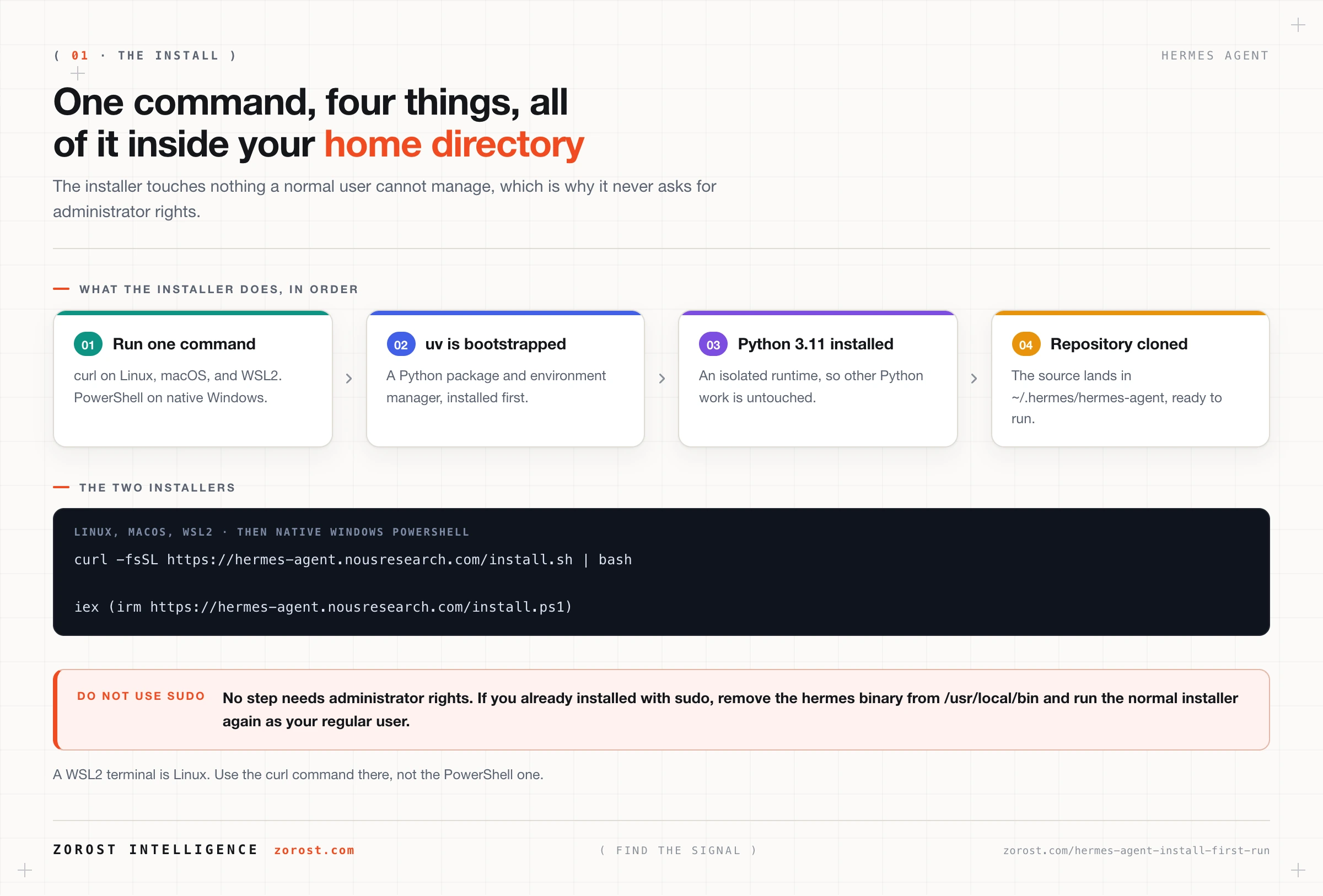
Run one command. On Linux, macOS, and WSL2, use the shell installer:
curl -fsSL https://hermes-agent.nousresearch.com/install.sh | bashOn native Windows, open PowerShell and run:
iex (irm https://hermes-agent.nousresearch.com/install.ps1)Pick by platform, not by preference. If you are inside a WSL2 terminal you are on Linux and want the first command. If you are at a Windows PowerShell prompt with no Linux environment, you want the second. Running the wrong one wastes a few minutes and confuses the error message you get back.
Do not prefix either command with sudo. The installer is designed to work without administrator rights, and adding them puts files where your normal user cannot manage them.
If your policy is to read scripts before piping them into a shell, both installer URLs are ordinary web addresses you can open in a browser and inspect first. That is a reasonable habit for any one-line installer, from any project.
What does the installer actually do?
The installer bootstraps uv, installs Python 3.11, and clones the Hermes Agent repository into ~/.hermes/hermes-agent. That is the whole footprint, and all of it sits inside your home directory.
uv is a Python package and environment manager. Bootstrapping it first means the installer can create an isolated Python 3.11 environment for Hermes rather than depending on whatever Python your operating system happens to ship. This is why you do not prepare a Python environment beforehand and why the install does not disturb other Python projects on the machine.
Cloning the repository into ~/.hermes/hermes-agent means you have the actual source on disk, not a compiled artefact. You can read it, and later posts in this series occasionally reference commands run from inside that directory.
Because everything lands under your home directory, no step requires elevated privileges. If you already installed with sudo at some point, the remedy is to remove the hermes binary from /usr/local/bin and then run the normal installer again as your regular user.
What is inside the ~/.hermes directory?
~/.hermes/ is where Hermes Agent keeps everything it knows: configuration, secrets, credentials, memory, skills, logs, scheduled jobs, backups, and its own source code. Learning this layout is the single most useful thing you can do early, because it turns later questions into lookups.
Item under ~/.hermes/ |
What it holds |
|---|---|
config.yaml |
Configuration, including the mcp_servers block that defines tool servers |
.env |
Secrets and environment variables, including provider API keys |
auth.json |
OAuth refresh tokens for providers you signed into rather than pasted a key for |
| Memory and skills | Markdown files, including memory.md, holding durable facts and the step by step skills the agent writes for itself |
| Session logs | The record of past conversations and runs |
| Cron definitions | Scheduled jobs, which persist across restarts |
| Backups | Copies written by hermes backup |
logs/gateway.log |
Activity from the messaging gateway and its scheduler |
hermes-agent/ |
The repository the installer cloned |
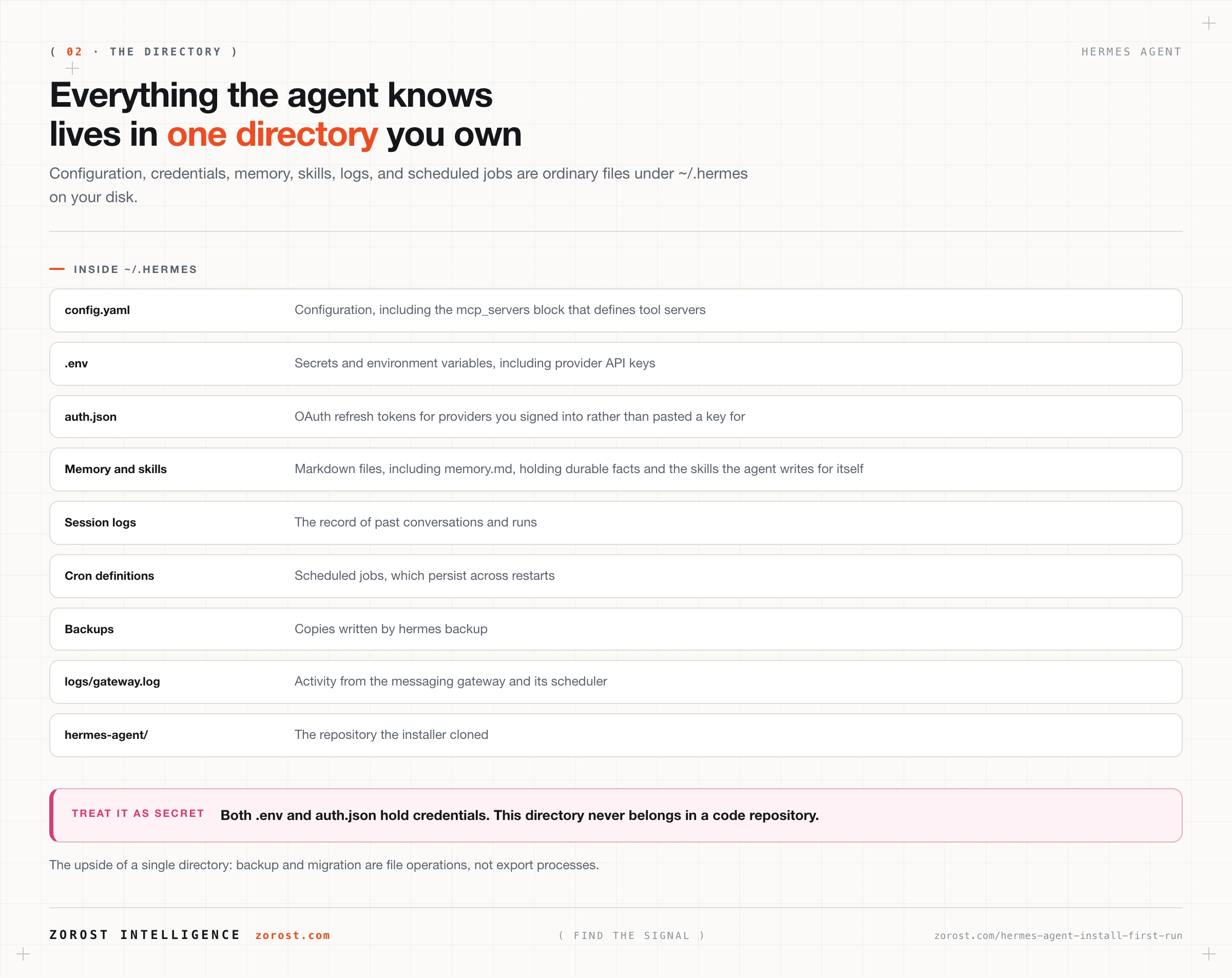
Two practical consequences follow. First, .env and auth.json are credentials, so this directory must never end up in a code repository. Second, backing up or migrating your agent is a directory operation rather than an export process, which is what makes moving to a new machine straightforward later.
Which setup mode should you choose the first time?
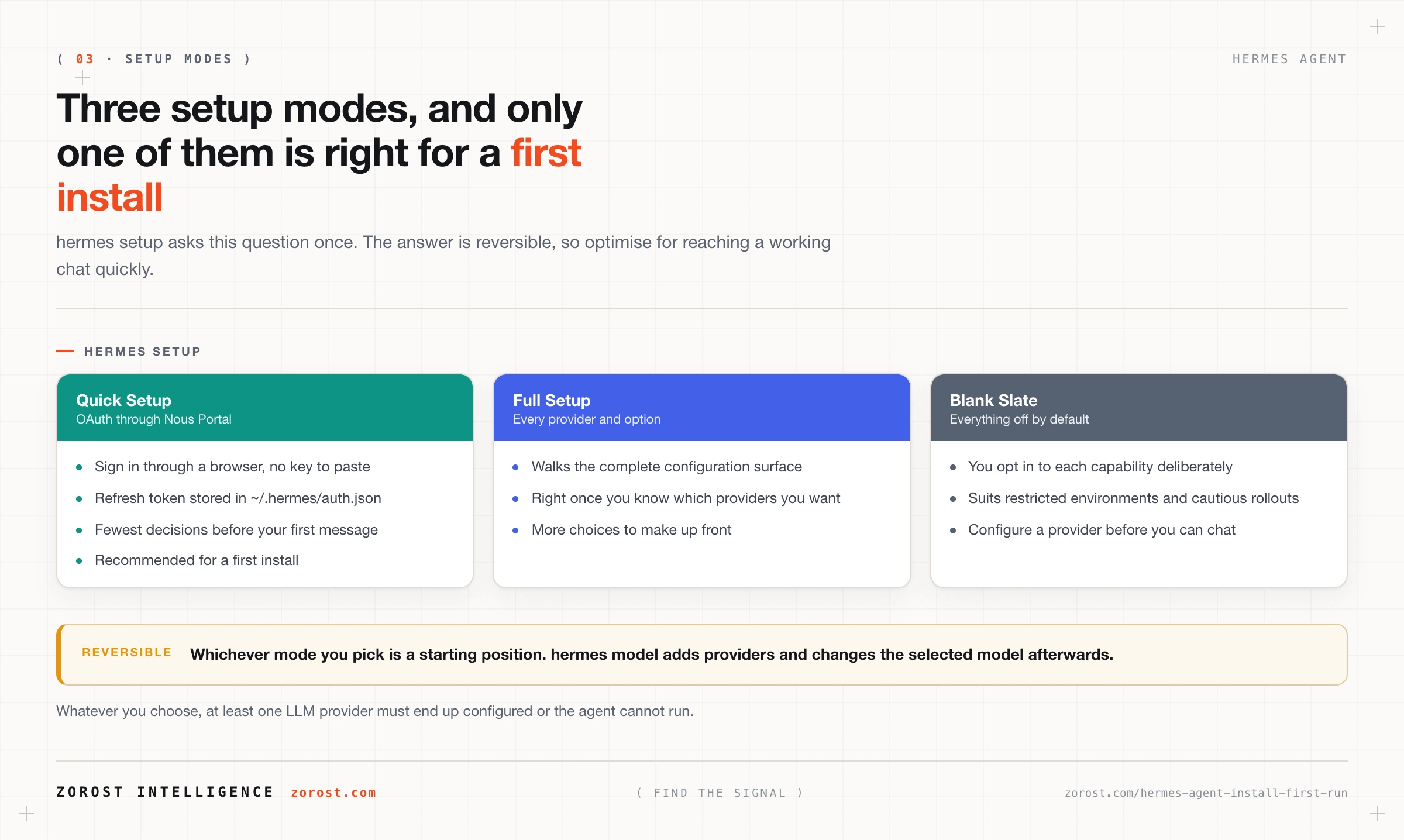
Run hermes setup and choose Quick Setup on your first pass. It gets you to a working chat with one browser sign-in and no key to paste, which means the first thing you debug is the agent rather than a credential.
hermes setupSetup offers three modes. Quick Setup authenticates through Nous Portal using OAuth, where OAuth means you sign in through a browser and the application receives a token instead of your password; Hermes stores that refresh token in ~/.hermes/auth.json. Full Setup walks you through every provider and option, which is the right choice once you know which providers and messaging platforms you actually want. Blank Slate turns everything off and makes you opt in deliberately, which suits a restricted environment or anyone who wants to understand each switch before enabling it.
Choosing Quick Setup first costs you nothing later. You can add providers, change models, and reconfigure at any point with hermes model, so the first mode is a starting position rather than a commitment.
What happens in your first chat session?
Start a session with hermes chat. The agent loads its configuration, connects to the provider you configured, and prints a startup line reporting the context limit it detected for the selected model.
hermes chatThe line looks like this:
Context limit: 128000 tokensRead that number first, every time. It is the detected context limit of the model currently selected, and it is your evidence that the provider connection works and that the model clears the floor. A number of roughly 64,000 or more means you are in good shape. A much smaller number means the session will degrade on longer tasks no matter how well you write your prompts.
From inside the session, slash commands change behaviour without restarting. /model switches the model mid-conversation, and /compress compresses the conversation history when a long session starts crowding the window. Model switching gets a full treatment in the next post.
How do you know the install worked?
Four checkpoints, in order. If all four pass, the install is sound and any later problem is configuration rather than installation.
- The
hermescommand runs. If your shell reports that the command is not found, open a new terminal first, because the shell you installed from may not have picked up the change. - The directory
~/.hermes/hermes-agentexists. That is the repository the installer cloned, and its absence means the install did not finish. hermes setupcompleted and left at least one provider configured. Without a provider, the agent cannot run at all.hermes chatstarts and prints aContext limit:line with a number of roughly 64,000 or more.
The fourth checkpoint is the one that matters most, because it exercises the whole path at once: the command resolves, the configuration parses, the credential authenticates, and the model reports a usable window.
Where this goes wrong
Hermes will not run because no provider is configured. At least one LLM provider must be configured before the agent can start, and a fresh install has none until setup finishes. Run hermes setup again, or configure a provider directly with hermes model.
You installed with sudo and now hit permission errors. The installer never needs administrator rights, and using them leaves files owned by root inside a user-owned directory. Remove the hermes binary from /usr/local/bin, then run the normal installer again as your regular user.
The startup line shows a context limit well under 64,000 tokens. The symptom appears later as an agent that forgets earlier steps or repeats work. The cause is a model too small to hold a persistent agent’s working state. Switch to a model with roughly 64,000 tokens or more rather than shortening your prompts.
The installer command does nothing recognisable. This is almost always the wrong installer for the platform. Use the PowerShell command on native Windows, and the curl command on Linux, macOS, and inside WSL2. A WSL2 terminal is Linux, even though it opened from Windows.
Common questions
Do I need administrator rights to install Hermes Agent?
No. The installer places everything under your home directory and does not need sudo or an elevated PowerShell session. If you have already installed with elevated rights, remove the hermes binary from /usr/local/bin and rerun the normal installer.
Where does Hermes Agent install itself?
Everything goes under ~/.hermes/, including the cloned repository at ~/.hermes/hermes-agent. Configuration, secrets, OAuth tokens, memory, skills, session logs, cron definitions, backups, and logs/gateway.log all live in that same directory.
Do I need to install Python before running the installer?
No. The installer bootstraps uv and installs Python 3.11 as part of the process, so you do not prepare an environment yourself. This also keeps Hermes separate from other Python work on the machine.
Which setup mode should I pick if I have never used an agent before?
Quick Setup. It authenticates through Nous Portal with a browser sign-in, so you reach a working chat session without handling an API key, and you can change providers later with hermes model. Full Setup and Blank Slate are better once you know what you want configured.
Can I run Hermes Agent on a small server instead of my laptop?
Yes. Because the inference happens at whichever provider you configure, the harness itself is light enough for a very small server. Running the model locally is the case where hardware starts to matter.
What is the difference between hermes setup and hermes model?
hermes setup is the first-run configuration flow, offering Quick Setup, Full Setup, and Blank Slate. hermes model is the model wizard you use afterwards to add a provider or change which model the agent uses.
Next steps
Read choosing and configuring models for Hermes Agent next. You have one provider working; that post covers the other thirty or so, the difference between API-key and OAuth providers, and how to pick a model per workload instead of settling for whatever setup gave you.
If you skipped the architecture, the introduction to Hermes Agent explains the five parts of the system, which makes the contents of ~/.hermes/ read as a design rather than a pile of files. Related technical writing is indexed at Signals.
An install is not finished until an observable check confirms it, which is why the four checkpoints above exist rather than a single “it seems to work”. Zorost applies the same rule to platform deployments as a trusted Databricks partner, where the last step of a migration is a parity check, not a hopeful look at a dashboard.