
Hermes Agent integrations, and the four shapes they take
Pull-quote: “The most expensive integration mistake is putting a model in a loop that contains no decision.”
Every integration you build for Hermes Agent is one of four shapes, and choosing the shape correctly matters more than choosing the service. Hermes Agent is an open-source, self-hosted agent harness from Nous Research that runs on your own machine, connects to messaging platforms, and calls tools on your behalf. Once it is installed and running scheduled work, the question is always the same one: how do I connect it to the systems I use all day?
The four shapes are an MCP server, a direct HTTP tool call, an inbound trigger, and a scheduled script. Three put the agent in the loop. The fourth tells you when the agent does not belong in the loop at all, which is the most common integration mistake and the one that quietly costs the most. What follows is the decision rule for each shape, the families worth building first, and the two disciplines that keep an integration alive: logging what was called, and pinning what you called it against.
What you will be able to do
- Classify any integration as one of four shapes, and defend the choice out loud.
- Decide between an MCP server and a single HTTP call before you build the wrong one.
- Wire version control, an authenticated internal API, a browser, and a second messaging platform into Hermes Agent.
- Recognise the tasks that should be a plain scheduled script with no model near them.
- Trace a tool call end to end so a broken integration is diagnosable rather than mysterious.
- Pin a tool contract so a server update cannot silently change what your agent can do.
What are the four integration shapes, and how do you pick one?
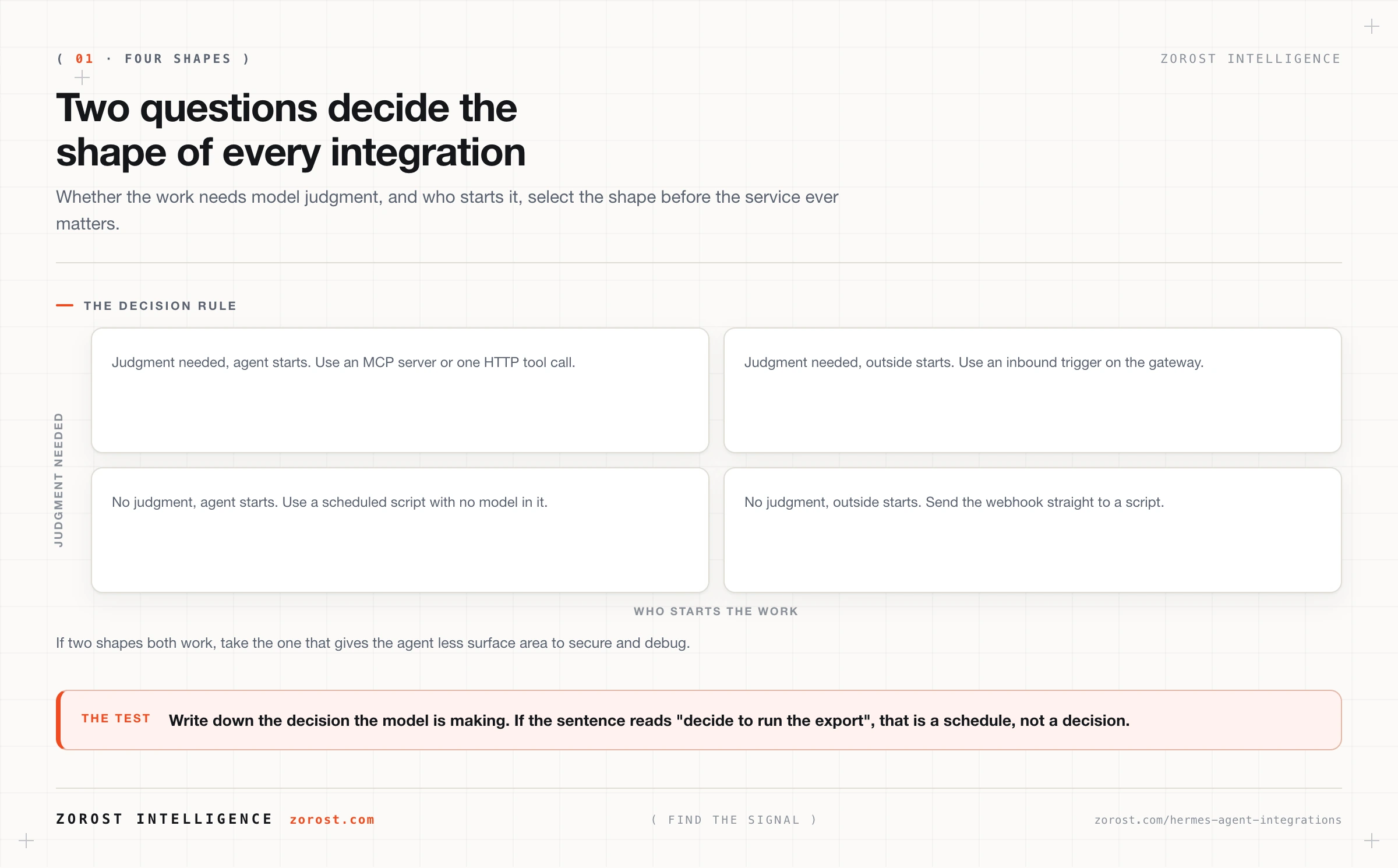
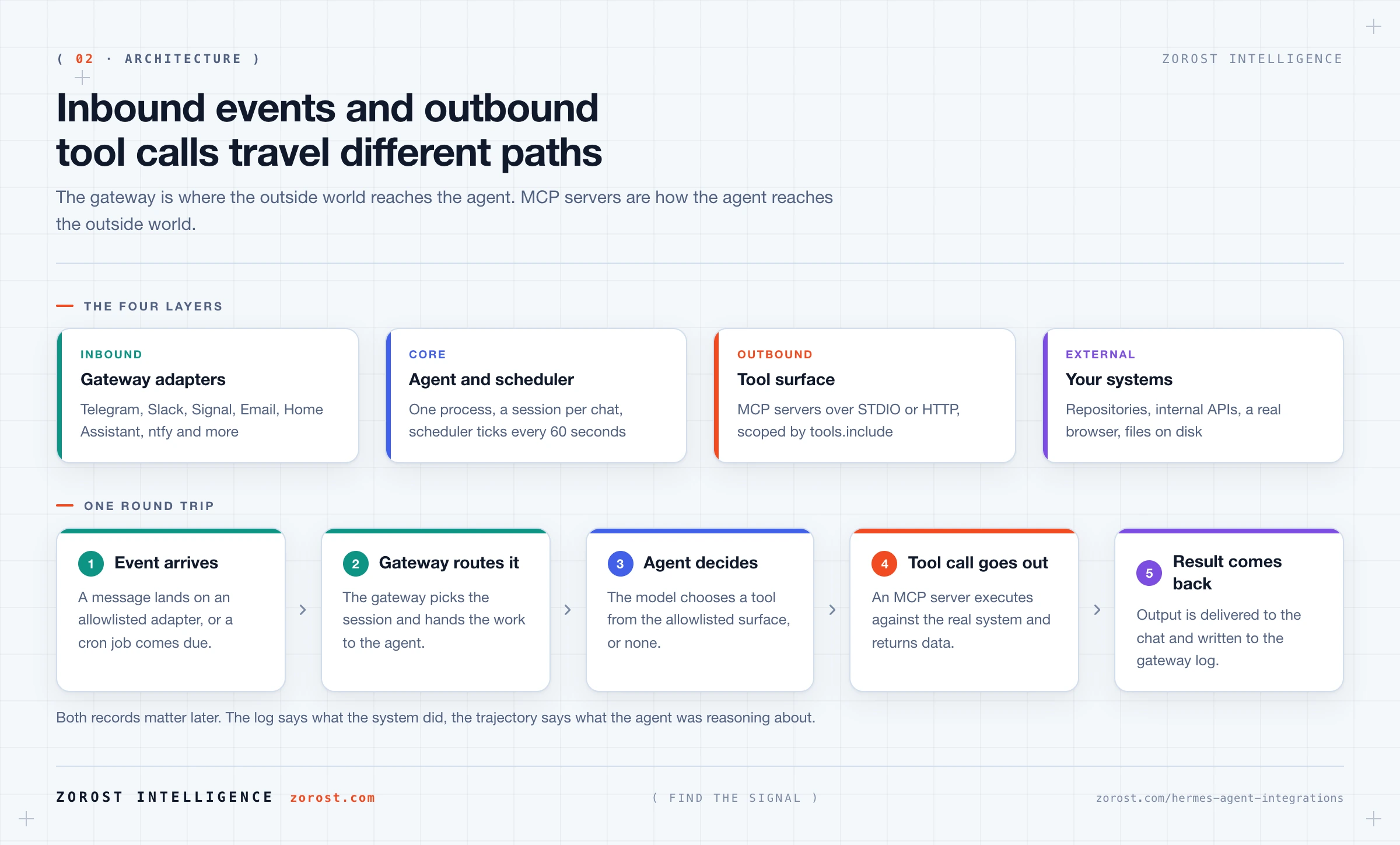
The four shapes are an MCP server, a direct HTTP tool call, an inbound trigger, and a scheduled script, and you choose between them with two questions: does the work need model judgment, and who starts it?
| Shape | Choose it when | The signal you chose wrong |
|---|---|---|
| MCP server | A maintained server exists, or you want a capability that is scoped and revocable | You are maintaining a whole server that exposes one function |
| Direct HTTP tool call | You need one endpoint of an internal API and a whole server is overkill | You keep bolting on endpoints and the argument handling is spreading |
| Inbound trigger | The outside world knows when the event happened, so polling is waste and lag | The agent checks every minute and finds nothing almost every time |
| Scheduled script | The task needs no model judgment at all | You are paying tokens for an outcome that never varies |
Read that as a preference order rather than a menu. When two shapes both work, take the one that gives the agent less surface area, because surface area is what you secure, debug, and keep current later.
When should an integration be an MCP server?
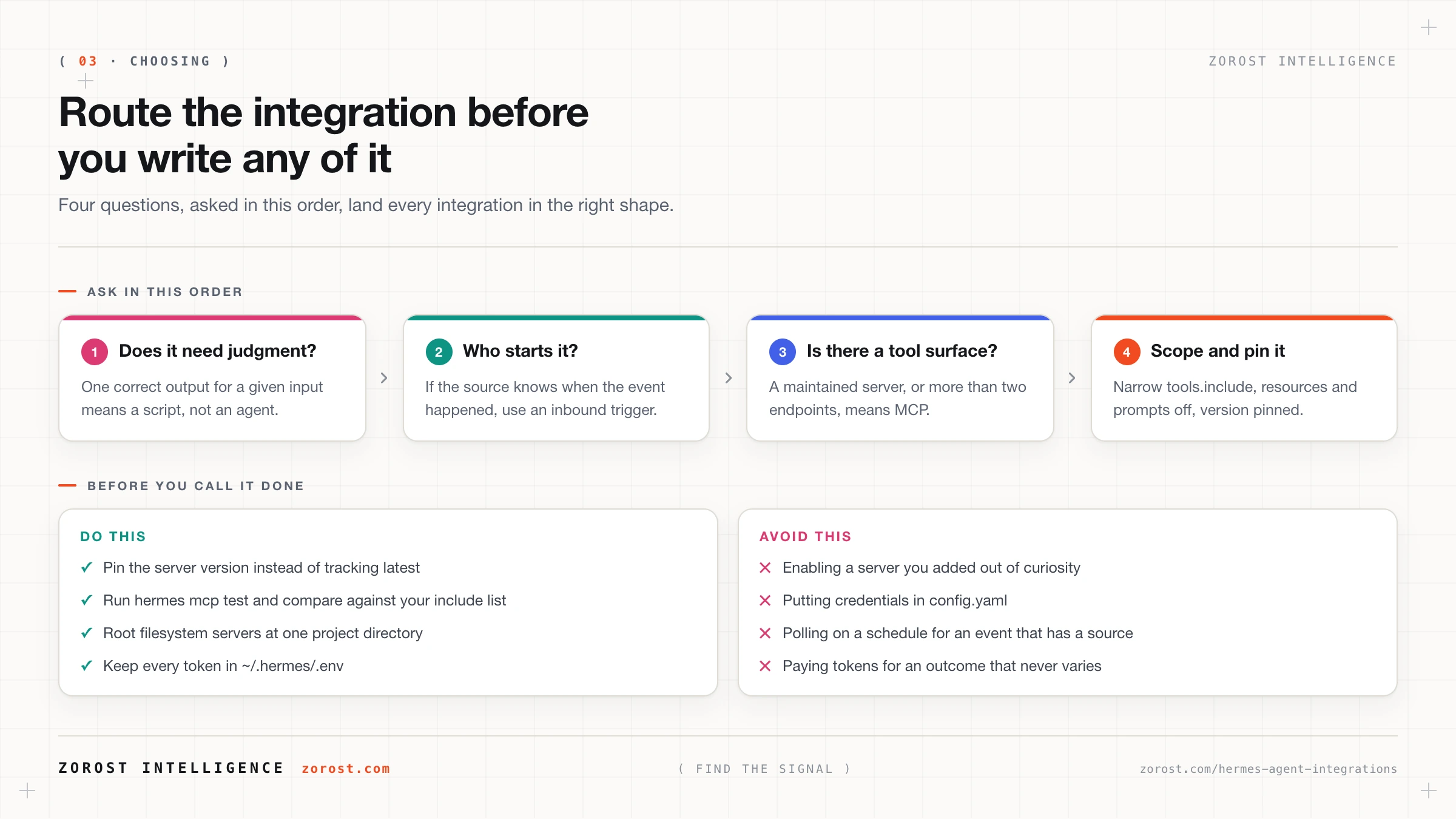
Choose an MCP server when a maintained server already exists for the system, or when you want a capability that can be scoped and switched off without touching anything else. MCP, the Model Context Protocol, is a standard way for a separate process to expose tools to an agent. Hermes is an MCP client, and servers reach it over STDIO or HTTP.
If your install skipped the extras, add them inside the repo with uv pip install -e ".[mcp]". Servers published to npm need Node and npx; Python servers can run through uvx. Add a server with hermes mcp add, check it with hermes mcp test <name>, and pick up a config change mid-session with /reload-mcp. Configuration lives under mcp_servers in ~/.hermes/config.yaml:
mcp_servers:
  filesystem:
    command: "npx"
    args: ["-y", "filesystem-mcp@latest", "--root", "/absolute/path/to/project"]
    tools:
      include: [read_file, write_file, list_directory]
      resources: false
      prompts: false
    enabled: true
Four keys carry the safety. Start with the narrowest include list you can work with, set resources and prompts to false when unused, root a filesystem server at one project rather than your home directory, and point Git servers at single repositories. Turn a server off with enabled: false rather than deleting the block, so you keep the record of the decision.
Here is your checkpoint. Run hermes mcp test filesystem. It should report exactly the three tools in include. If it reports more, your allowlist is not being applied where you think it is.
When is one HTTP call enough, and a whole server too much?
Reach for a direct HTTP tool call when you need one endpoint of an internal API and the cost of building and maintaining a server exceeds the value of a full tool surface. A tool that fetches the current on-call rota does not justify a process with its own lifecycle.
Hermes documents MCP servers over both STDIO and HTTP. A general-purpose native HTTP request tool with its own configuration key is [NEEDS SOURCE] at the time of writing, so the dependable way to build this shape today is the smallest possible server: one endpoint, one handler, one entry in tools.include. You are exposing one verb rather than building an integration platform.
Watch for the moment the small thing stops being small. On your third endpoint, or when two share authentication logic, you have an MCP server whether you called it one or not. Promote it deliberately rather than discovering later that a helper script became load-bearing.
When should the outside world start the work instead of the agent?
Use an inbound trigger when the source system already knows the event happened, because polling for it burns tokens on empty checks and adds lag equal to your poll interval. The documented inbound paths run through the gateway, a single background process started with hermes gateway that connects every configured platform, keeps a session per chat, and runs the scheduler.
A message arriving on an allowlisted platform is an inbound trigger, which is broader than it sounds. The gateway has adapters for Telegram, Discord, Slack, WhatsApp, Signal, Matrix, Microsoft Teams, Mattermost, LINE, SMS, Email, Home Assistant, DingTalk, Feishu and Lark, WeCom, Weixin, QQ, BlueBubbles and iMessage, ntfy, and a browser. Anything that can put a message on one of those surfaces can start agent work.
If what you have is a raw webhook from a system with no adapter, the reliable pattern is a small service of your own that receives it and posts a message into an adapter you already allowlist. Whether Hermes exposes a native HTTP webhook receiver is [NEEDS SOURCE], so do not design around one until you have confirmed it.
Why is using an agent where a cron script would do the most common waste?
Because a model in a loop that contains no decision adds cost, latency, and variance while returning nothing you could not have computed. It is worth stating plainly: if the task has one correct output for a given input, it is a script, and the agent is the wrong tool.
The tell is easy to check. Write down what the agent is supposed to decide. If the sentence reads “decide to run the export”, that is a schedule rather than a decision. Move it to system cron, let it write its result somewhere the agent can read, and keep the agent for the part that varies: spotting the row that looks wrong, and deciding whether it is worth waking you for.
Hermes has its own scheduler, and it is the right home for the judgment half of that split. A single cronjob tool creates, lists, pauses, edits, and removes jobs, defined in natural language or with an explicit expression such as 0 8 1-5. The scheduler ticks every 60 seconds and delivers output to the target chat. See scheduling real work with Hermes Agent cron jobs for designing jobs that fail safely.
Which integrations are worth building first?
Start with the families where the agent’s judgment is obviously worth something and the blast radius is small. These five cover most of what people want, and each maps onto one of the four shapes.
| Family | Shape | What it looks like in Hermes |
|---|---|---|
| Version control and CI | MCP server | A GitHub server pointed at single repositories, with list_issues, create_issue, and search_code in tools.include, authenticating with GITHUB_PERSONAL_ACCESS_TOKEN |
| Internal APIs behind auth | Smallest possible MCP server | One tool per endpoint you need, credentials read from ~/.hermes/.env, egress through HTTPS_PROXY where the network requires it |
| Systems with no API | MCP server | The documented Chrome DevTools server, which drives a real browser over remote debugging |
| Home and device | Inbound trigger | Home Assistant as a gateway adapter, so the house starts the conversation rather than the agent polling it |
| Other messaging | Inbound trigger and notification sink | Slack, Discord, Signal, Matrix, Teams, Mattermost, Email, SMS, and ntfy as gateway adapters |
Credentials for all of this go in one place. ~/.hermes/.env holds provider keys such as OPENAI_API_KEY and ANTHROPIC_API_KEY, and MCP server tokens such as GITHUB_PERSONAL_ACCESS_TOKEN sit alongside them. Providers that authenticate through OAuth keep refresh tokens in ~/.hermes/auth.json instead. Nothing sensitive belongs in config.yaml, which is the file you are most likely to paste into a support thread.
Two distinctions there are worth saying out loud. A browser appears twice in the Hermes world: the browser adapter is a place you talk to the agent, the Chrome DevTools server is a tool the agent uses to drive one. And ntfy, though on the adapter list, is built for one-way push, which makes it an alert sink rather than a conversation surface.
How do you keep an integration debuggable?
An integration is debuggable when you can answer three questions after the fact: which tool was called, with what arguments, and what came back. Design for those answers from the start, because you will want them on a day when the agent’s behaviour makes no sense and six things could be responsible.
Hermes keeps two records. Gateway activity, including scheduler runs and delivery, goes to ~/.hermes/logs/gateway.log. Episodic memory keeps time-stamped conversation and run trajectories, which can be exported. The log tells you what the system did, the trajectory what the agent was reasoning about.
Before you debug the agent, test the surface. Running hermes mcp test <name> reports what the server exposes right now, which separates “the agent chose badly” from “the tool is not there any more”. Getting that backwards is how people end up rewriting prompts to fix an infrastructure problem. On your own servers, log the call and the response too, because a tool that swallows its errors gives the model nothing to recover from. The reasoning is in tool design for agents.
What happens when a tool contract changes underneath a working agent?
Your agent silently loses or gains a capability while your configuration stays identical, which makes it one of the harder failures to recognise. The documented filesystem example ships with the trigger built in: filesystem-mcp@latest resolves at launch, so a server that renames, removes, or adds a tool between two restarts has changed your agent without asking.
Pin the version instead of tracking latest, on every server you depend on. Then treat an upgrade as a deliberate act with a check attached. Run hermes mcp test <name> afterwards and compare the reported tools against the include list you wrote, because a tool that has quietly disappeared makes the agent improvise around the gap, and improvisation looks a lot like the model getting worse.
This class has a name and a recovery pattern. Stale tool contracts, tool misuse, and hallucinated success all present as an agent that seems less capable than last week. A failure taxonomy for production agents gives each one a detection signal, which beats a general instinct that something is off.
Where this goes wrong
The agent starts picking the wrong tool as you add servers. The symptom is a capable agent making careless choices, and the cause is tool count, since every server adds candidates to a selection problem the model solves imperfectly. Narrow each tools.include and set enabled: false on the servers you added out of curiosity.
An integration works in chat and does nothing on a schedule. The symptom is a scheduled job producing no output and no error. The usual cause is that the gateway is not running, since the scheduler lives inside it. Check ~/.hermes/logs/gateway.log before touching the job definition.
The inbound trigger fires and the message vanishes. Gateway access is controlled by per-platform allowlists, so an event from an identity you never allowlisted is dropped rather than executed. That is correct behaviour and confusing the first time. Unlisted users get a pairing code, which you approve with hermes pairing approve telegram <CODE>.
A credential lands somewhere it cannot be rotated. The symptom is a token pasted into a chat message, a config file, or a screenshot. Secrets belong in ~/.hermes/.env and nowhere else, because once a token has been in a conversation it is in episodic memory, and cleaning that up costs more than rotating it.
You built an agent integration for a deterministic task. The symptom is a monthly bill and a variable result for a job that used to be a reliable ten-line script. Demote it.
Common questions
What is the difference between an MCP server and a native tool in Hermes Agent?
A native tool ships with Hermes and runs inside it, while an MCP server is a separate process exposing tools over STDIO or HTTP. The practical difference is lifecycle and scope: a server can be versioned, allowlisted with tools.include, and disabled with enabled: false without touching the agent. The native tool set is the right starting point, and MCP is what you add for capability the harness lacks.
Can Hermes Agent reach an internal API that is not on the public internet?
Yes. Hermes runs on your machine and calls out from there, so anything that machine can reach, the agent can reach. That is an underrated property of self-hosting. If your network routes outbound traffic through a proxy, set HTTPS_PROXY so provider calls and server traffic follow the same path.
How many MCP servers is too many?
There is no fixed number, but the practical limit is where tool selection degrades, and you will see that as wrong-tool choices rather than as an error. Keep each server’s include list to the tools you use, and disable servers between projects instead of accumulating them.
Can I trigger Hermes Agent from a webhook?
The documented inbound paths are the gateway’s platform adapters and the built-in scheduler, so the dependable pattern is a small service that receives your webhook and posts into an adapter you already allowlist. A native HTTP webhook receiver is [NEEDS SOURCE]. The adapter route also lands the inbound event somewhere you can watch it happen.
Next steps
- Pick one integration you have been meaning to build, write down which of the four shapes it is, and build only that shape. If you cannot name the decision the model is making, build the script version instead.
- Read securing a self-hosted agent next, because every integration you just added widened the trust boundary, and that post narrows it back down.
- For the theory underneath the scoping advice here, see tool design for agents.
- The same decision, whether a capability should be a scoped tool surface or a deterministic job with no model in it, is how integrations get scoped behind FreightCortex in freight operations, where a wrong-shape integration shows up as cost before it shows up as a bug.