
Genie Code, agentic data and ML engineering
Pull-quote: “An agent that can edit a pipeline is exactly as safe as the diff you are willing to read.”
Genie Code is generally available, so the useful question is no longer whether to try it. Genie Code is the AI coding and data assistant inside the Databricks workspace: it generates and runs code, builds pipelines and AI/BI dashboards, debugs errors, and works directly against Unity Catalog tables, columns, and lineage, across notebooks, the SQL editor, the Lakeflow Pipelines Editor, dashboards, and MLflow (Databricks documentation). If you have a workspace, you have it.
That turns adoption into a delegation problem: which surface your team works in, which tasks an agent may finish on its own, and what a person reads before a change reaches a table anyone else depends on. Draw that line too permissively and you inherit pipelines nobody can explain. Draw it too tightly and you have bought a well-informed autocomplete.
This post is for data and ML engineers who own pipelines, jobs, and models on Databricks. It assumes you write SQL and Python and have a Unity Catalog metastore, and nothing about Genie. By the end you will be able to pick a starting surface, write the unattended boundary down as a rule your team can apply without you, and review an agent’s work in less time than the work itself would have taken.
What you will be able to do
- Say what Genie Code is and how it differs from a general-purpose coding agent.
- Choose between the side pane and the full page command center for a given piece of work.
- Describe how agent mode handles a multi-step task, and where it stops for input.
- Write the unattended boundary as five rules covering reversibility and review cost.
- Reach data outside Databricks through Lakehouse Federation, and tickets and code through MCP connectors.
- Review a thread the way you review a pull request, at the asset boundary.
What is Genie Code, and how is it different from a general coding agent?
Genie Code is Databricks’ AI coding and data assistant for engineers and technical practitioners, purpose-built for data and ML work rather than general software development, and generally available in the workspace. The difference from a general coding agent is not the model. It is what the agent can see and what it is allowed to touch.
Three things follow from being part of the platform. It reads Unity Catalog metadata, including tables, columns, descriptions, and your most-used data assets, so a request about revenue resolves against your catalog rather than a guess. It is governed by your Unity Catalog permissions, so it reaches only data and operations you are already entitled to. And it routes across multiple models, selecting per task, so your workflow does not depend on one vendor’s release cadence.
Which Genie Code surface should you work in?
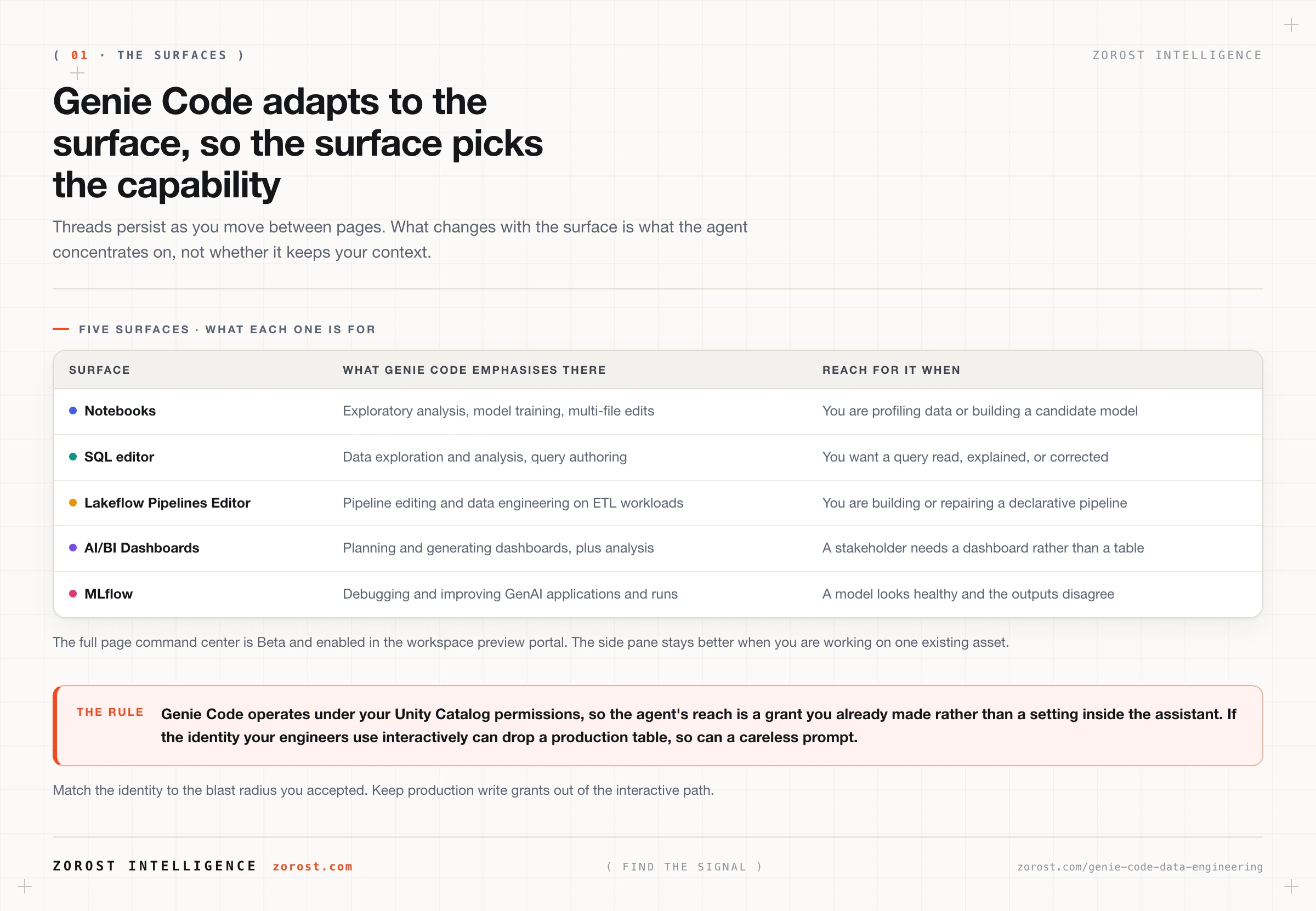
Genie Code runs in notebooks, the SQL editor, the Lakeflow Pipelines Editor, AI/BI Dashboards, and MLflow, and its chat threads persist as you navigate between those pages, so the surface you choose decides which capabilities it emphasises rather than whether you keep your context. Pipeline editing in Lakeflow, exploration in notebooks and the SQL editor, dashboard generation in dashboards, and debugging GenAI applications in MLflow.
There is also a full page command center, which Databricks documents as Beta and which you enable by turning on Full page Genie Code in the workspace preview portal (Databricks documentation). Use the full page when starting work from scratch or running several tasks in parallel. The side pane stays better when you are working on one existing asset, such as debugging a notebook or inspecting a serving endpoint.
You know the preview is on when the Genie Code side pane shows a maximize button in its top left corner. Click it and you get a thread list instead of a chat box.
What does agent mode change about a multi-step task?
Agent mode adapts to the surface you are on and handles multi-step tasks autonomously, so your unit of work becomes a thread with a reviewable outcome rather than a prompt with a single answer. That moves your effort from writing the code to specifying and checking it.
In the full page experience you can switch threads while one keeps running in the background, and threads can be renamed, shared, copied, deleted, and searched. When Genie Code needs to edit or run a specific asset, that asset opens as a tab alongside the thread. For some assets, including AI/BI dashboards, it navigates to the asset’s own page and keeps the thread in the side pane.
Specify the contract, not the output. A prompt naming the grain, the keys, the expectations, and the target catalog produces a reviewable artefact. A prompt naming a deliverable produces something that runs and means nothing.
Build a Lakeflow pipeline loading bronze.orders into silver.orders.
Grain: one row per order_id.
Keys: order_id primary. customer_id references silver.customers.
Expectations: order_id not null and unique, order_ts not null,
  amount_usd >= 0.
Target: the dev catalog only. Never write to prod.
Stop and show me the plan and the diff before you run anything.
Databricks also announced scheduled tasks for Genie Code at Data + AI Summit 2026, where a task starts from a prompt and optionally an asset, and creates a thread with results for you to review when it runs. The blog describes this as coming soon rather than shipped (Databricks blog), so check your own release notes before you plan a workflow around it.
How far outside Databricks can Genie Code reach?
Genie Code reaches whatever Unity Catalog and Lakehouse Federation expose, which includes Databricks tables, external platforms, and on-premises systems, and it reaches Jira, Confluence, and GitHub through Model Context Protocol connectors. Lakehouse Federation is the Unity Catalog feature that registers an external database as a foreign catalog so it is queryable in place without a copy. The Model Context Protocol, or MCP, is an open protocol for handing an agent tools and context from outside its own runtime.
The practical consequence is that the agent’s reach is a governance decision you already make in Unity Catalog, not a toggle inside the assistant. If a federated Oracle catalog is registered and you have SELECT on it, Genie Code can read it on your behalf. If it is not registered, no prompt will conjure it.
Treat every MCP connector as a permission grant rather than a convenience. A GitHub connector that can open a pull request is a different risk from one that can only search code, so the usual discipline applies: narrow scopes, one purpose per connector, and no write capability you have not deliberately granted. The reasoning is set out in tool design for agents.
Where should you let Genie Code run unattended?
Let it run unattended where the change is reversible and cheap to verify, and require a human to read a diff everywhere else. Those two properties, not the difficulty of the task, are what decide the answer.
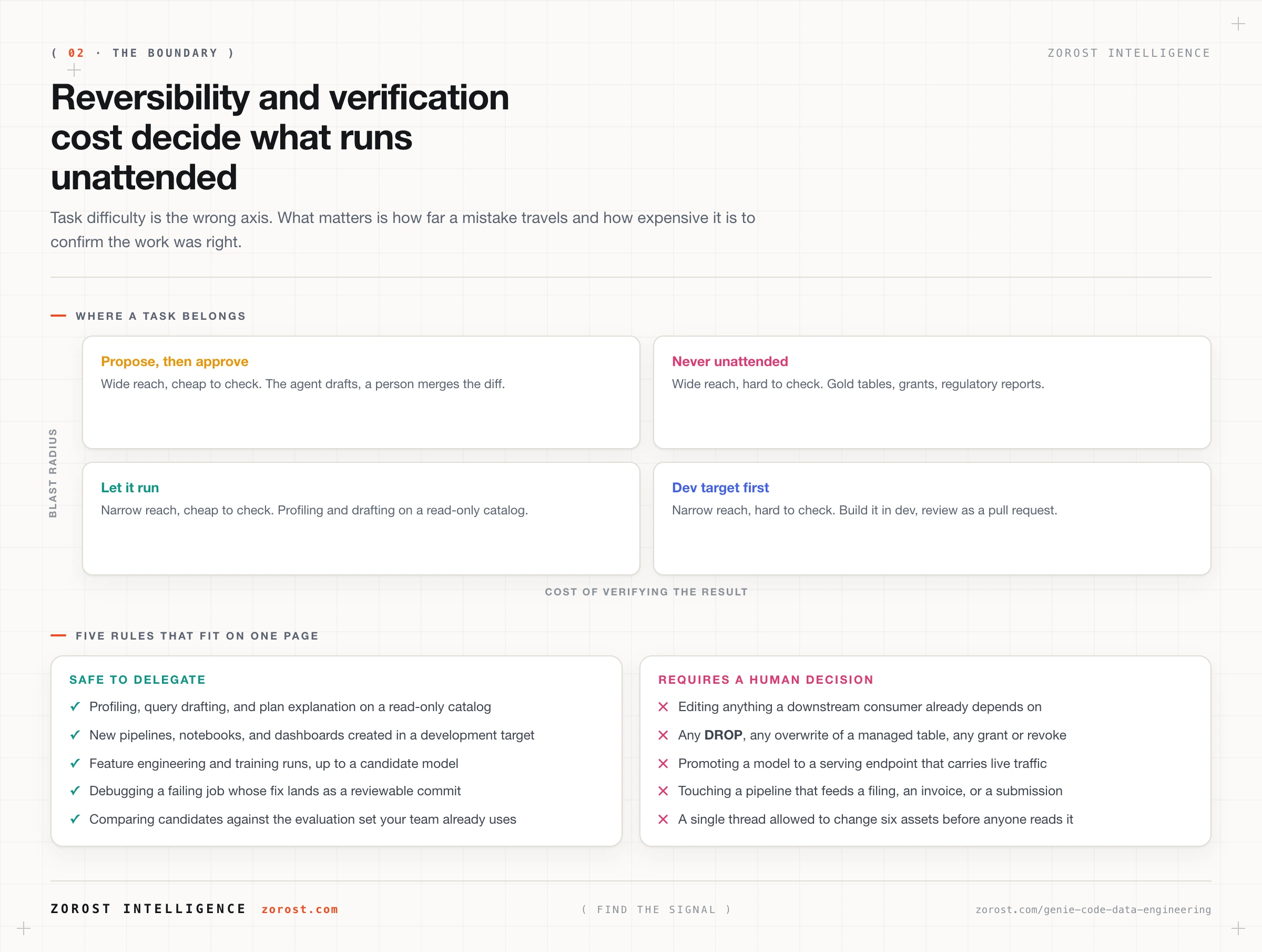
Five rules cover almost every case, and they are short enough to paste into a team charter.
- Exploration against a read-only catalog runs unattended. Profiling, query drafting, explaining a Spark plan. There is nothing to revert.
- New assets in a development target run unattended, then arrive as a pull request. A dev-catalog pipeline is cheap to throw away and easy to read as a diff.
- Edits to anything with downstream consumers never run unattended. A Gold table with three consumers is a contract. The agent proposes, a person approves.
- Model work runs unattended up to the candidate. Features, training runs, and comparisons are fine. Promotion to a serving endpoint is a human decision.
- Destructive and privileged operations never run unattended. Any
DROP, any overwrite of a managed table, any grant or revoke.
One caveat teams discover late: Genie Code operates under your Unity Catalog permissions, so unattended means unattended with your privileges. If the identity your engineers use interactively holds ALL PRIVILEGES on the production catalog, the boundary in your charter is doing all the work on its own. Match the identity to the blast radius you accepted.
How do you review what Genie Code changed?
Review a thread the way you review a pull request: read the summary, then read the diff, then decide. The thread entry gives you the summary, because it carries the count of assets modified and lines of code changed, and the asset tabs give you the diff.
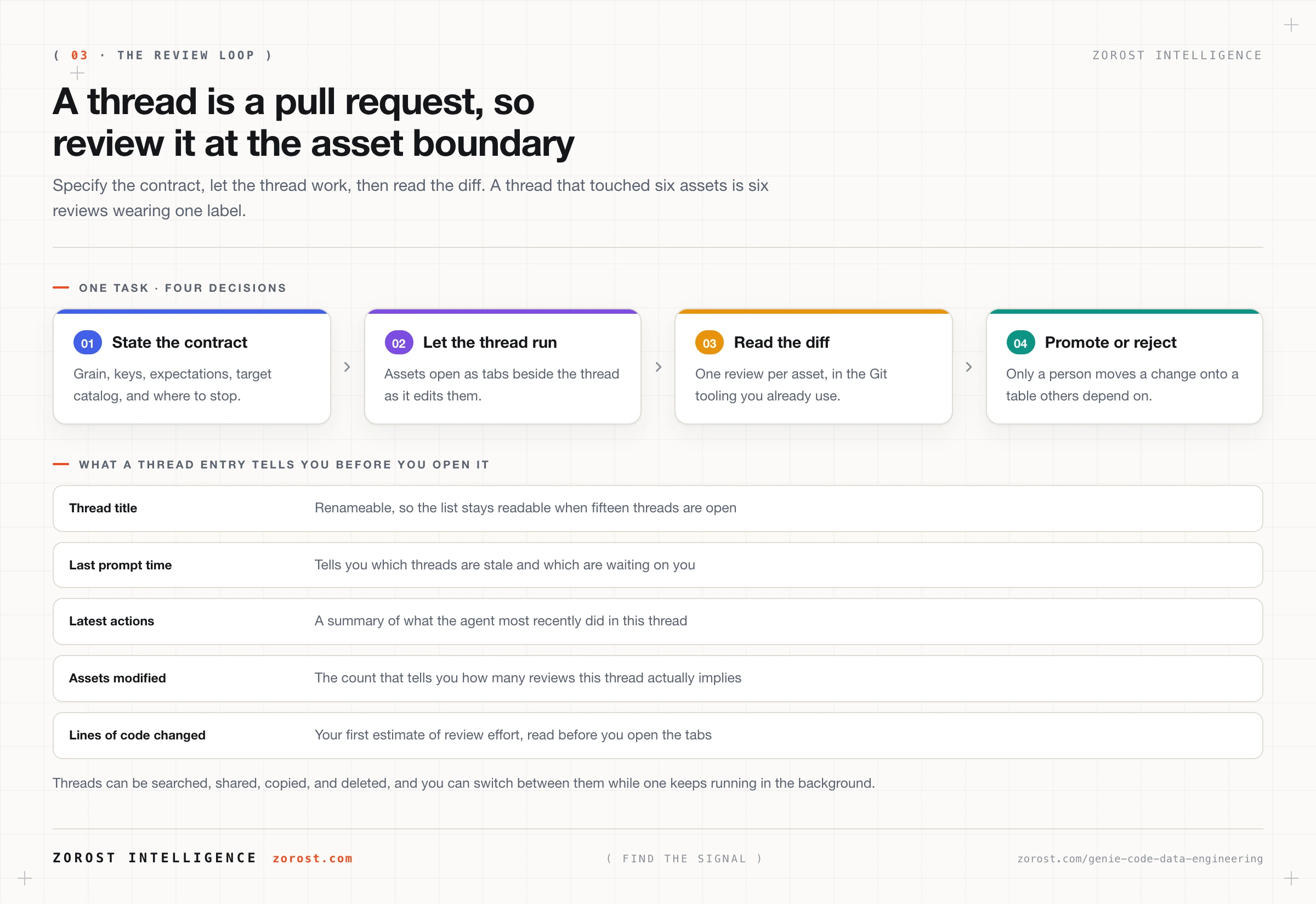
Three habits make that review fast rather than theatrical. Keep notebooks and pipeline source in Git folders, so the work lands as a commit you read in the tooling you already use. Put the ticket reference in the prompt, so thread and work item stay attached without a mapping to maintain. And review at the asset boundary, because a thread that touched six assets is six reviews wearing one label.
For machine learning work Genie Code now reads the evidence you would want: MLflow runs, artifacts, model lineage, quality metrics, and system metrics, plus Model Serving endpoint health, and it moves to AI Runtime when a job needs a GPU for training (Databricks blog). Ask it to compare a candidate against the evaluation set your team already uses, and read that comparison rather than its narrative summary of it.
What does Genie Code cost to run?
Genie Code is billed pay-as-you-go with a per-user free monthly allowance of 150 DBUs, and consumption beyond the allowance is metered in DBUs, so it behaves like a per-engineer variable cost rather than a platform line item. Databricks documents the pay-as-you-go start as 8 July 2026 at 00:00 UTC and notes that account administrators can manage budgets and cost controls for Genie (Databricks documentation).
The consequence worth acting on is that cost tracks concurrency rather than headcount: an engineer running fifteen parallel threads consumes fifteen threads of inference. An agentic tool with a per-token cost and no budget is a support ticket waiting to happen, so the account-level budget belongs in your rollout plan rather than in your retrospective. Budgets, SKUs, and a sequencing plan are the subject of the next post in this series.
Where this goes wrong
Symptom: the pipeline runs, passes, and produces a table nobody can explain. The cause is a prompt that described an output instead of a contract, so the agent chose a grain, a join, and a set of nulls for you. State the grain, keys, and expectations, and reject any result that does not declare them.
Symptom: a thread ran for an hour and landed changes across six assets. The cause is a task with no review point, which converts an assistant into an unsupervised contractor. Scope one thread to one asset group, and end the prompt with an instruction to stop and show the plan.
Symptom: it consistently picks the wrong table. The cause is almost never the model. It is undescribed columns, an undeclared grain, or two tables that could both plausibly answer the question. That is the modelling defect that breaks a Genie Agent, and the fix is the same one, set out in putting Genie inside your data engineering workflow.
Symptom: you cannot enable Genie Code at all. Genie Code is a Designated Service that uses Geos to manage data residency, so a workspace enforcing data processing within its own geography may block it. The documented fix is to disable Enforce data processing within workspace Geography for AI features, which is a governance decision rather than a checkbox to clear in passing.
Common questions
Is Genie Code generally available or still a preview?
Genie Code itself is generally available in the Databricks workspace. Two pieces around it are newer: the full page command center is documented as Beta and must be enabled in the workspace preview portal, and scheduled tasks were announced at Data + AI Summit 2026 as coming soon. State that distinction when you brief a team, because a feature someone cannot find costs you their trust in everything else you said.
Can Genie Code see data I am not permitted to see?
No. Genie Code is governed by your Unity Catalog permissions, so it can only access data and perform operations you are entitled to perform. The reverse matters more: if your identity can drop a production table, so can a prompt you typed carelessly. Entitlement is the real boundary, so review the grants on the identity your engineers use interactively.
Is Genie Code the same product as Genie One?
No. Genie One is the business-user experience, a single entry point to dashboards, chat, and apps. Genie Code is the engineering assistant that builds and debugs the pipelines, models, and dashboards underneath. They are different products in the same family, and giving a business team Genie Code is a common mis-assignment.
Does Genie Code work with our repository and our tickets?
Yes, through MCP connectors that reach Jira, Confluence, and GitHub, so the ticket describing the work and the repository holding the code become context rather than something you paste in. Scope each connector to the narrowest set of operations that makes it useful, and treat any write capability as its own decision.
What should we not ask Genie Code to do?
Anything irreversible or expensive to verify: dropping objects, overwriting managed tables, changing grants, editing a pipeline that feeds a regulatory report, or promoting a model to production traffic. Those are limits on how much unreviewed change your platform can absorb, not on the agent’s competence. Keep them in a written rule so the answer does not depend on who is asking.
Next steps
Pick one pipeline you already own and run the loop once this week. Write a prompt that states the grain, the keys, the expectations, and a dev-only target, let the agent work in a thread, then read the diff at the asset boundary and record how long the review took. That number is your real adoption decision, because it tells you whether review is cheaper than authoring in your codebase.
Then write the boundary down: five rules, one page, agreed by the people who own the Gold tables. Once that exists, the operations half of the story matters. Genie ZeroOps and the review-and-approve operating model covers the background agent that watches assets and proposes fixes, and Genie App Builder, App Spaces, and governed vibe coding covers what happens when the people asking for pipelines start building their own apps.
Zorost runs agentic data engineering on client lakehouses as a trusted Databricks partner, where the unattended boundary is written down before the first thread runs and every promotion to a Gold table is read by a person who knows the model.