
Databricks and Fabric together: where governance leaks
Pull-quote: “The table arrives in Fabric. The permission that made it safe does not.”
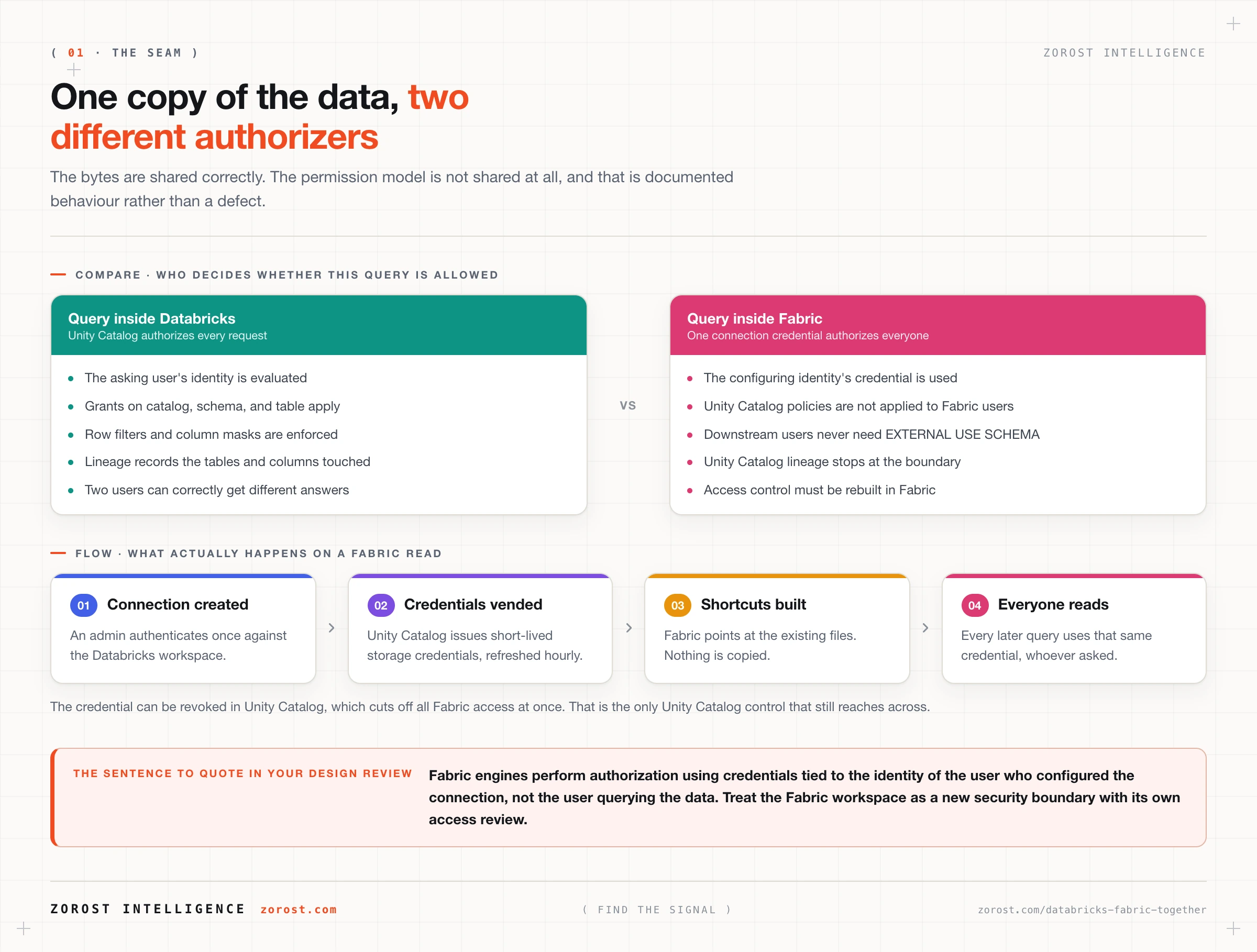
Azure Databricks and Microsoft Fabric can read one copy of the same tables with no duplication, and the thing that does not cross the boundary is authorization. Microsoft’s own page on the integration states it without hedging: Fabric engines authorize using short-lived credentials tied to the identity of the user who configured the connection, not the user running the query, and “Fabric engines do not apply Unity Catalog governance and security policies to Fabric users” (Azure Databricks documentation). That one sentence is the entire design problem, and it is solvable, but only deliberately.
This is for the architect or platform engineer who has both products in the estate, has been told the combination is “better together”, and now has to write down who can see what.
What you will be able to do
- Name and distinguish the two documented ways Unity Catalog tables reach Fabric, and say which team initiates each.
- State precisely whose identity a Fabric engine uses when it reads a mirrored Databricks table.
- Predict which Unity Catalog objects will not appear in Fabric, and why that omission is a safety property rather than a bug.
- Rebuild equivalent access control on the Fabric side using workspace roles, item permissions, and OneLake security.
- Design a published catalog that is shaped for export, so the seam has a contract instead of an assumption.
How do Databricks and Fabric share one copy of the data?
Through Unity Catalog metadata and OneLake shortcuts, by two documented paths that both end in a read-only mirrored catalog on the Fabric side. Neither path copies data.
Unity Catalog is the governance layer inside Databricks: every table, view, volume, and model is a securable object in a three-level catalog.schema.object namespace, with permissions, lineage, and audit under every query (Unity Catalog). OneLake is Fabric’s tenant-wide storage layer. The integration connects the two without moving bytes.
The paths differ in who starts them. A Fabric workspace administrator creates a Mirrored Azure Databricks Catalog item, selecting schemas and tables with optional auto-sync of new ones, and that route is generally available. An Azure Databricks catalog admin instead runs Catalog > Share > Publish to OneLake, which pushes a whole catalog into a chosen Fabric workspace, and that route is in Public Preview. Microsoft describes the choice as “mostly about which team drives the integration” (Microsoft Fabric with Azure Databricks).
Either way, Fabric mirrors the catalog structure and reaches the files through shortcuts, so a change in Databricks is visible in Fabric without refreshing the data (Mirroring Azure Databricks Unity Catalog). Each mirrored item gets a SQL analytics endpoint, and mirrored tables are read-only.
Publishing needs three grants on the catalog, plus external data access enabled on the metastore:
GRANT USE CATALOG ON CATALOG published_gold TO `<service_principal_application_id>`;
GRANT USE SCHEMA ON CATALOG published_gold TO `<service_principal_application_id>`;
GRANT EXTERNAL USE SCHEMA ON CATALOG published_gold TO `<service_principal_application_id>`;
Storage can run the other way too. A Unity Catalog storage credential plus an external location typed as OneLake lets you create a catalog whose MANAGED LOCATION is an ID-based abfss:// path inside a Fabric workspace, so Databricks managed tables land in OneLake directly (OneLake external locations).
Your checkpoint that the plumbing worked: open the mirrored item in Fabric and click Manage catalog. You should see the source catalog’s schema names. An empty item means the grants or the external data access setting are wrong, not that the tables are missing.
Where exactly does the governance seam leak?
At authorization. The data is shared correctly and the permission model is not shared at all, which means a Fabric user can read a table they hold no Unity Catalog grant on.
The mechanism is a credential substitution. When the connection is created, Unity Catalog vends short-lived storage credentials through its open APIs, refreshed hourly and revocable. Those credentials belong to the configuring identity. Every subsequent query from any Fabric engine uses them. The Fabric-side security page says the same thing from the other direction: “The credential used to create the connection to Unity Catalog of this catalog mirroring is used for all data queries” (Fabric mirrored databases from Azure Databricks security).
Two consequences follow, both documented rather than inferred. The EXTERNAL USE SCHEMA privilege is a one-time requirement on the configuring user: after that, the Databricks documentation states, “no downstream Fabric users who have access to the connection are required to have this privilege, effectively bypassing Unity Catalog governance”. And Unity Catalog lineage does not record operations performed in Fabric, so the audit trail you rely on for “who touched this column” stops at the boundary.
A storage-layer variant is worth knowing about. If you enable trusted workspace access so Fabric can reach firewall-protected Azure Data Lake Storage, that connection goes straight to the storage account. Unity Catalog row filters, column masks, and attribute-based rules are enforced by the query engine rather than the object store, so they are not applied on that path at all.
None of this makes the integration unsafe. It makes the Fabric workspace a new security boundary you have to configure, exactly as you would treat an extract into any other system, except that nothing was extracted so the instinct to check never fires.
Which Unity Catalog objects will not appear in Fabric?
The ones carrying your most careful controls. Fabric filters out several object types, and the filter is a safety property: a table with a column mask cannot arrive in Fabric silently unmasked, because it does not arrive.
| Object in Unity Catalog | Mirrors into Fabric | What to do instead |
|---|---|---|
| Delta managed or external table | Yes | Nothing, this is the supported case |
| Iceberg table with UniForm | Yes, via Publish to Fabric | Confirm UniForm is enabled before publishing |
| Table with a row filter or column mask | No | Publish a pre-filtered table, or serve through DirectQuery |
| View or materialized view | No | Materialise it as a Delta table in the published catalog |
| Streaming table | No | Land the result in a managed Delta table |
| Lakehouse Federation catalog | No | Ingest the federated source, then publish |
| Catalog shared in from another account | No | Republish from a local Delta copy |
| Non-Delta format table | No | Convert, or leave it out of the published catalog |
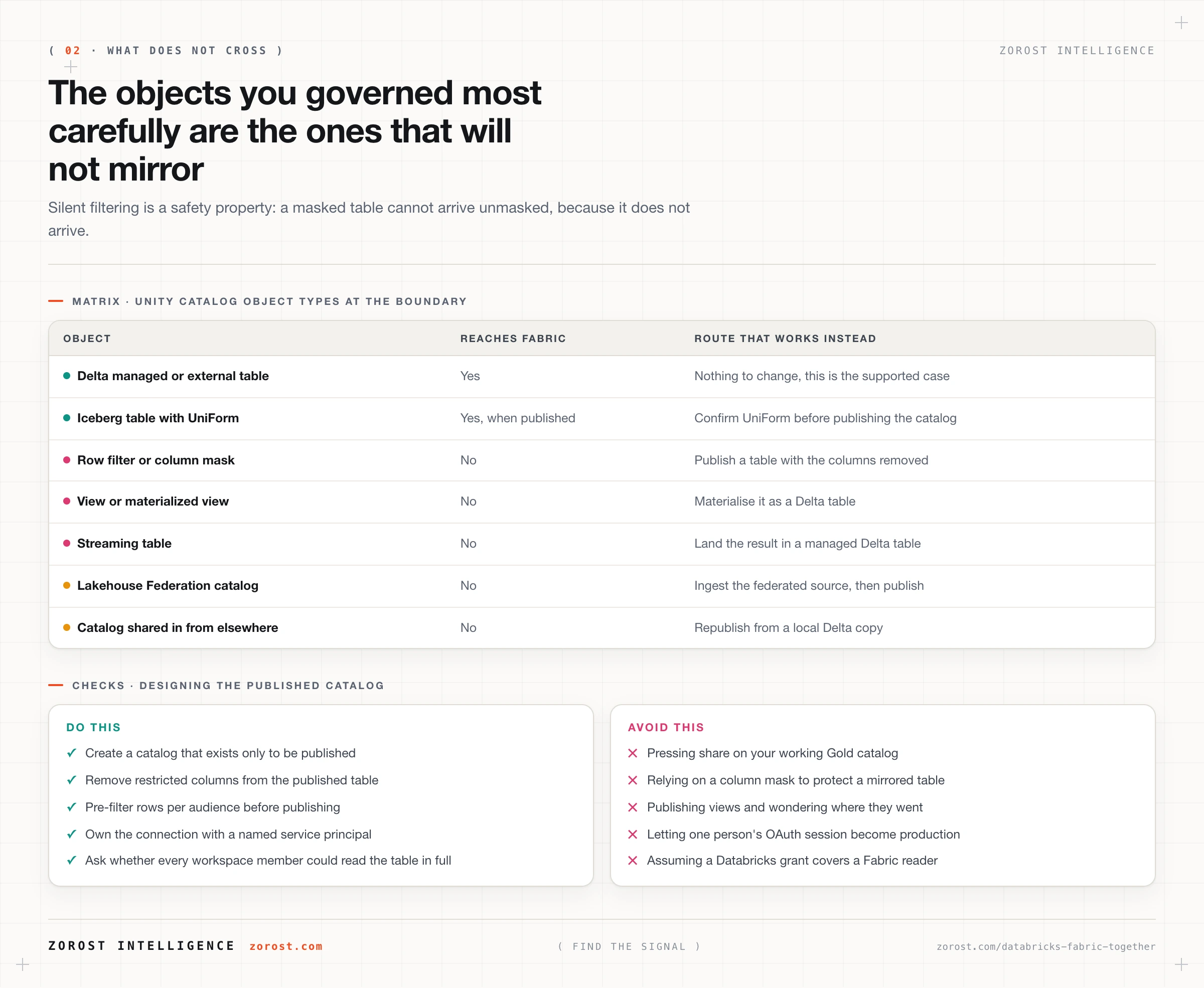
The two limitation lists agree on substance and differ in wording, so read both: the Azure Databricks page lists views, materialized views, streaming tables, OpenSharing catalogs, Lakehouse Federation catalogs, tables using row filters or column masks, and non-Delta tables, and the Fabric limitations page enumerates the same set including Delta Sharing tables.
Publishing has small rules that cost an afternoon when you meet them by surprise. Display names accept alphanumeric characters and underscores only, so a catalog called sales-gold cannot be published under that name.
How do you rebuild access control on the Fabric side?
With Fabric’s own three layers, because Unity Catalog grants cannot be reused. Microsoft is explicit that permissions set on catalogs, schemas, and tables in Databricks “can’t be replicated to your Fabric workspace” and that you need Fabric’s permission model instead.
The first layer is the workspace role: Admin, Member, Contributor, or Viewer. The second is item-level permission on the mirrored catalog and its SQL analytics endpoint. The third is OneLake security, where row-level and column-level rules live: roles grant access to folders and tables and can restrict a table further with a row predicate written as a SQL WHERE clause, or by hiding columns.
Three details decide whether that works for you, all in the OneLake security access control model documentation. OneLake security is in public preview, with Azure Databricks Mirrored Catalog a supported item type at Read permission. Filtering is applied by Fabric engines rather than at storage, and engine support varies: lakehouse, Spark notebooks, the SQL analytics endpoint in user’s identity mode, and Direct Lake on OneLake semantic models support it, while Eventhouse and warehouse external tables are listed as planned. Row rules and column rules must live in a single role, because combining two roles produces query errors rather than an intersection.
One path keeps Unity Catalog enforcement, and it deserves more attention than it gets. The mirroring limitations “do not apply when you use Power BI Direct Query with Unity Catalog registered data”. If a report needs per-user enforcement including row filters and column masks, DirectQuery against Databricks is the design that provides it. Mirroring buys Direct Lake performance and costs you that enforcement. Pick per report, not once for the estate.
Which workloads belong on which platform?
Writes and heavy engineering belong on Databricks because mirrored tables are read-only, and the last mile of consumption usually belongs on Fabric because that is where Power BI, Excel, and Teams already are.
That split is a consequence of the mechanism rather than a preference. Databricks owns the table lifecycle: ingestion, Lakeflow pipelines, managed tables, model training and serving, and anything that mutates data. Fabric owns reach: Direct Lake semantic models read the same Delta files without an import step, and consumption inside Microsoft 365 needs no bridge built.
Being honest about the other direction matters. Fabric genuinely wins the consumption layer in a Microsoft 365 estate, on breadth rather than depth: low-code pipelines, one capacity bill, and a shorter path from a table to a report a finance team will open. It is not the only route to those surfaces. Genie One, the Databricks business-user assistant, runs inside Microsoft Teams and Slack with Unity Catalog governing throughout (Genie One), so “our users live in Teams” argues for a governed surface, not automatically for mirroring.
The failure mode on either side is the same: choosing for the team’s comfort rather than the workload. A Spark engineer moving a transformation into a Fabric dataflow because the licence is already paid for, and an analyst told to learn PySpark to build a bar chart, are the same mistake wearing different clothes.
What does a publication boundary look like in practice?
A separate Unity Catalog catalog that exists only to be published, containing tables shaped for export rather than your working Gold layer with a share button pressed on it.
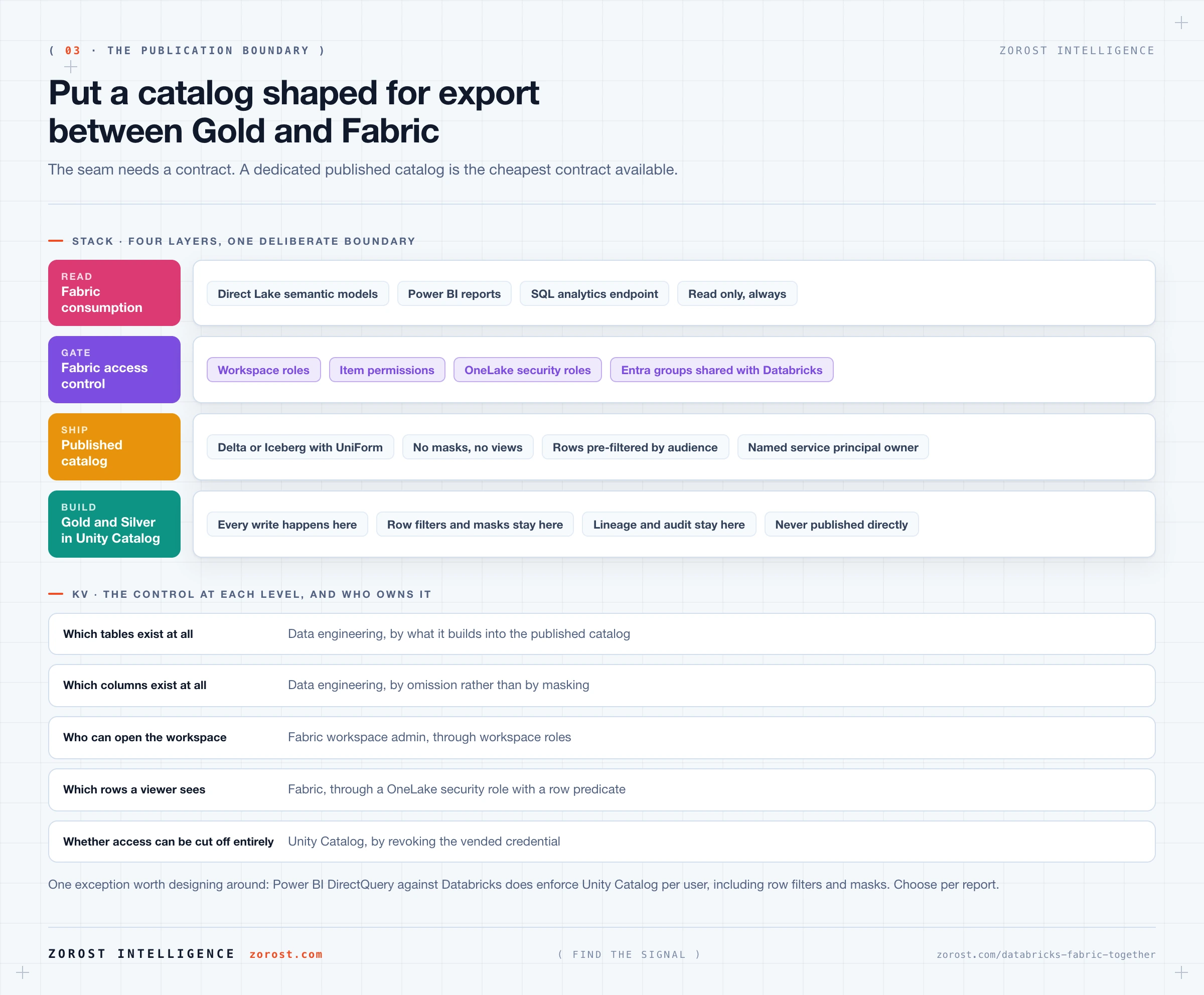
Six rules make it hold, and they are ordered by how much pain they save.
- Publish a dedicated catalog, never your working one. The publishing grants are catalog-wide. If the catalog holds anything a Fabric viewer should not read, the grant is the wrong shape and downstream configuration cannot fix it.
- Remove restricted columns physically, do not mask them. A masked table will not mirror at all, so the mask is not protecting you here, it is blocking you. Build the published table without those columns.
- Pre-filter instead of using row filters. Where audiences need different rows, publish one table per audience or one table plus a OneLake security role, and decide which before you build.
- Materialise every view. Views do not cross. A view Fabric users need becomes a managed Delta table refreshed by a pipeline.
- Bind the Fabric roles to the same definition as the Databricks grants. Keep group membership in one place, usually Microsoft Entra ID groups used on both sides, so a leaver is removed once.
- Treat the configuring identity as privileged. It is the identity every Fabric query runs as. A service principal with a documented owner beats a person’s OAuth session, which stops working when that person changes role.
The review gate is one question per table before it enters the published catalog: if every user of the target Fabric workspace could read this in full, would that be acceptable? If not, it does not belong there yet.
Where this goes wrong
Assuming Unity Catalog travels with the table. The symptom is an auditor asking why a Fabric viewer can see salary data and nobody being able to explain it, because the Databricks grants look correct. The cause is the credential substitution above. Treat the Fabric workspace as its own security boundary with its own access review.
Publishing the working Gold catalog. The symptom is tables appearing in Fabric that nobody intended to expose, often reference data with personal information embedded. The cause is that publishing is catalog-scoped while your mental model was table-scoped. Create a publication catalog and move only what is agreed.
Discovering the unsupported list one table at a time. The symptom is a mirrored item showing twelve of nineteen expected tables and no error explaining the gap. The cause is silent filtering of views, streaming tables, and masked tables. Query the catalog for those object types first and decide the fate of each.
Relying on OneLake security features still in preview. The symptom is a row-level rule that works in a Spark notebook and does nothing in a warehouse external table. The cause is that enforcement is per engine and the support matrix is incomplete. Check the engine your consumers use, and prefer removing data over hiding it.
Letting a personal OAuth connection become production. The symptom is every Fabric report failing the day someone changes teams. The cause is that the connection credential is a single point of authorization. Use a registered service principal owned by a team rather than a person.
Common questions
Does mirroring copy my data into Fabric?
No. Both paths create shortcuts to the existing files, so there is one copy and no synchronisation to maintain. Metadata is what replicates: Fabric polls Unity Catalog and reflects added, dropped, and altered tables at the next sync, and you can force an immediate refresh from the mirrored item.
If no data moves, does the integration cost anything?
Yes, on both sides. The Databricks documentation notes that reading Unity Catalog data from Fabric “requires a running Fabric capacity to perform metadata scans and refreshes, which adds cost”, and publishing fails with a 403 when the target workspace has no active capacity. Databricks compute is still needed for every write.
Can Fabric users write back to a Databricks table?
No. Mirrored tables are read-only and all writes go through Azure Databricks. If a Fabric process needs to produce data that Databricks consumes, write it to a Fabric lakehouse and read it from Databricks through an external location rather than trying to reverse the mirror.
Which route should I choose, Publish to Fabric or Mirrored Azure Databricks Catalog?
Choose by who should own the decision, then by release status. The Fabric-initiated mirrored catalog is generally available and lets a Fabric admin pick individual schemas and tables. Publish to Fabric is in Public Preview, starts in Databricks Catalog Explorer, and shares a whole catalog, which suits a team that wants the data owner rather than the reporting team controlling exposure.
Do we still need Unity Catalog if governance stops at Fabric?
Yes, more than before. Unity Catalog is what makes the published catalog a deliberate subset instead of an accident: it holds the grants on everything you did not publish, the lineage proving where the published tables came from, and the filters and masks keeping the working layer safe. What it cannot do is reach into a system that has told you it will not honour its policies.
Next steps
Run one query against your metastore before designing anything: list every table in the catalog you were about to publish, with its format and whether it carries a row filter, a column mask, or is actually a view. That inventory usually answers the architecture question by itself, because most Gold catalogs contain three or four objects that were never meant to leave.
Then read Fabric and Foundry solve different problems, because the same identity question decides how an AI agent reaches this data, and choosing a data platform in 2026 by workload if the real conversation is consolidation rather than coexistence. More engineering writing sits in the Signals index.
Zorost designs these publication boundaries on client estates as a trusted Databricks partner, where the access review on the Fabric workspace is part of the delivery rather than a follow-up ticket, because a governance model that exists on only one side of a seam is not a governance model.