
AI Engineering Lab: 24 weeks from first notebook to a production lakehouse
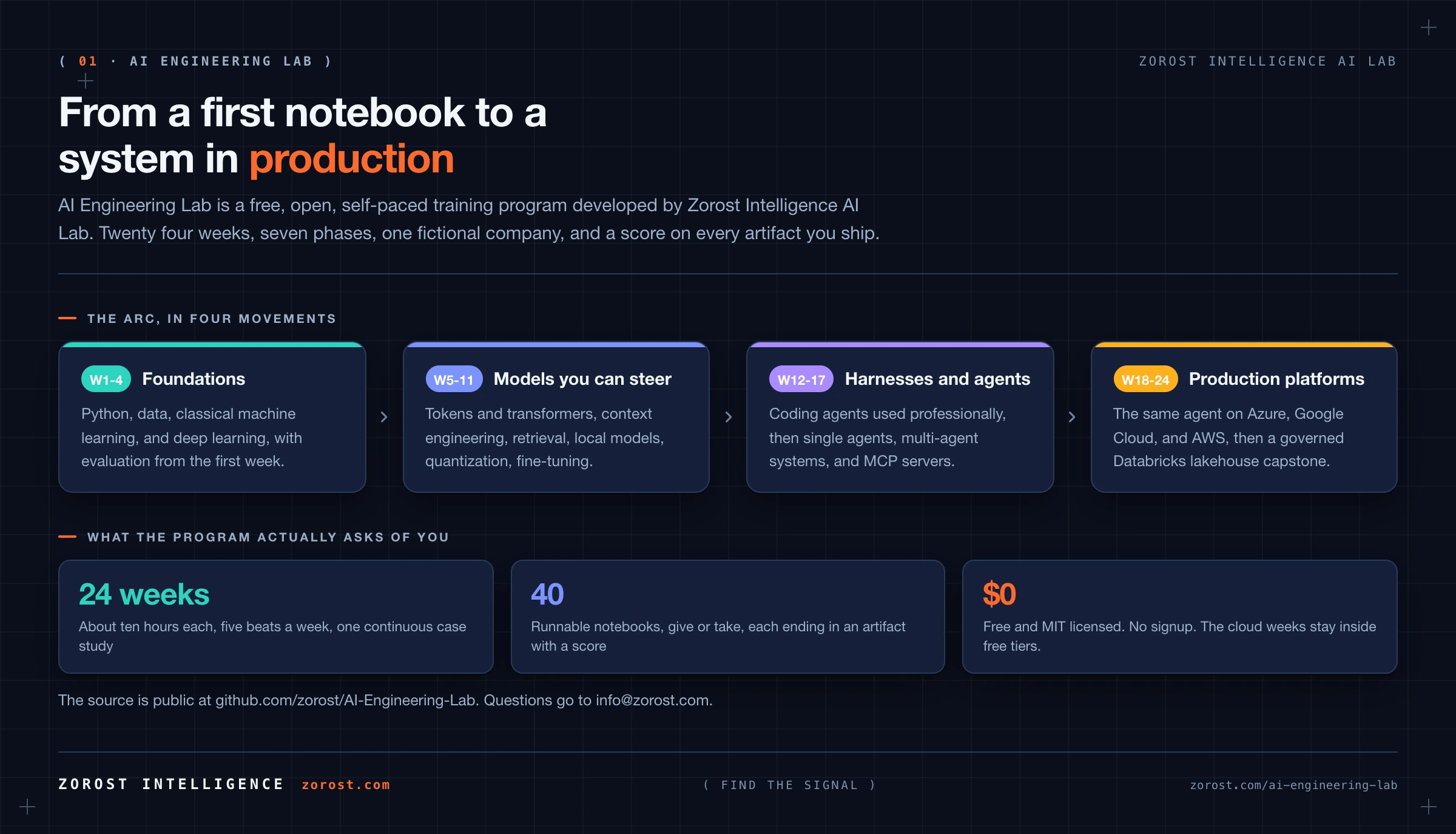
Reading about agents and shipping one are different skills. This program teaches the second: 24 weeks, one company's data, and a score on every artifact you produce.
AI Engineering Lab is a free, open, self-paced training program developed by Zorost Intelligence AI Lab. It takes a motivated beginner from a first Python notebook to a governed production lakehouse, by way of retrieval, fine-tuned models, agents, and three public clouds.
It is the curriculum we would hand an engineer joining a generative AI, applied ML, or Databricks modernization team: opinionated, hands-on, organized around use cases, and honest about what breaks once a system carries real traffic.
The source is public at github.com/zorost/AI-Engineering-Lab under the MIT license. There is nothing to sign up for. Questions and corrections go to [email protected].
What this program is
An AI engineer, in the sense this program means it, is someone who can design, build, evaluate, and ship software that uses AI. That is a different job from inventing a model architecture, and it is the job the market is currently short of. You will learn how large language models work, how to prompt and measure them, how to run them on your own machine, how to fine-tune them, how to build agents, how to use coding agents professionally, and how to deploy the same system on Azure, Google Cloud, AWS, and Databricks.
Every concept arrives with three things attached: a use case that continues from the week before, a runnable notebook, and a row you can tick in a 24 week workbook. From Week 3 onward, every artifact ships with a number and a note on where it failed. That habit, more than any single framework, is what the program is trying to install.
The Lab already publishes AI Fieldwork, our dated evaluations and working experiments. Fieldwork records what held and what broke on the AI we all depend on. Training teaches the method underneath it, so you can run the same work yourself.
Who it is for
You need a computer you can install software on, about ten hours a week, and the patience to run a notebook rather than only read it. You do not need prior Python, a GPU, or a paid API key for the required path.
It fits a software developer adding AI to an existing toolkit, a data analyst moving toward engineering, a student or career changer who wants evidence rather than certificates, and a technical founder who would rather build AI features than describe them. It is the wrong program if you want a research career in model architecture, or a two hour crash course in prompting.
Experienced engineers can test out of the first four weeks by shipping their four Friday use cases. If those are easy, start at Week 5.
What you finish with
A portfolio someone can inspect: about 40 executed notebooks, a fine-tuned model, a retrieval agent, a multi-agent system with an MCP server you wrote, the same agent deployed on three clouds, an evaluation harness you built rather than imported, and a governed Databricks lakehouse capstone. The tracker dashboard is the record of how you got there.
None of it is a certificate. All of it is inspectable work, which is the artifact a hiring manager can actually read. Share the fork with a mentor, a hiring manager, or with us at [email protected].
The 24 week journey
Seven phases, each one built on the phase before it. The compression is deliberate: a beginner who tries to start at agents spends the whole program debugging environment problems instead of learning to evaluate anything.
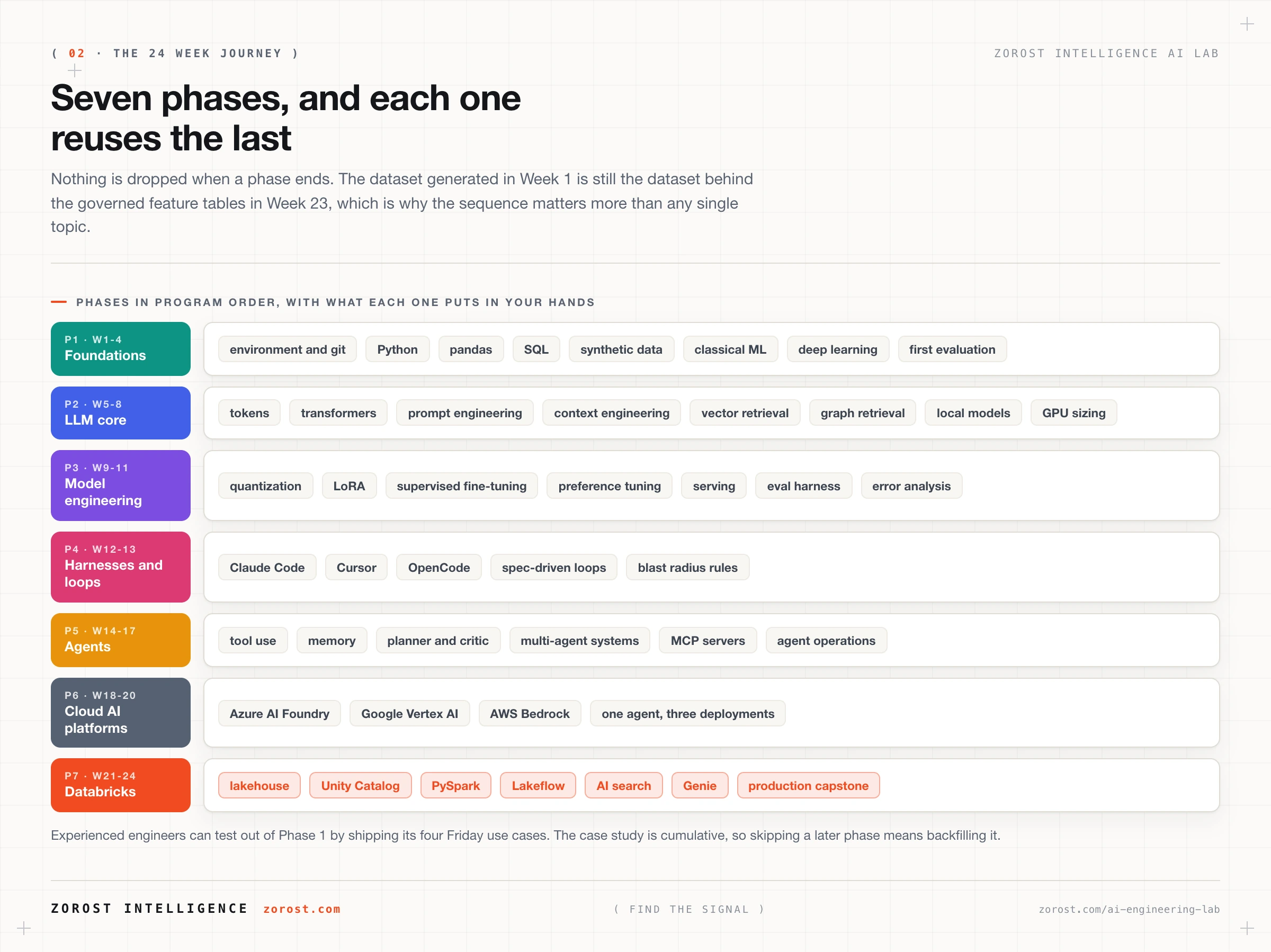
The week by week titles, notebooks, and quizzes live in the repository under curriculum/. A beginner orientation sits in START-HERE.md, and every technical term used anywhere in the program is defined in reference/GLOSSARY.md. If you would rather read the whole thing before cloning it, all 24 weeks are listed at the bottom of this page, filterable by phase, each one opening its folder on GitHub. The same list, plus the diagrams, is published as a standalone handbook at zorost.github.io/AI-Engineering-Lab.
How a week works
The weekly rhythm never changes, which is what makes 24 weeks survivable.
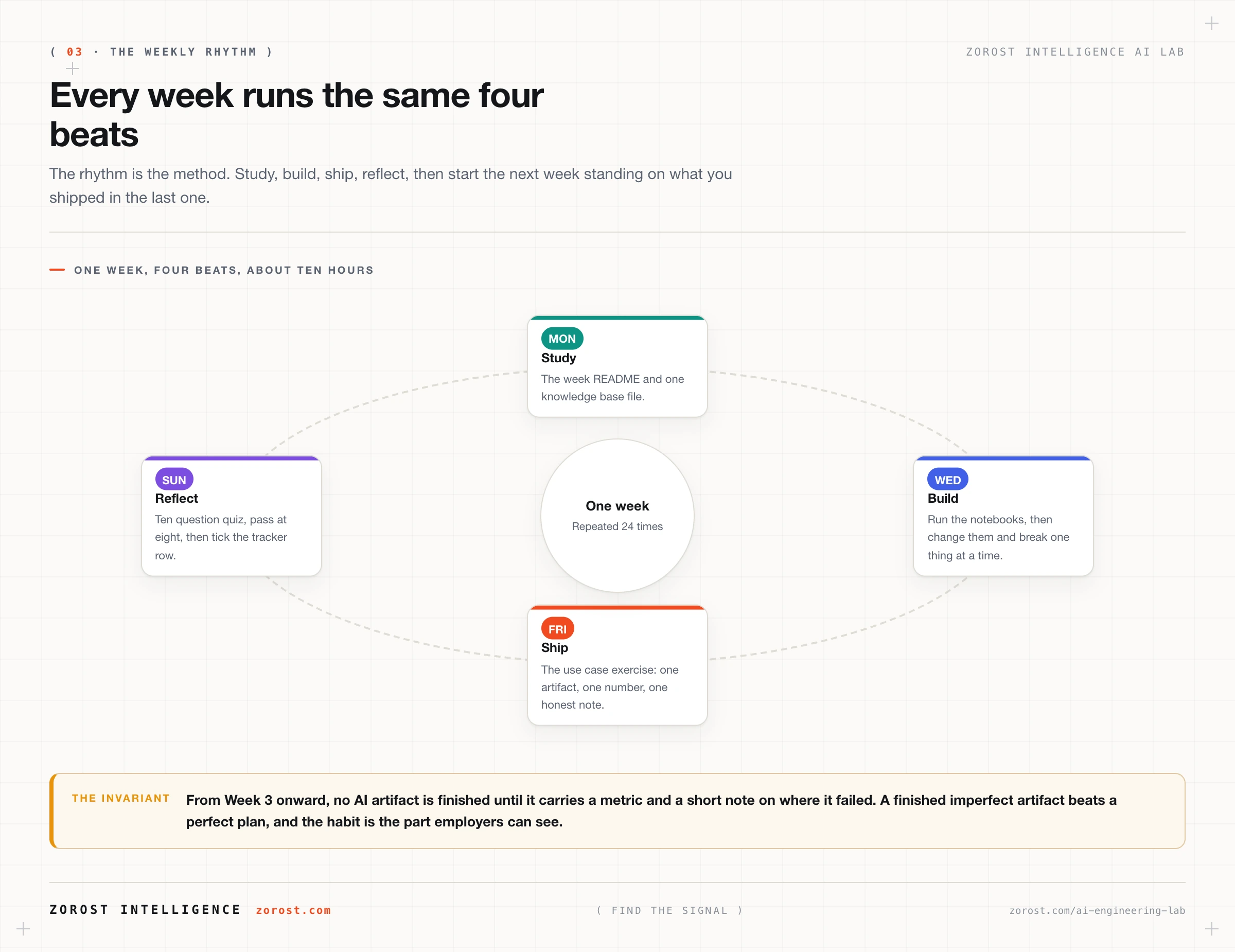
- Monday and Tuesday, study. The week README and one knowledge base file.
- Wednesday and Thursday, build. Run the notebooks, then change them. Break one thing at a time and watch what happens.
- Friday, ship. Complete the use case exercise: one concrete artifact, with a number attached.
- Friday to Sunday, reflect. Ten question quiz, pass at eight, then tick the tracker row.
The invariant from Week 3 on: no AI artifact is finished until it carries a metric and a short note on where it failed. A finished imperfect artifact beats a perfect plan, every week of the program.
One company, the whole way
The program runs one continuous fictional case study. ZoroLogistics is a freight operator with shipments, carriers, lanes, support tickets, and policy documents, generated from seeded code in zoro/data.py: no API key, no network, and the same rows on every machine that clones the repository.
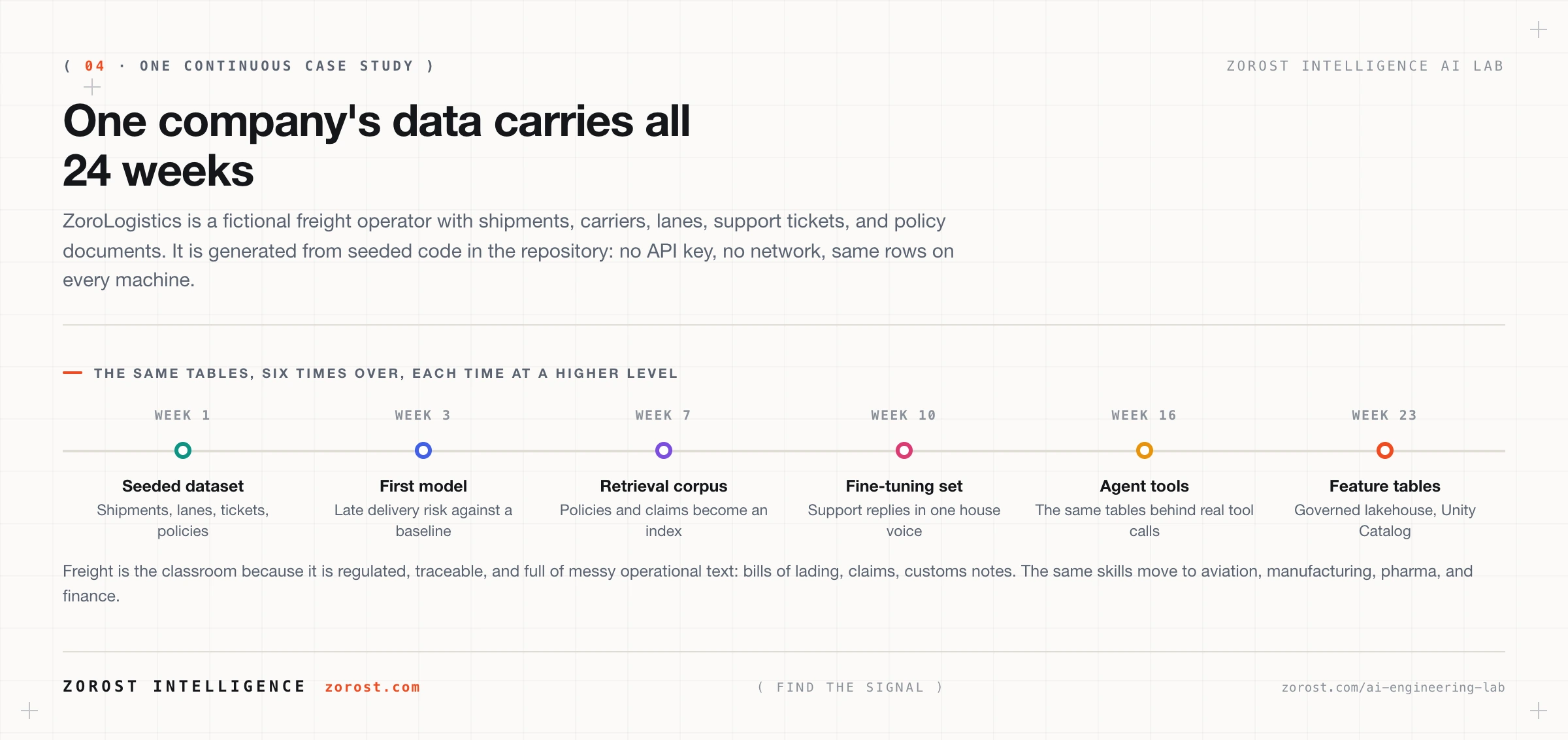
Freight is the classroom because it is regulated, traceable, and full of the messy operational text that real AI systems have to survive: bills of lading, claims correspondence, customs notes. The skills move without translation to aviation, manufacturing, pharmaceuticals, government, and finance, which is the work the Lab already ships in production.
The framework behind it
The program implements Andrew Ng's AI Engineering Skills Map: building and deploying AI applications, software engineering fundamentals, using coding agents, and shaping the build. It also uses his three loops, agentic coding measured in minutes, developer feedback in hours, and external feedback in days to weeks, as the structure for how the weekly work is organized.
AI Engineering Lab is an independent implementation and is not affiliated with or endorsed by Andrew Ng or DeepLearning.AI. Our own reading of that map, including the systems engineering spine we think it assumes, is in The AI Engineering Skills Map, turned into a training plan.
What is in the repository
One repository, MIT licensed, with no hosted platform to log into. It is organized around the question you are actually asking on any given day: what do I do now, and where is the thing that explains it.
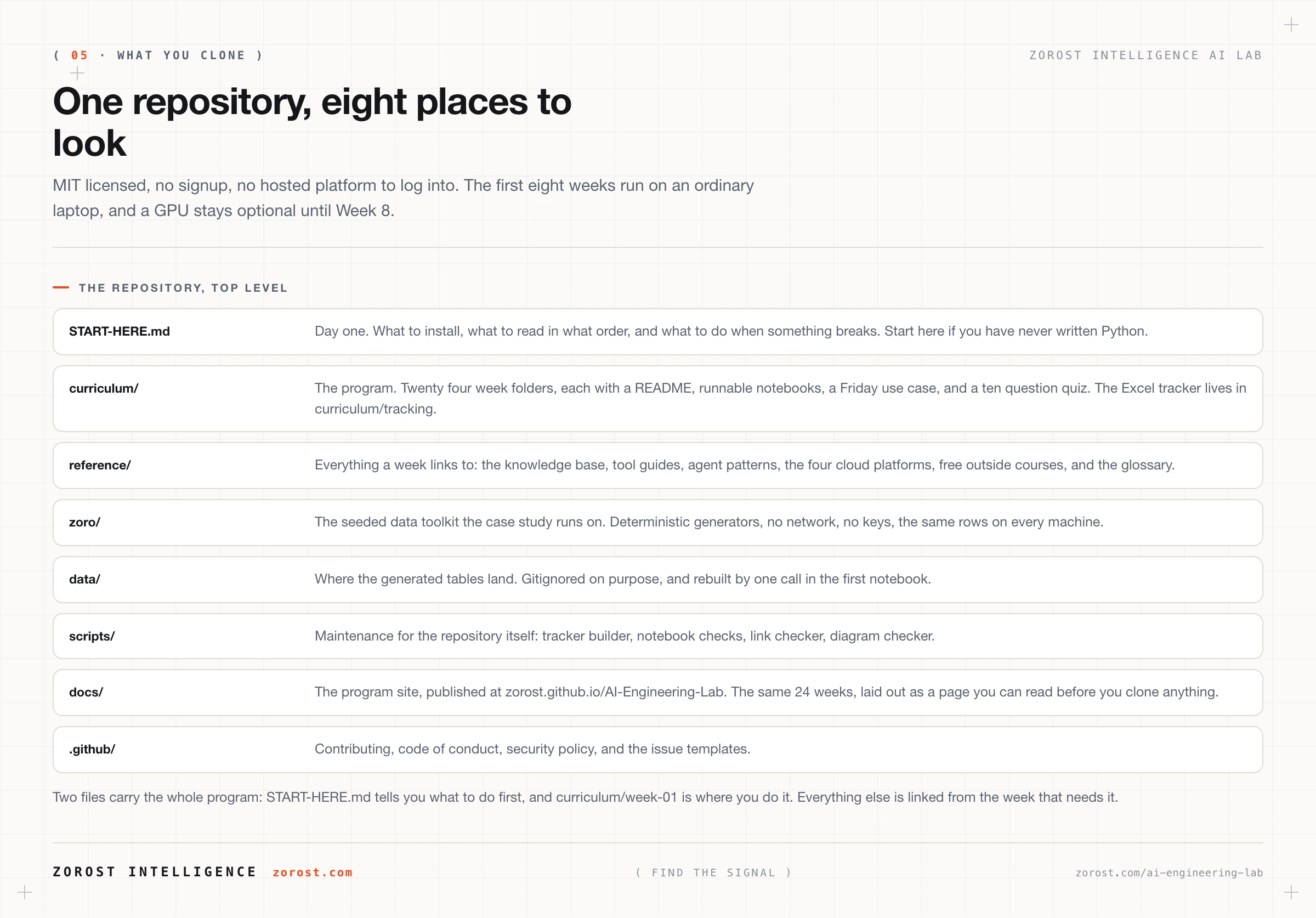
START-HERE.md and curriculum/week-01.Read the whole program before you clone anything
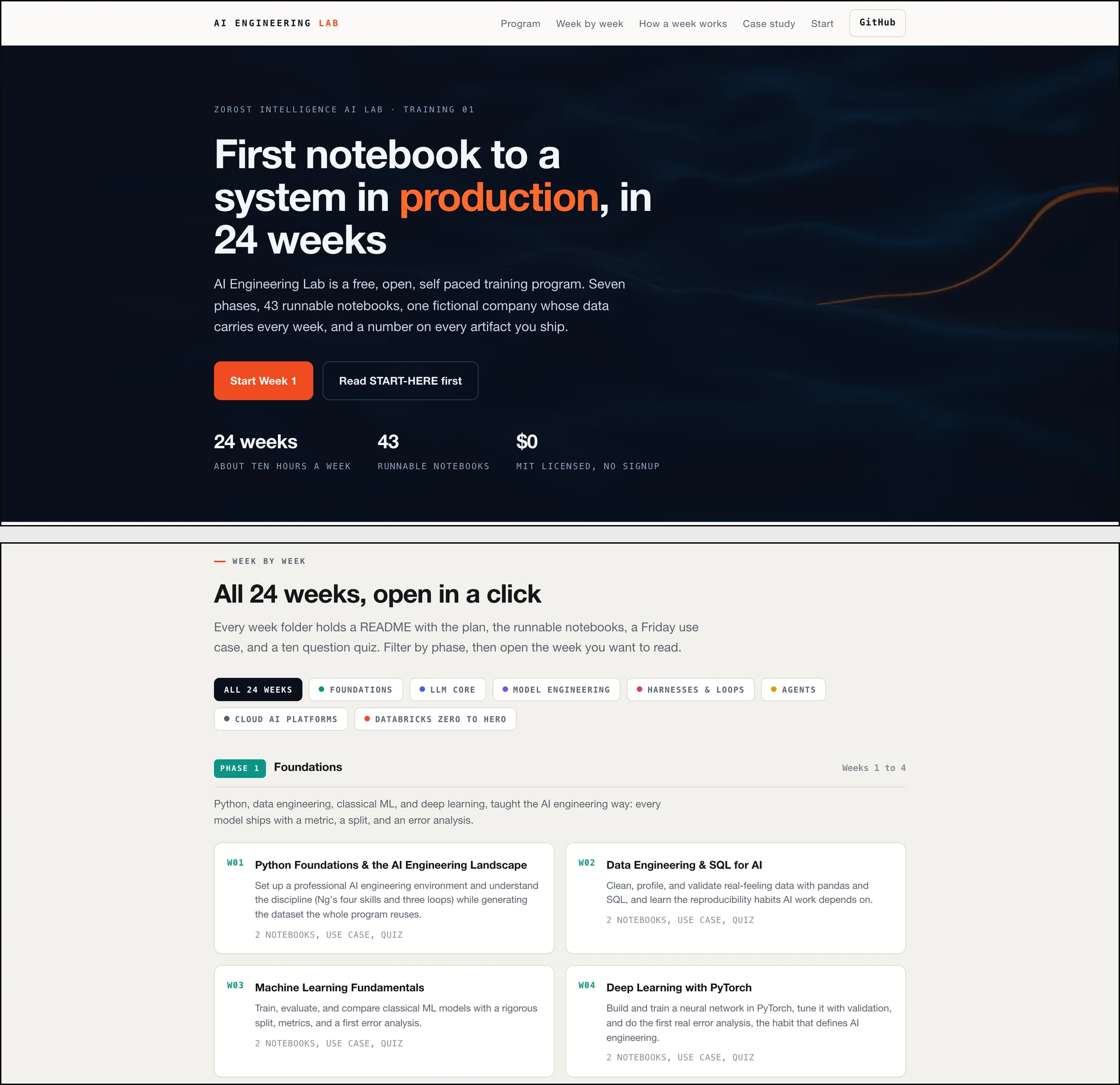
The repository is the program, but a repository is a poor place to decide whether to spend six months. So the curriculum is published a second time, as one page you read in a browser: zorost.github.io/AI-Engineering-Lab. No account, no clone, no Python installed. It is generated from the same manifest the repository builds from, so the page and the code cannot drift apart.

Scan the shape in two minutes
Seven phase filters sit above the weeks. Press Agents to see only weeks 14 to 17, press Databricks to see the last four. Weeks stay in calendar order inside each phase, so the dependency chain reads in the direction you will actually walk it.
Judge each week on its outcome
Every week states what exists by Friday, how many notebooks it takes, and which skills it covers. That is the only honest way to weigh week 9 against week 20 before you spend an evening on either.
See the framework, not just the topics
The page carries the same mapping as this article: four skill areas and three loops laid over 24 weeks. You can see which weeks teach evaluation, which teach delivery, and where the two finally meet.
Then clone, once
It ends where the work starts: four commands in a block you can copy, the first file to open, the tracker to claim, and what Friday of week 1 looks like. Nothing on the page asks for an email address.
Getting started, in three moves
- Read the handbook. Ten minutes, top to bottom, is enough to know whether the sequence fits the job you are aiming at. Read it before you install anything.
- Clone the repository. Four commands, printed on the page and repeated in the README. The first eight weeks need no GPU and no paid API key.
- Finish week 1. Install the toolchain, generate the ZoroLogistics dataset every later week reuses, write its data dictionary, then take the quiz and put your name on the tracker.
Open the handbookGet the repository
What it costs
Nothing. Weeks 1 to 13 have a free path throughout: local models, free tier APIs, or no API at all. Weeks 18 to 24 use cloud free tiers and each week states how to stay inside them. Where a paid option is meaningfully better, the week says so and names the expected cost.
A GPU is not required until Week 8, and even then a small quantized model on CPU covers the core exercises. Week 8 teaches VRAM sizing precisely so you can predict what your machine will run before you download anything.
How to start
- Read the 24 weeks below before you commit to any of them, or open the standalone handbook at zorost.github.io/AI-Engineering-Lab.
- Clone github.com/zorost/AI-Engineering-Lab.
- Read
START-HERE.mdif you have never written Python. Skip it if you have. - Follow Week 1 to install VS Code, Python, Jupyter, and git.
- Open the tracker in
curriculum/tracking/and put your name on it. - Generate the seeded dataset, write its data dictionary, and keep the weekly cadence from there.
When a term is unclear, use the glossary. When you are stuck for more than 30 minutes, use the escape hatches in the start here file: re-read the error, check the week's hints, ask an assistant to explain the traceback, then open an issue on the repository.
Common questions
Is this a paid course or a Zorost product?
Neither. It is an open training program developed by Zorost Intelligence AI Lab and published under MIT. The platforms we run in production stay on the AI Lab. This repository is the teaching version of that practice.
Do I have to join a community to use it?
No. There is no cohort, no Discord, and no enrollment. Use the repository's issues and discussions for questions, or write to [email protected].
Is it affiliated with Andrew Ng or DeepLearning.AI?
No. The skills map is a public framework we implement. The writing, notebooks, case study, and evaluation harnesses are original Zorost work.
What happens when I fall behind?
Nothing. It is self-paced, and the tracker is for you rather than for us. The one rule worth keeping is not to skip the Friday artifact, because every later week assumes the earlier one shipped.
Can a team run it together?
Yes, and it works better that way. Fork it, keep the tracker honest, and treat the Friday use case as the review artifact. The blast radius and secret handling rules in the agent weeks are written for teams that will eventually point this at real data.
Will there be more trainings?
Yes. Each one publishes as its own numbered post in the Training section of the AI Lab, with its own repository. This is Training / 01.
Next steps
Read the handbook, then open the repository and start Week 1. If you want the argument behind the skills map before you commit 24 weeks, read the training plan article first. If you want to see the Lab's own test bench, enter AI Fieldwork. Everything else we publish sits on the Signals index.
Phase 1FoundationsWeeks 1 to 4
Python, data engineering, classical ML, and deep learning, taught the AI engineering way: every model ships with a metric, a split, and an error analysis.
- W01Python Foundations & the AI Engineering LandscapeSet up a professional AI engineering environment and understand the discipline (Ng's four skills and three loops) while generating the dataset the whole program reuses.2 notebooks · use case · quiz
- W02Data Engineering & SQL for AIClean, profile, and validate real-feeling data with pandas and SQL, and learn the reproducibility habits AI work depends on.2 notebooks · use case · quiz
- W03Machine Learning FundamentalsTrain, evaluate, and compare classical ML models with a rigorous split, metrics, and a first error analysis.2 notebooks · use case · quiz
- W04Deep Learning with PyTorchBuild and train a neural network in PyTorch, tune it with validation, and do the first real error analysis, the habit that defines AI engineering.2 notebooks · use case · quiz
Phase 2LLM CoreWeeks 5 to 8
How LLMs actually work, from tokens and embeddings to attention and the KV cache, then the two engineering superpowers on top: prompt & context-window engineering, and retrieval (RAG + knowledge graphs). Week 8 goes fully local.
- W05How LLMs Work: Tokens to TransformersBuild the correct mental model of what happens between your prompt and the answer: tokenization, embeddings, attention, and generation.2 notebooks · use case · quiz
- W06Prompt Engineering & the Context WindowEngineer prompts and the context around them so a model does a real job reliably, measured by an eval, not by vibes.2 notebooks · use case · quiz
- W07RAG, Vector Search & Knowledge GraphsGround model answers in a corpus (RAG with citations) and in structure (knowledge graphs), and measure retrieval quality.2 notebooks · use case · quiz
- W08Open Models & Local Inference: GPUs, Ollama, llama.cppRun open models on your own hardware: pick models by license and VRAM, and operate the local stack (Ollama, llama.cpp, MLX) with confidence.2 notebooks · use case · quiz
Phase 3Model EngineeringWeeks 9 to 11
Make models cheaper and yours: quantization formats and serving engines, fine-tuning with LoRA/SFT/DPO, and the discipline that decides it all, evals and error analysis.
- W09Quantization & Efficient InferenceShrink models without breaking them, serve them with vLLM, and make quality-vs-cost decisions from data.2 notebooks · use case · quiz
- W10Fine-Tuning: LoRA, SFT & DPOFine-tune small open models efficiently (LoRA/SFT/DPO) and decide, with before/after evals, whether the fine-tune earns deployment.2 notebooks · use case · quiz
- W11Evals & Error Analysis for AI SystemsBuild the reusable eval harness (ZoroEval) that gates every AI artifact in this program, the core AI engineering habit.2 notebooks · use case · quiz
Phase 4Harnesses & LoopsWeeks 12 to 13
Become dangerous with coding agents: Claude Code, Cursor, OpenCode, DeepSeek Harness, then run the three loops (agentic coding → developer feedback → external feedback) with a spec, a verifier, and a blast-radius rule.
- W12Coding-Agent Harnesses: Claude Code, Cursor, OpenCode, DSHSet up and steer the major coding-agent harnesses, and build a real CLI tool with an agent from a spec.1 notebook · use case · quiz
- W13Agentic Coding Loops & Spec-Driven DevelopmentRun Ng's three loops on a real MVP: spec → agentic coding with a verifier → developer review → external feedback.1 notebook · use case · quiz
Phase 5AgentsWeeks 14 to 17
From a hand-written ReAct loop to LangGraph state graphs, multi-agent orchestration, and MCP, then OpenClaw as a personal assistant and agent operations.
- W14Agent Fundamentals: The Loop, Tools & MemoryBuild an agent from scratch (no framework) so you own the mental model: loop, tools, planning, reflection, guardrails, and traces.1 notebook · use case · quiz
- W15Agent Frameworks: LangGraph & the State-Graph ModelMove from hand-rolled loops to LangGraph: state, checkpoints, streaming, and human-in-the-loop, and know when a framework earns its complexity.1 notebook · use case · quiz
- W16Multi-Agent Systems & MCPOrchestrate a team of agents only where it beats one good agent, measured, and connect everything with MCP.2 notebooks · use case · quiz
- W17OpenClaw, Hermes & Agent OperationsRun OpenClaw as a personal AI assistant with skills and a context loop, drive it with Hermes-class open models, and add the production layer: tracing, evals, and cost.1 notebook · use case · quiz
Phase 6Cloud AI PlatformsWeeks 18 to 20
The same ZoroLogistics support agent, deployed three ways: Azure AI Foundry (Microsoft), Vertex AI + AI Studio (Google), Bedrock + SageMaker (AWS). Compare capabilities, governance, and cost, then learn how to pick.
- W18Azure AI FoundryDeploy and evaluate the support agent on Azure AI Foundry: serverless endpoints, agents, evaluation, and AI Gateway governance.2 notebooks · use case · quiz
- W19Google Vertex AI & GeminiUse Gemini across AI Studio (fast) and Vertex AI (governed), build a multimodal document pipeline, and evaluate agents on Vertex.2 notebooks · use case · quiz
- W20AWS Bedrock & SageMaker AIBuild on Bedrock (Converse API, Knowledge Bases, Agents, Guardrails) and SageMaker AI, then finish the three-cloud comparison.2 notebooks · use case · quiz
Phase 7Databricks Zero to HeroWeeks 21 to 24
The full Zorost Databricks modernization playbook: Unity Catalog, Delta Lake medallion, DBSQL, PySpark, streaming, Lakeflow, MLflow, Mosaic AI, Genie, then DABs, CI/CD, governance, and FinOps, ending in the lakehouse capstone.
- W21Databricks Day Zero: Unity Catalog & the LakehouseStand up a governed lakehouse: Unity Catalog, Delta Lake, DBSQL, and the medallion architecture in pure SQL.2 notebooks · use case · quiz
- W22Databricks Data Engineering: PySpark, Streaming & LakeflowEngineer data at scale with PySpark, streaming, and declarative Lakeflow Pipelines, with data quality expectations and scheduled Jobs.2 notebooks · use case · quiz
- W23Databricks ML & GenAI: Training, Serving, GenieRun the full Mosaic AI stack: MLflow, point-in-time feature engineering, model serving, Vector Search, AI functions, and Genie.3 notebooks · use case · quiz
- W24Databricks Production: DABs, Governance & the CapstoneShip everything as code: Asset Bundles, CI/CD, governance, FinOps, then deploy the full ZoroLogistics Lakehouse Intelligence capstone.1 notebook · use case · quiz